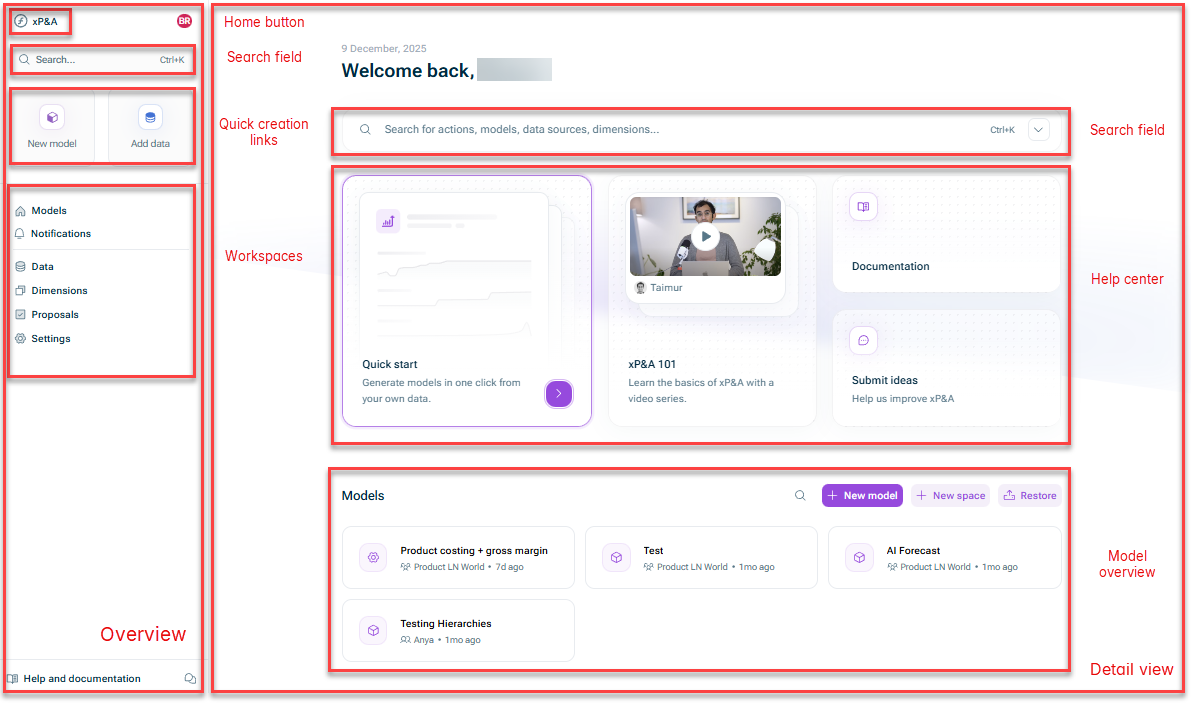
The following elements are available in the overview on the Lucanet xP&A start page:
Element
Description
Home button
You can use the home button to navigate back to the start page from anywhere in the xP&A solution.
Search field
You can use the search field to: • Quickly create a new model or data source • Access our product documentation • Navigate to specific elements that are already present in xP&A
Quick creation links
You can use these links to quickly create a new model or data source.
Workspaces
You can use this area to navigate to the different workspaces of the xP&A solution: • Models: Opens the model overview (which is shown by default on the start page) • Notifications: Opens the notification center where you are updated on actions regarding your models, data, comments, and organization and teams. • Data: Opens the Data workspace where you can administrate your data integrations, i.e. manage and share your data sources and data connections. • Dimensions: Opens the Dimensions workspace where you can manage your dimensions. • Proposals: Opens Proposals workspace where you can manage change proposals. • Settings: Opens the Settings workspace where you can • Adjust your notification settings • Open the Help center to access our resources to learn xP&A and get support.
The following elements are available in the detail view on the Lucanet xP&A start page:
Element
Description
Search field
You can use the search field to: • Quickly create a new model or data source • Access our product documentation • Navigate to specific elements that are already present in xP&A
Help center
You can use the Help center to: • Access our resources to learn xP&A and get support. • Submit your ideas to help us improve xP&A
Model overview
In the model overview, you can see all models that you have access to and organize them.