A model in Lucanet xP&A (Extended Planning & Analysis) refers to a structured representation of data and calculations, similar to a tab in a spreadsheet.
You can define a model as your "base" model representing the default scenario. To compare different scenarios, you can create variants of your "base" model in which some variables (or cells of a variable) have different values or formulas.
The structure of the model — the variables, groups, and sections — doesn't change across scenarios.
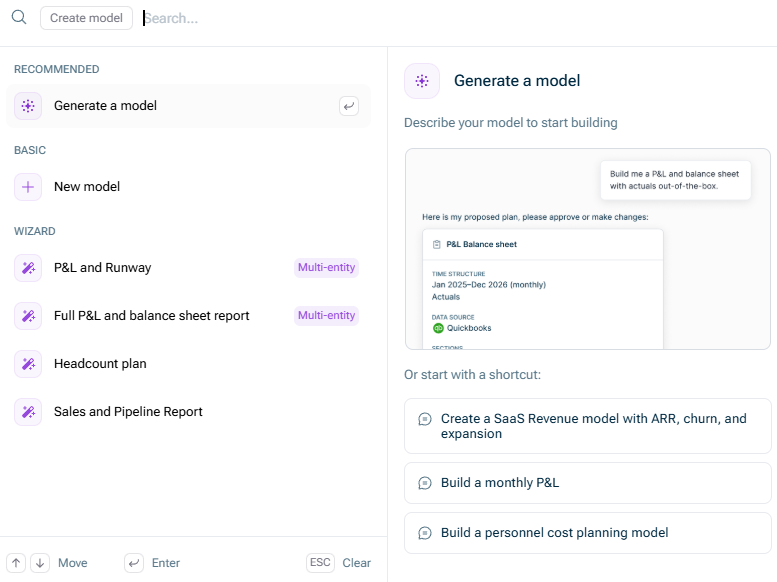
If you want to create a new model in Lucanet xP&A, click New model directly on the start page or in the overview on the start page. The Create Model dialog is displayed as follows:
The 'Create Model' dialog
The following table describes the options for creating a model in Lucanet xP&A:
Option
Description
Recommended
You can use the Generate a model option to build a new model with the help of our AI-supported Modeler Agent, based on a plain-language description. Using the agent, you can avoid repetitive structural setup steps at the start of a project and build a best-practice xP&A structure without writing formulas yourself.
You can use the New model option to create a new model manually from scratch.
Wizard
In the wizard area, specific types of models can be created using a wizard guiding through the setup process and using your data during the setup. The following model types are available: • P&L and Runway • Full P&L and balance sheet report • Headcount plan • Sales and Pipeline Report
If you hover over the model type name, a description of the model type is displayed on the right side of the dialog.
Once the model is created, you can start editing it and filling it with your data as described in Modeling your Data.
This content was generated using AI and reviewed by Lucanet subject matter experts before publication.