Come and explore the exciting new features of our solution Lucanet Data Collection! We update our CFO Solution Platform on a regular basis to offer you the latest features and improvements.
The versions of all solutions that you are currently using and those of the CFO Solution Platform are displayed when you select About Lucanet from the Help section in the CFO Solution Platform.
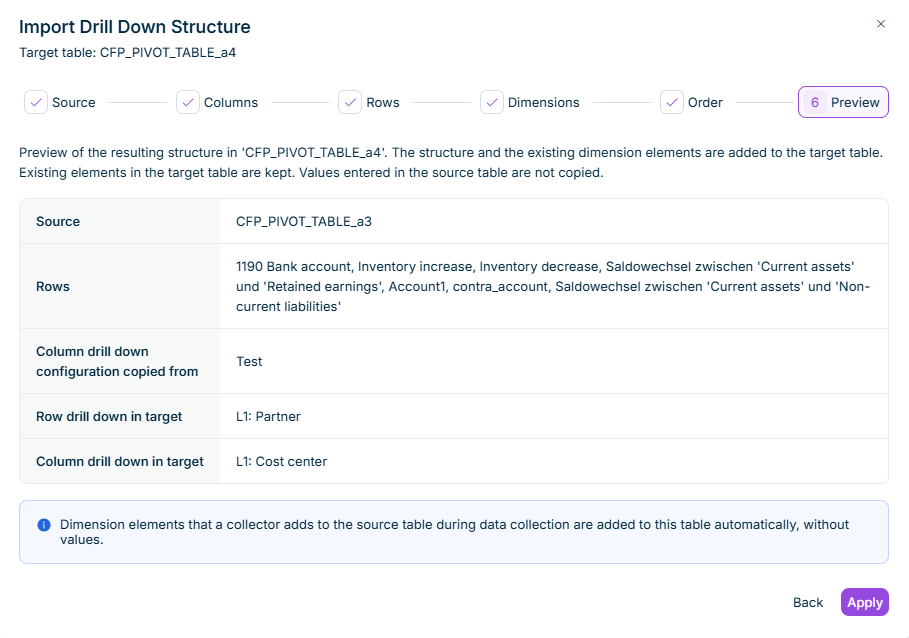
In Lucanet Data Collection, administrators can now import the drill down structure of one CFP pivot table into another CFP pivot table of the same form template. If the target table already has a drill down configuration, the import overwrites it. In the Import Drill Down Structure dialog, you select the source table, the source columns whose drill down configuration you want to apply to columns of the target table, the rows, and the drill down dimensions, and you map each dimension to rows or columns. A preview displays the resulting structure. The import copies only the structure, not the values entered in the source table.
'Preview' step of the 'Import Drill Down Structure' dialog
The import links the target table to the source table, and the target table displays Structure imported from with the name of the source table. The labels and the structure of the imported rows and columns are read-only, but collectors can enter values in the cells.
The target table adopts changes to the drill down structure of the source table automatically, regardless of whether collectors add or remove dimension elements or a CFP import changes the structure. New elements stay empty until collectors enter values. A CFP import, in contrast, also fills the values in the target table.
Administrators can remove the link to the source table with Remove link next to Structure imported from in the target table of the form template. Deleting an imported row or the source table also removes the link. The imported rows and columns stay in the target table and become editable again. Creating or removing a link in the form template affects only data collection processes that start after the change. Data collection processes that are already running keep their current behavior.
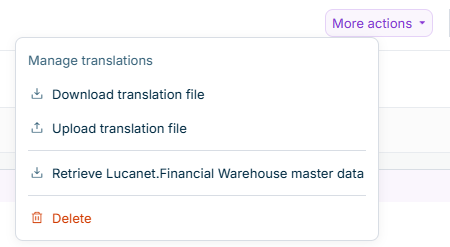
In Lucanet Data Collection, administrators can now translate the texts of a form template. The Manage translations section in the More actions menu of a form template contains the options Download translation file and Upload translation file. The translation file is an Excel file with the labels of the form template in the selected languages. Administrators add the translations and upload the file again. Collectors then see the labels in the language of their profile. Labels without a translation are displayed in English. Translation files are available only for form templates in the Draft status.
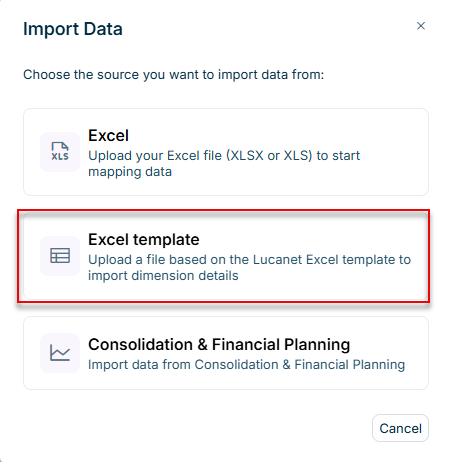
In Lucanet Data Collection, collectors can now import values with dimension details from a file based on the Lucanet Excel template. The template has one sheet with eight columns: account, partner, cost center, adjustment level, transaction type, value in local currency, transaction currency, and value in transaction currency. In the mapping step, collectors assign the file values to dimension elements with Map dimension values in the form header, and the import fills the drill down rows. If the form cannot store the details of a dimension, the import sums the lines in the target row without a breakdown.
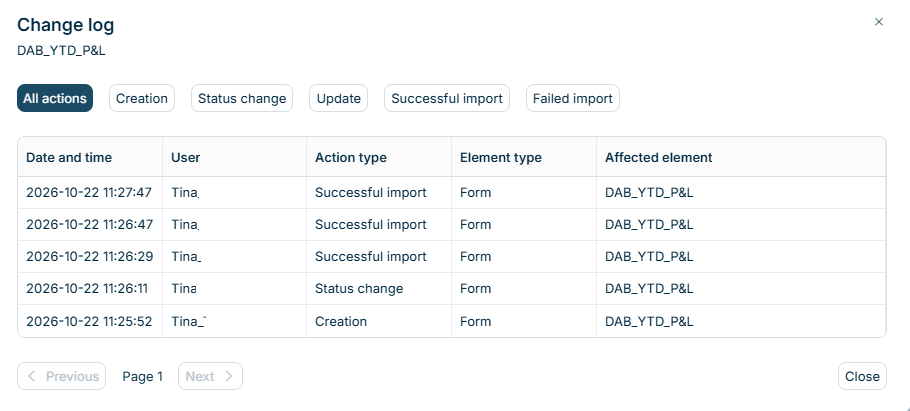
In Lucanet Data Collection, a change log now records the actions on forms, form templates, reporting packages, validation rules, and reporting entities. View change log in the three-dot menu of a row opens the Change log dialog for the selected element. Each entry names the action, its date and time, and the user who executed it, e.g. the creation of a form template, the publishing of a reporting package, saved changes in a form, or a failed import into a form.
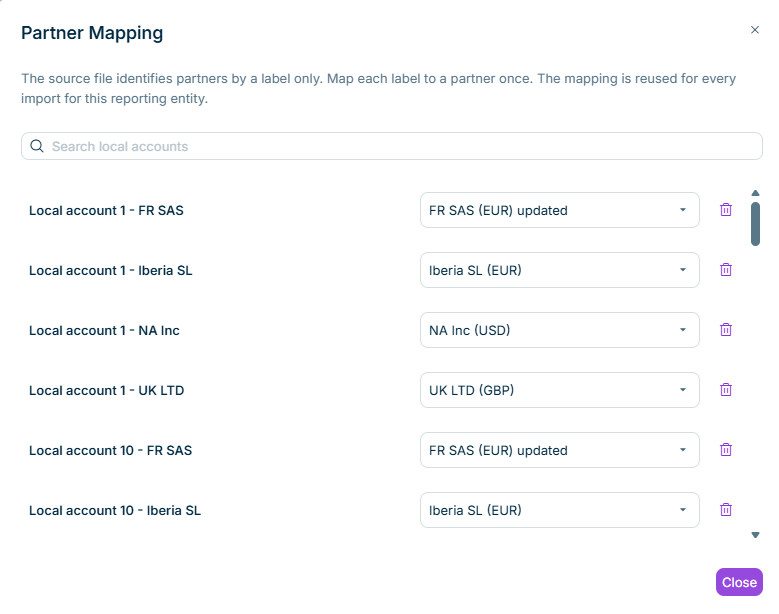
In Lucanet Data Collection, administrators and collectors can now assign a partner once per reporting entity to local accounts that are dedicated to a single counterparty. Every Excel import and Lucanet.Financial Warehouse import then applies the assigned partner to the values of that local account, so collectors no longer have to enter the partner manually after each import. Collectors can assign partners for the reporting entities assigned to them. The Map partners button in the mapping step of the import opens the Partner Mapping dialog, in which each local account can have one partner.
'Partner Mapping' dialog
The assigned partner applies wherever the target table has a Partner drill down, also as the second level below Local account. If the source supplies a different partner for the local account, the assigned partner replaces it. Local accounts without an assignment keep the partner from the source. Assignments are reused for all forms and data collection processes of the reporting entity. If an administrator or collector changes or removes an assignment, the next import applies the change.
In Lucanet Data Collection, the import from Consolidation & Financial Planning (CFP) now replaces each imported column of a form in full. For each lowest-level cell of an imported column, the import writes the value from CFP. If CFP returns no value for a cell, the import clears the cell. Previously, existing values remained in cells without a CFP value.
Columns with the period value type N/A, total columns, and formula columns keep their content. If a value moves from one partner to another in CFP, the next import clears the row of the previous partner and fills the row of the new partner.
In Lucanet Data Collection, the postings that Consolidation & Financial Planning (CFP) imports now take the adjustment level from the Adjustment level drill down. Each value receives the adjustment level of its drill down element. If a table contains several adjustment levels, Data Collection creates a separate posting document for each adjustment level. Postings from schedule tables remain in the DC-SchedulePostings posting document. Without an Adjustment level drill down, the adjustment level of the column or the default adjustment level Import Data still applies.