A scenario in Lucanet xP&A (Extended Planning & Analysis) is a live variant of your model in which some variables (or cells of a variable) have different values or formulas. The structure of the model — the variables, groups, and sections — does not change across scenarios.
This is useful when comparing different discrete options. For example, you might be trying to decide whether to hire 5 people or 10 people this year.
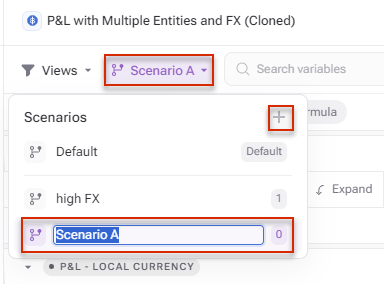
Do one of the following to create a new scenario in xP&A:
Right-click on a variable and click New Scenario.
Click Scenarios in the toolbar, and then click +.
Creating a new scenario
Rules when changing formulas and/or values in scenarios
If you change (override) the formula and/or value of a cell, that cell will no longer be linked to the default scenario (but the rest of the variable will).
If you change (override) the entire variable's formula, then the entire variable will no longer be linked to the default scenario.
Any variables and cells you do not change or override, will still be linked to the default scenario (so any formula and/or value updates in the base model will flow through).
If you want to remove the override in the scenario, hit Reset row or Reset override. This will revert the formula to match the default scenario, and reinstate the link (so that any future updates to the base model will flow through).
Variables and/or cells that have been changed in a scenario will have a pink background.
If you have a set of linked models - the scenario will automatically apply across all models. If you subsequently create a new linked model they will be automatically pulled across.
Selecting a scenario under Scenarios in the toolbar, will take you into Scenario mode. In this mode, you will be able to change the value of any variable and/or cell, and this change will only be applied in the active scenario.
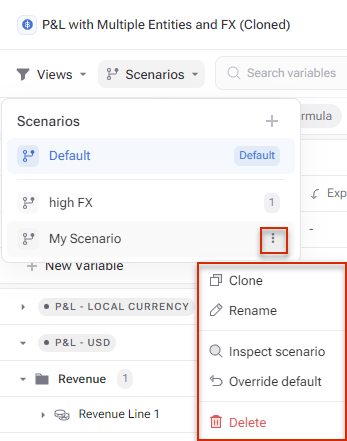
You also have the following functions available via the three-dots menu of a scenario:
Additional functions for scenarios
Overriding the default scenario
If other scenarios exist after overriding the default model with another, all unchanged values for variables in the other scenarios will all revert to the values of the new, default model.
In other words, if you have a base model and two additional scenarios: Scenario A and Scenario B, and the base model is overridden by Scenario A to be the default model, then all of the variables in Scenario B that were unchanged from the original, default scenario, those variables will now take on the values of the new, default scenario.