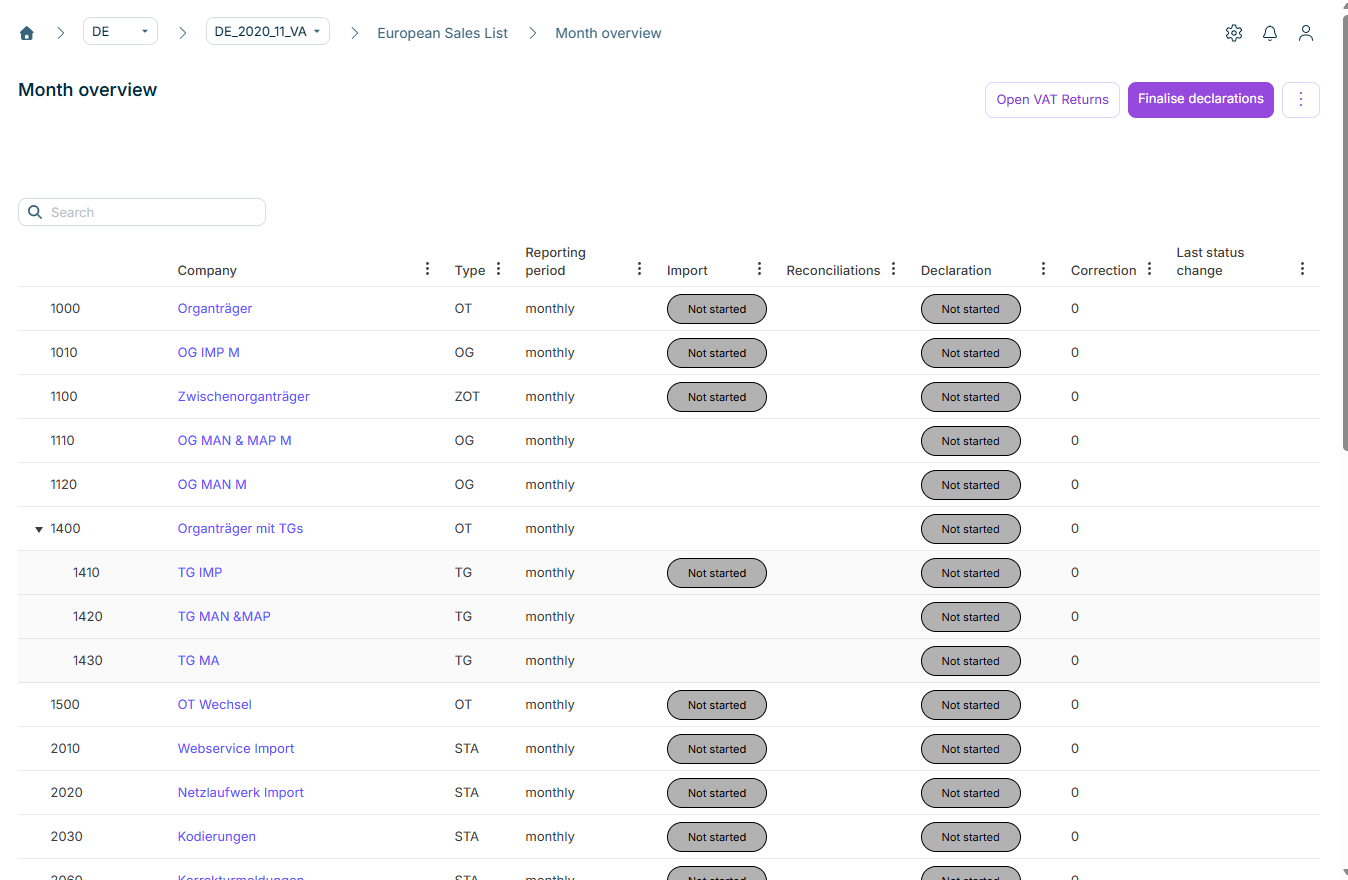
The Month overview in the European Sales List (ESL) functional area in Lucanet VAT (Value Added Tax) provides a tabular overview of the reporting progress of all companies in a period for the European Sales List – similar to the Status workspace, but with a view of several companies at the same time. Either all companies of the current VAT group or all standalone companies are displayed. Only the companies assigned to the logged-in user are visible.
The month overview of the European Sales List in VAT only displays the second level of the VAT group. To view the third level, navigate to the respective intermediate company and open its month overview there. The month overview displays company members indented below the superordinate company. VAT transfers the ESL data of the company members into the declaration of the superordinate company automatically (see the European Sales List page).
Use the Search field to filter the table by company name or number.
The table of the month overview of the European Sales List in VAT displays the following columns:
Column
Description
Company
Company number and name. VAT group total rows are displayed in bold; each superordinate company is displayed twice – once as the total status of the VAT group and once as an individual declaration. Clicking the name opens the Status workspace of the respective company.
Type
Type of the company, e.g. OT, ZOT, OG, or STA
Reporting period
Reporting frequency of the company: monthly, every 2 months, quarterly, every 4 months, every 6 months, or yearly
Due date
Due date of the declaration, if stored in the master data under Companies | Due dates VAT Return
Import
Status of the data import. Possible values: • No entry: VAT group declarations do not receive an import status, as VAT does not execute an import for them • Imported: Import successful • Not started: Import pending, or the company reports manually. Clicking opens the Import workspace of the company. No import status is displayed for VAT group total rows.
Reconciliations
Status of the reconciliations. Possible values: • No entry: VAT group declarations do not receive a reconciliation status, as no reconciliations are executed for them • Not started: not executed yet, or no reconciliations configured • With errors: at least one reconciliation contains errors • Successful: all reconciliations passed. Clicking opens the Reconciliations workspace of the company.
The status in the Declaration column of the month overview in VAT displays the current processing status of the European Sales List. In most cases, clicking the status triggers an action directly:
Status
Meaning
Action on click
Not started
The declaration has not been processed yet.
Finalize the declaration: results in a nil declaration – only use in exceptional cases
In work
The declaration is being processed.
Finalize the declaration: some rules are ignored, e.g. reconciliations do not have to be completed – only use in exceptional cases
Closed
The declaration has been finalized.
Reopen the declaration: e.g. if inconsistencies were noticed during the review
Sending
The transmission file for the ELMA5 procedure was created; the declaration has not been marked as sent yet (see Send declaration).
Set the status back to Closed, e.g. if corrections are required before the upload
Transmission error
A technical error occurred during the transmission.
Set the status back to Closed: requires the VAT: Reset Send Error - Edit authorization
Sent
The declaration was transmitted successfully to the Federal Central Tax Office.
Create correction: Click the status to create a correction to the sent declaration.
In addition to the general functions, the following functions for all displayed companies are available via the buttons and the three-dot menu (⋮) in the top right corner of the month overview of the European Sales List in VAT:
Function
Description
Open VAT Returns
Reopens all finalized declarations of the displayed companies, provided they have not been sent to the Federal Central Tax Office yet.
Finalise declarations
Finalizes all declarations of the displayed companies. Some rules are ignored – e.g. reconciliations do not have to be completed. Only use this function in exceptional cases, e.g. if a deadline is at risk.
Run reconciliations (three-dot menu ⋮)
Executes the reconciliations for all displayed companies. Not all companies can be reconciled, e.g. if no import has taken place yet or the declaration is already finalized.
Depending on the configuration in the country settings, additional review columns can be displayed in the table of the month overview of the European Sales List in VAT. The review implements the four-eyes principle as part of VAT compliance:
Review variant
Description
Review before transfer
Can only be performed or reversed while the declaration is finalized. If this variant is active, the review must be completed before the declaration can be sent. If the declaration is reopened, the review is reset automatically.
Review after sending
Is performed after the declaration has been sent.
Both variants can also be configured at the same time, so that different users take on different review roles. The four-eyes principle setting in the country settings additionally ensures that the user who finalized the declaration cannot perform a review, and vice versa.
Each review variant creates two columns in the month overview of the European Sales List in VAT:
Review (before/after sending): This is where the review is confirmed or withdrawn.
Last status change review: Displays the user and time of the last status change of the review.
This content was generated using AI and reviewed by Lucanet subject matter experts before publication.