In the Send declaration workspace in the European Sales List (ESL) functional area in Lucanet VAT (Value Added Tax), you transmit the European Sales List electronically to the Federal Central Tax Office. This workspace is only available for standalone companies and representative VAT group members.

There are two procedures for transmitting the European Sales List. Which procedure a company uses is defined in the master data via the Send via ELMA5 check box:

  • ELMA5 procedure: You create an upload file in VAT and upload it in the ELMA5 portal of the Federal Central Tax Office. This procedure is intended for mass data.
  • ELSTER procedure: VAT transmits the declaration directly to the Federal Central Tax Office via the webservice.

Before sending, you can check the VAT identification numbers – in the Declaration workspace via the Check VAT IDs - VIES and Check VAT IDs - BZSt functions.

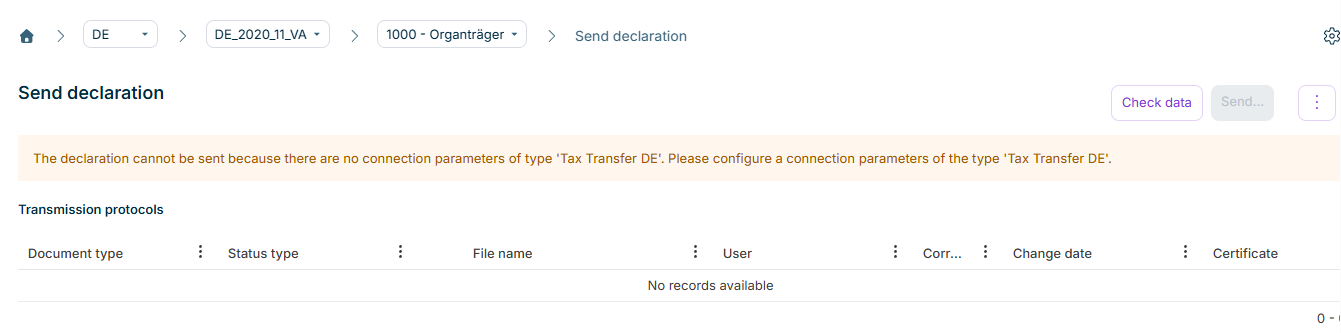
The Send declaration workspace can be found under VAT | European Sales List | Send declaration and is displayed as follows, for example:

Shows the 'Send declaration' workspace of the European Sales List in VAT for the period 'DE_2020_11_VA' and the company '1000 - Organträger' with the 'Check data' and 'Send...' buttons, the three-dot icon, and the message 'The declaration cannot be sent because there are no connection parameters of type 'Tax Transfer DE'. Please configure a connection parameters of the type 'Tax Transfer DE'.'. Below it is the empty 'Transmission protocols' table with the columns 'Document type', 'Status type', 'File name', 'User', the abbreviated column 'Corr...', 'Change date', and 'Certificate'.
The 'Send declaration' workspace

The Send declaration workspace of the European Sales List in VAT displays the Transmission protocols table and the buttons for sending the declaration. Which buttons are available depends on the configured transmission procedure and the status of the declaration.

The Transmission protocols table contains all protocols created in connection with sending the European Sales List and shows the following columns:

ColumnDescription
Document typeType of the document, e.g. protocol or declaration file
Status typeStatus of the transmission process
File nameName of the protocol file. Clicking the file name downloads the file.
UserUser who triggered the transmission process
CorrectionIndication of the associated correction, if available
Change dateDate and time of the last change of the protocol entry
CertificateName of the digital certificate used for the transmission

Before you can send the European Sales List in VAT, the following prerequisites must be fulfilled:

  • The declaration is finalized in the Declaration workspace.
  • For sending via the ELSTER procedure, connection parameters of the corresponding type are configured. You reach the connection parameters via the gear icon in the top right corner.

With the ELSTER procedure, VAT transmits the European Sales List directly to the Federal Central Tax Office via the webservice.

To send the European Sales List from VAT via the ELSTER procedure:

1

Click Check data to check the plausibility of the declaration data in advance. VAT generates an XML file from the declaration data and checks it for completeness and technical plausibility.

2

Click Send.... VAT transmits the XML file to the Federal Central Tax Office using the stored authentication.

3

After sending, click Retrieve protocols to retrieve the protocols of the tax administration. VAT saves the protocols in the Transmission protocols.

After a successful transmission, VAT sets the status of the declaration to Sent. Reopening the declaration is no longer possible after that; you make changes to the declaration data only via corrections.

If the transmission via the ELSTER procedure fails, there are two possible causes:

  • Connection problems: Your own connection server is configured incorrectly, or the server of the tax administration cannot be reached. Execute the transmission again at a later time. If this does not lead to the desired result, obtain technical support.
  • Faulty declaration file: The generated declaration file is incomplete or not plausible. Process the error message from a professional perspective.

To send the European Sales List from VAT via the ELMA5 procedure:

1

Click Create ELMA5 upload file for transmission and enter the ten-digit Account ID of your ELMA5 user account. VAT creates the upload file and sets the status of the declaration to Sending.

The button is only available once the declaration is finalized and all companies that send via ELMA5 have finalized their declaration.

2

Upload the created file in the ELMA5 portal of the Federal Central Tax Office.

3

Upload the protocol of the Federal Central Tax Office to the declaration via Upload ESL report. VAT saves the protocol in the Transmission protocols.

4

Mark the declaration as sent via the context menu of the three-dot icon (⋮) and the Mark as "sent" function. VAT sets the status of the declaration to Sent – only after that can you create a correction.

Regardless of the transmission procedure, you can activate additional review steps for the European Sales List in the country settings. The steps are then displayed in the Send declaration workspace in VAT:

  • Review before transfer: Complete the review before you send the declaration. VAT only releases the transmission after the review is completed.
  • Review after sending: Confirm the review after the declaration has received the Sent status.

Optionally, document the review by uploading a document. You activate this function separately in the country settings.

This content was generated using AI and reviewed by Lucanet subject matter experts before publication.