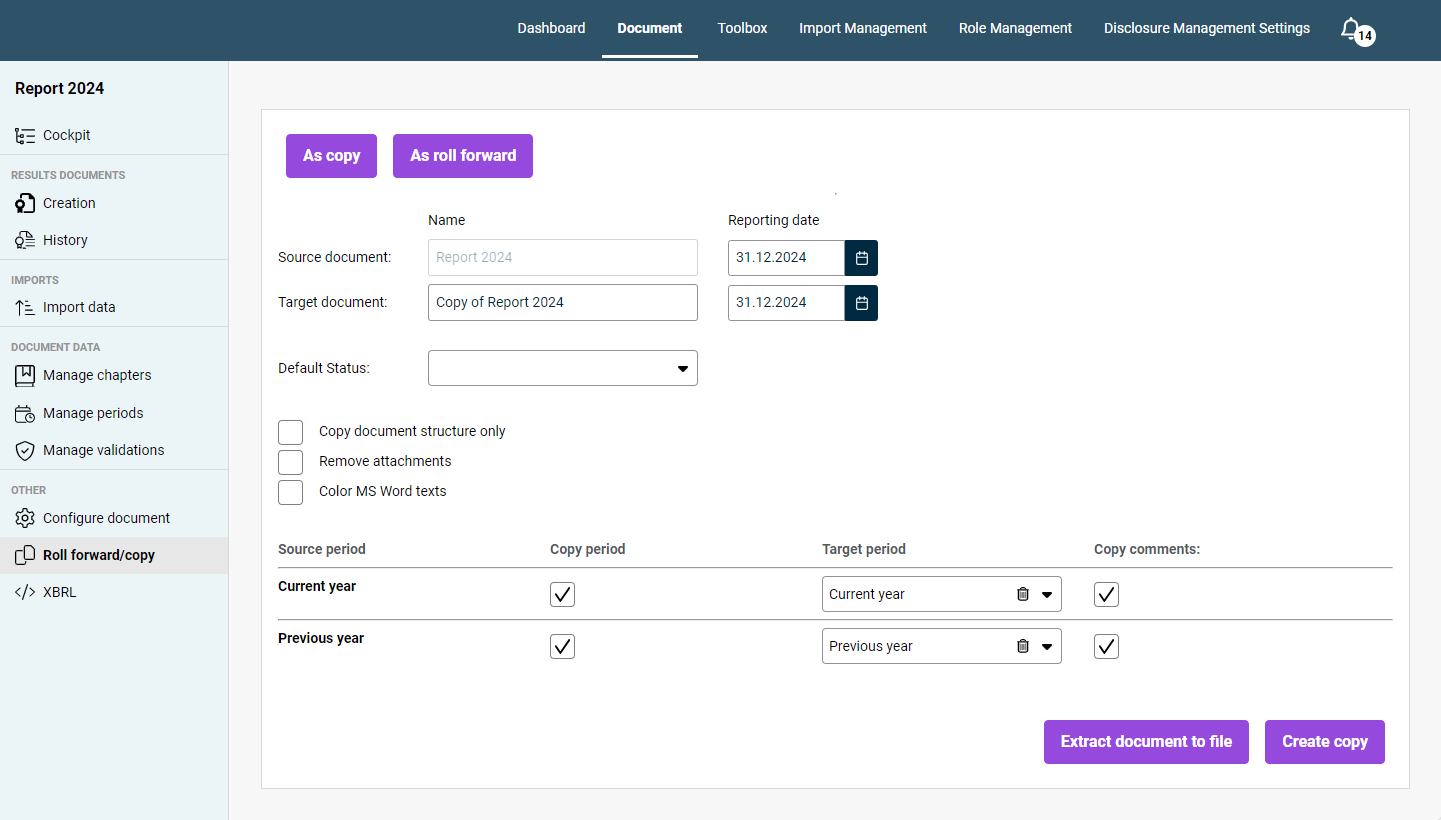
In the overview of a document in Disclosure Management, click Roll forward/copy to open the workspace. The workspace is displayed as follows, for example:
First, select whether you want to create a Copy or a Roll forward. The processes of rolling forward and copying a document differ in the following ways:
When rolling a document forward, all the document’s periods are rolled forward based on their hierarchy, and the current period is used as the previous period in the new document. Unlike when copying a document, this process does not create an exact copy; instead, the periods in the document are moved forward in time.
When copying a document, the whole document is copied, with the option to include all the created Office files and all the defined validations associated with it.
The options that are subsequently displayed will vary depending on your selection.
The following options are available for configuring a copy or roll forward in Disclosure Management:
Option
Description
Source document
Name of the document for which you wish to create a copy or roll forward, and the source document reporting date.
Target document
Name of the target document you want to create; this is set by default to the name of the current document with the prefix Copy of. Also shows the target document reporting date.
Default status
The initial status you want to set for the copy or roll over of your document.
Copy document structure only
All MS Office files will be excluded from the copying process. The copy you create will only contain the document structure of the source document. If this check box is activated, the period table will be hidden.
Remove attachments
The attachments in the source document will not be included in the copied or rolled-over document.
Color MS Word texts
All the texts from the Word files will be highlighted in your copied and rolled-over documents. The Color MS Word texts option is useful if you want to highlight the parts of the text that still need to be revised or checked, for example.
Period table
The period table has the following columns: - Source period: The Source period column shows all the periods in the source document. - Copy period: Periods whose Copy period check box is activated will be copied from the source document into the target document. - Target period: Period in the target document to which the source period in question will be added. - Copy comments: Comments whose Copy comments check box is activated will be copied from the source document into the target document.
Extract document to file
Disclosure Management allows you to create extracts of documents so you can send them to our Support or your Lucanet contact person for auditing or inspection, for example. Once creation of the extract is complete, a message will appear in the Notification window. You can use this dialog to download your extracted report.
Create copy
Creates the copy of the source document using the selected options. Once creation of the copy is complete, a corresponding message will appear in the Notification window. The new document will appear in the Dashboard under the name you have given it. You can now open it from there.
In the notification window of Lucanet Disclosure Management, the Name: line shows the name of the target document and the year of its new reporting date while the document is being copied or rolled forward. The information remains visible after completion or an error. For more information, see Identifying the Target Document in Notifications.
If the original document contains Word references, they initially still point to the old source document in the copied or rolled-forward document. For information on how to re-point these Word references, see Re-Pointing Word References with Lucanet Lume to a New Source Document.
This content was generated using AI and reviewed by Lucanet subject matter experts before publication.