For a document managed by Disclosure Management, you can create as many periods as you need, e.g. current year or previous year. A period is a time frame for which report data are imported and saved and in which data are aggregated by time.

Periods are needed in the following contexts:

  • During a data import, the report data are always imported into a specific period.
  • The programming in an Excel file is always configured for a specific period.
  • When programming an Excel file using the Programming Assistant, the report data for the relevant period are always displayed.

To create a new period:

1

In the overview of a document, click Manage periods to open the workspace.

2

In the detail view, click Add period to create a new period.

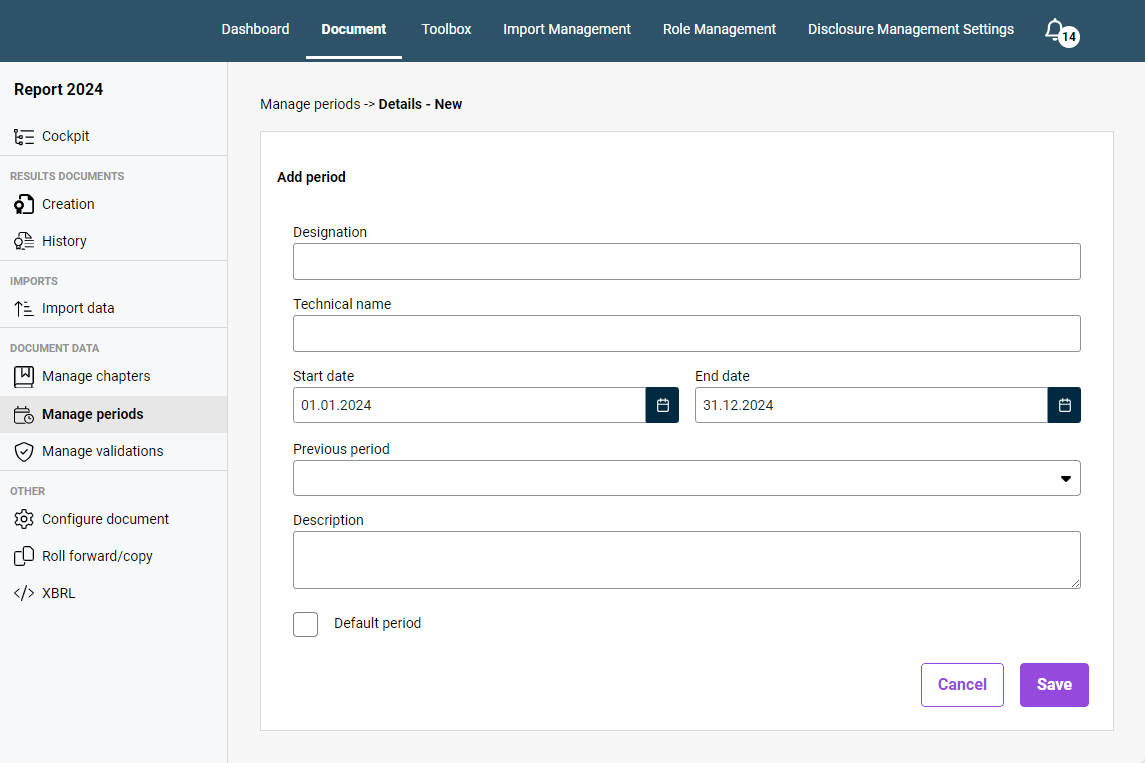
Displays the detail view of the 'Manage periods' workspace with input fields for creating a new period.
Creating a new period

You have the following options for configuring periods:

OptionDescription
DesignationPeriod name
Start date and end dateDates on which the period starts and ends
Previous periodIf applicable, the previous period from which the data are to be carried over when updating the document
DescriptionOptional description of the period
Default periodCheck box for defining this period as the default period

Note regarding a previous period: If you assign a Previous period to a period, this previous period will be indented:

Displays the period management workspace. The previous period for 'Current year' is highlighted in red.
Example of a previous period displayed in the period management workspace

To edit or delete a period, navigate to the desired period in the Manage periods workspace and click the pencil icon or the trash can icon in the relevant row.