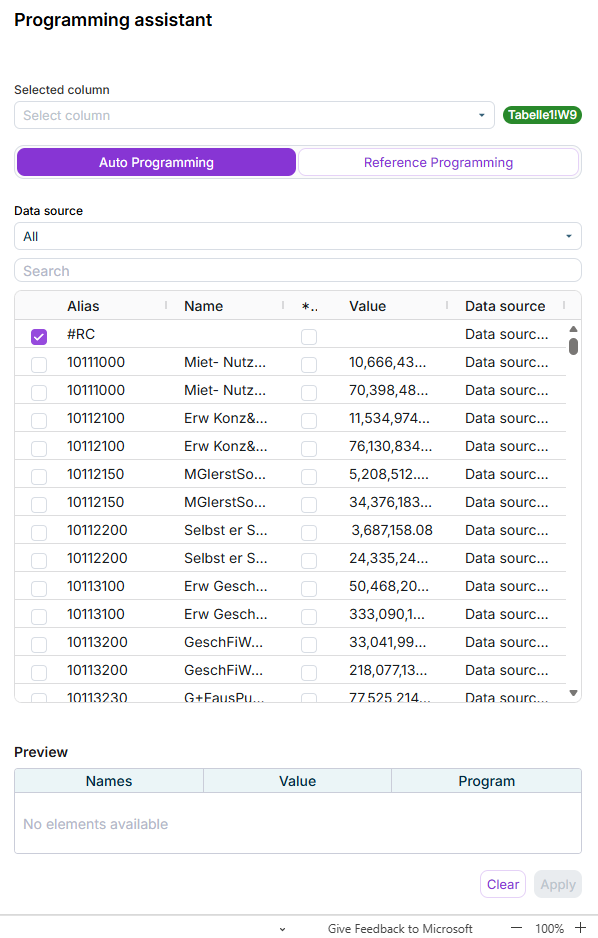
Disclosure Management provides the Programming Assistant for inserting report values in Excel files. This allows previously imported report values to be inserted in an Excel table easily and conveniently.
Data to be used from an ESG report created with Lucanet ESG Reporting are inserted into an Excel file using a separate function in the Excel ribbon. How to do this is described in the chapter Inserting Tables From ESG Reports.
How you insert report values into an Excel file in Disclosure Management depends on the Office variant you use. In Office for the Web and Office Native, the user guidance and interface are identical.
To insert report values from a Data Import in MS Excel in Office for Desktop:
1
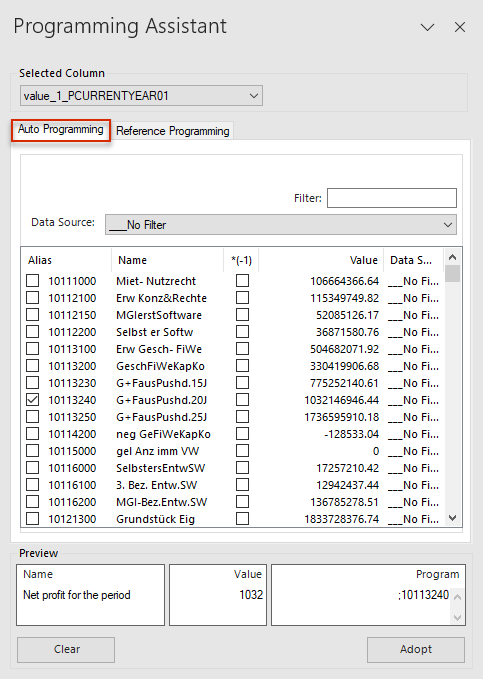
Double-click a cell in a value column or programming column. The Programming Assistant will then be displayed in MS Excel:
'Auto Programming' tab in the Programming Wizard in MS Excel
2
Configure the Selected Column and Data Source drop-down lists.
3
If necessary, enter a character string in the Filter input field to filter the list of report values.
4
In the Alias column of the list of report values, activate the check box of the value that you want to carry over to the Excel file.
5
Click Adopt.
6
In the Excel ribbon, click Check In to apply the changes in Disclosure Management.
You should be aware that the programming columns in the Excel file might be on top of each other for the current year and previous year. When using the programming column, it is therefore important to ensure that the desired column is set in the Selected Column drop-down list before inserting report values.
On the Auto Programming tab of the Programming Assistant, the imported values are assigned to cells in the Excel file in Disclosure Management.
The following options are available on the Auto Programming tab:
Option
Description
Selected Column
Depending on whether you have opened the Programming Assistant via a value column or programming column, the value columns or programming columns available in the Excel file will be shown to you for selection in the Selected Column drop-down list.
Filter
Filter value for the report data. The specified filter will be applied across all four columns, meaning you can also search for texts, names, or even individual values.
Data Source
Data source from which report values are to be carried over.
List of report values
Once all the settings have been configured, a list will be displayed with all the report values that can be inserted in the Excel file. Alias: The Alias column displays the account numbers or item numbers from the data source or Data Import. Activate the check box of the value(s) that you want to carry over to the Excel file.
Preview
The selected report values are displayed here as a preview along with their name (account/item numbers from the alias column), their value, and the programming in the programming column.
Clear
Clears the preview and, after clicking Adopt, also clears the value and programming in MS Excel.
Adopt
Adopts new/changed programming in the Excel file. After clicking Adopt, a semicolon followed by the selected alias (e.g. ;10100230) will be entered in the programming column. The value of the selected alias will be entered in the value column. With immediate effect, the current report value of this account/item number will always be displayed in the corresponding value column.
To apply the changes in Disclosure Management, the Excel file must be subsequently checked in.
If an item number that does not exist in the current data import is addressed in the programming column, this will be highlighted in red and labeled as Unknown in the Programming Assistant of Disclosure Management.
An unknown item number is displayed in the Programming Assistant.
If this item number is present again in a later data import, the corresponding report value will be displayed as normal. For example, this may be the case when zero values are not imported.
As soon as the report value of the item number is no longer zero in a later import, it will be displayed in the Programming Assistant along with its name, value, and data source.
This content was generated using AI and reviewed by Lucanet subject matter experts before publication.