Once a data collection process has been started, assigned collectors can view, edit, validate, and submit data through forms. This chapter covers the complete workflow from entering data to final approval.

Users can view and browse the forms within data collection processes they are authorized to access:

  • Administrators can view all forms in the system.
  • Collectors can view forms for reporting entities they are assigned to (all statuses).
  • Approvers can only view forms for reporting entities they are assigned to with status Submitted, Approved, or Cancelled.

To view the forms, navigate to Data Collection | Data collection.

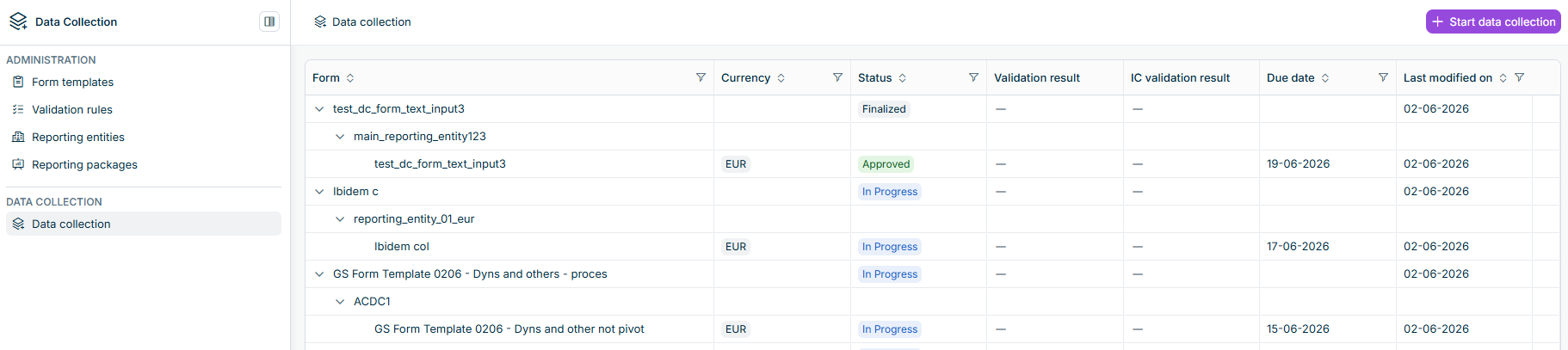
A list of forms is displayed.
Forms list

The following columns are available:

ColumnDescription
FormHierarchical view showing data collection process name, reporting entity name, and form name
CurrencyDefault currency of the reporting entity, which is also the currency of each of its forms
StatusCurrent status of the form or data collection process. See Form and process statuses below for the available values.
Validation resultsIndicator showing the result of validation rule execution, if validation rules have been executed
IC Validation resultIndicator showing the result of the last intercompany validation rule execution, if intercompany validation rules have been executed
Due dateDeadline for form completion
Last modified onDate of the most recent modification

Forms can have the following statuses:

StatusDescription
NewThe form exists, but no Collector has started editing yet.
In ProgressA Collector has started work on this form. Data entry, import, or validation can continue until the form is submitted.
SubmittedThe form was submitted and is awaiting approval.
ApprovedAn Approver approved this form.

Data collection processes can have the following statuses:

StatusDescription
NewThe process exists; collection has not yet effectively started.
In ProgressData collection is in progress for this process as a whole: at least one form still needs work before the process can finish.
FinalizedThe process is complete.

To view a form, click on the form name in the data collection list. The form detail view displays all sections and elements defined in the form template, along with any data already collected.

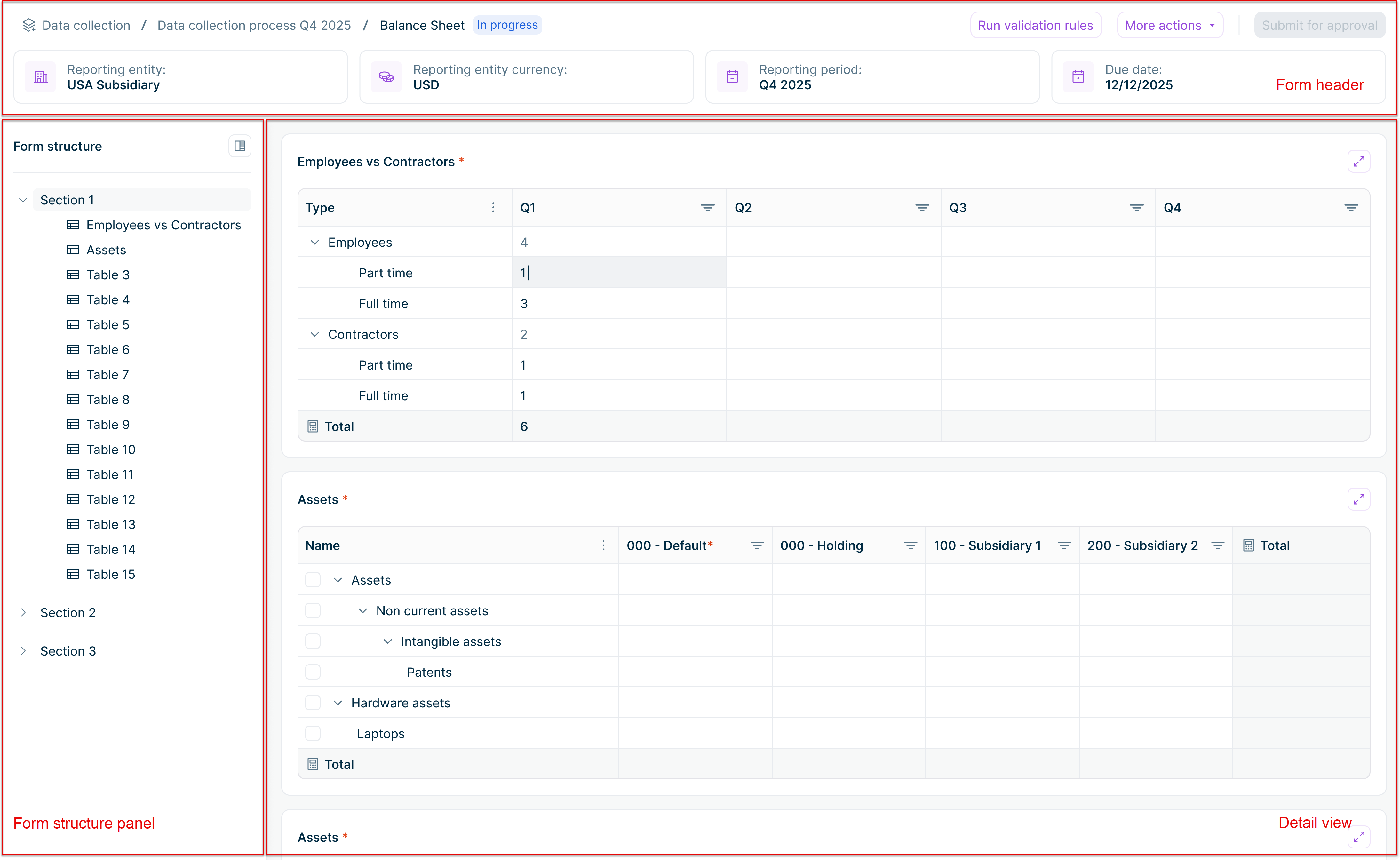
The detail view of a form is displayed with different form parts highlighted in red.
The detail view of a form

Forms consist of the following sections:

SectionDescription
Form headerDisplays the key details of the form at a glance: data collection process name, form name, form status, reporting entity, default currency, reporting period, due date, and validation status (once validation rules have been run). The header also contains the action buttons described below.
Form structure panelLeft sidebar showing all form sections and their subordinate elements. Click on a section or element to navigate directly to it. Sections can be expanded or collapsed.
Element detail viewDisplays all form sections and elements with the data collected so far. Tables with hierarchical rows allow drill down to any level of detail. Failed validations are indicated next to the affected elements. If the form is in status New, Submitted, or Approved, elements are displayed in read-only mode.

The buttons available in the form header depend on your role and the current form status:

ButtonDescription
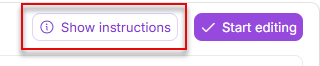
Start editingAvailable when the form status is New. Click to unlock the form for data entry. The form status changes to In Progress.
Run validation rulesAvailable when the form is In Progress. Executes the validation rules configured for this form.
More actionsContains the Import data option. Use this to import data from Consolidation & Financial Planning, Excel (upload a file), or Lucanet.Financial Warehouse.
Submit for approvalAvailable when the form is In Progress. Submits the form to the assigned Approvers. The form status changes to Submitted.
ApproveAvailable to Approvers when the form status is Submitted. Approves the form. The form status changes to Approved.
Send backAvailable to Approvers when the form status is Submitted. Returns the form to the Collector for corrections. The form status changes to In Progress.

When a form is first created, it has the status New and is displayed in read-only mode.

To start editing a form:

1

Open the form by clicking on its name in the forms list.

2

Click Start editing in the top right. The form status changes to In Progress and the form becomes editable.

Only Collectors assigned to a reporting entity in a reporting package can edit that reporting entity's forms. Administrators can edit any form regardless of reporting entity assignments.

Once a form is in In Progress status, Collectors can enter data manually or import it from an external source.

To import data instead of entering it manually, click More actions | Import data and choose from Excel, Consolidation & Financial Planning, or Lucanet.Financial Warehouse. See Importing Data for details.

To enter data manually:

  • Click on a cell to enter or edit values
  • Data is saved automatically as you type
  • For tables with hierarchical rows, only lowest-level rows are editable. Superordinate rows aggregate values automatically.
  • If drill-down is configured for a row or column, enter data at the drill-down level

Multiple Collectors assigned to the same reporting entity can edit the form concurrently. If two users modify the same cell at the same time, a conflict dialog appears. You can resolve the conflict by keeping your value, accepting the other user's value, or entering a different value.

A Dynamic table is a table where collectors add the rows during data collection. The column structure and the maximum number of rows are defined in advance by the administrator when configuring the form template. The rows themselves reflect the items collectors need to report.

In a Dynamic table, you can:

  • Click + Add row to add a new empty row at the bottom of the table.
  • Right-click an existing row and select Duplicate to add a new row with the same values at the bottom of the table.
  • Right-click a row and select Delete to remove it. The row and its data are removed immediately.
  • Click each cell to enter a value. Data is saved automatically when you move out of the cell.

Cells in a Dynamic table support these data types, depending on how the administrator configured each column:

TypeDescription
TextFree text in a single-line or multi-line input, depending on the column configuration
NumericInteger or float, depending on the column configuration
CurrencyNumeric values with the form's currency

Any Total column in the table is recalculated automatically as you enter values in its source columns.

If the administrator configured a maximum number of rows for the table, the + Add row button and the Duplicate option are disabled once the limit is reached.

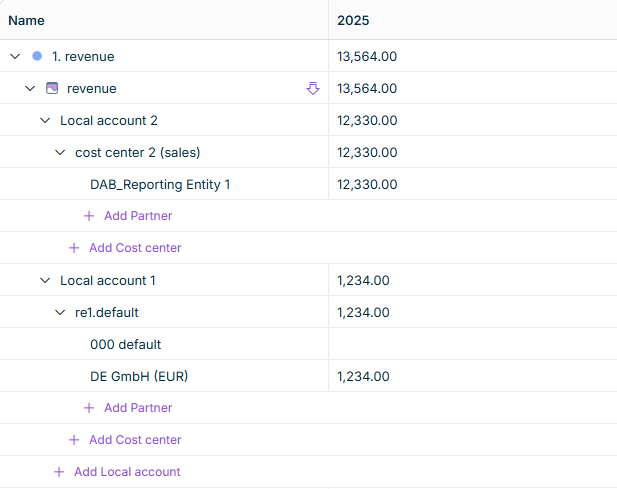
When drill down is configured for a row or column, the cell in the main table is read-only. Its value is automatically calculated as the sum of all drill down entries. To enter or edit values, click the drill down icon () in the cell.

Drill down can be configured at row level or column level, but not both on the same pivot table. Each level can have one or two drill down levels. The following sections describe what happens when you click the drill down icon, depending on how many levels are configured.

Single-level drill down

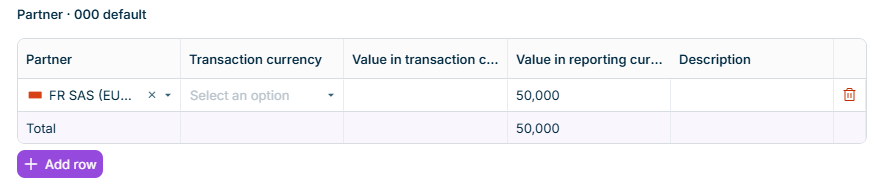
A dialog with a table opens, showing one row per dimension element. The table contains the following columns:

Drill-down modal showing a single-level list of Local Account entries with Code, Description, Transaction Currency, Value in TC, and Value in RC columns
Drill-down dialog – single level
ColumnDescription
[Dimension name]Identifier of the dimension element (read-only)
DescriptionDescription of the dimension element (read-only)
Transaction CurrencyDrop-down list for selecting the transaction currency
Value in transaction currencyEditable value in transaction currency
Value in reporting currencyEditable value in reporting currency

Two-level drill down

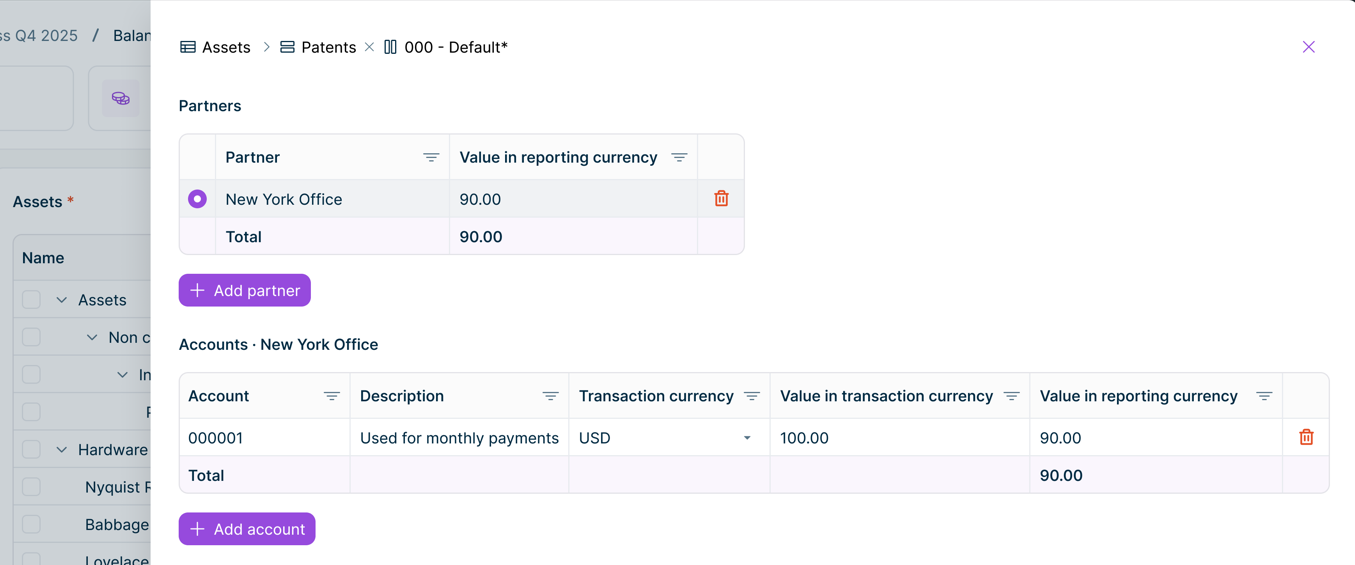
A dialog with two tables stacked vertically opens:

  • Level 1 (top): One row per Level 1 dimension element. The Value in reporting currency column is read-only and shows the aggregated sum of all Level 2 entries for that element. Click a Level 1 row to select it and load its Level 2 entries in the grid below.

  • Level 2 (bottom): The detailed entries for the selected Level 1 element. Transaction currency and values are editable here. The section title shows the name of the selected Level 1 element.

Two-level drill down modal showing a Partners grid (Level 1) and an Accounts grid (Level 2) stacked vertically, with New York Office selected in Level 1 and its account entries displayed below.
Drill down dialog – two levels

Adding entries

Click + Add [dimension type] to open a dimension selector and add a new entry.

Deleting entries

Click the delete icon at the end of a row and confirm the deletion. When all entries are deleted, the parent cell value becomes empty.

Saving changes

Changes in the drill down modal are saved automatically when you leave a cell, for example by pressing Enter, or Tab, or by clicking elsewhere. Pressing Escape while editing a cell cancels that edit without saving. There is no Save button – close the dialog using the X button, by pressing Escape when no cell is active, or by clicking outside the dialog.

Data Collection provides two types of validation that can be executed during a data collection process:

  • Validation rules – check data quality within a single reporting entity's forms (executed from inside a form)
  • Intercompany validation – check that transactions between related reporting entities match (executed from the data collection list)

To execute validation rules, click Execute validation rules in the top right of a form. The system executes all active validation rules that apply to the form and displays a summary when complete.

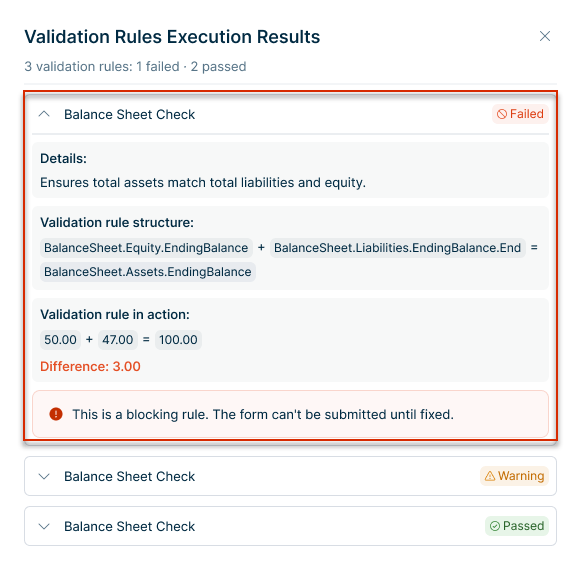
A summary of all validation rules executed on a form is displayed.
Summary of all validation rules executed on a form

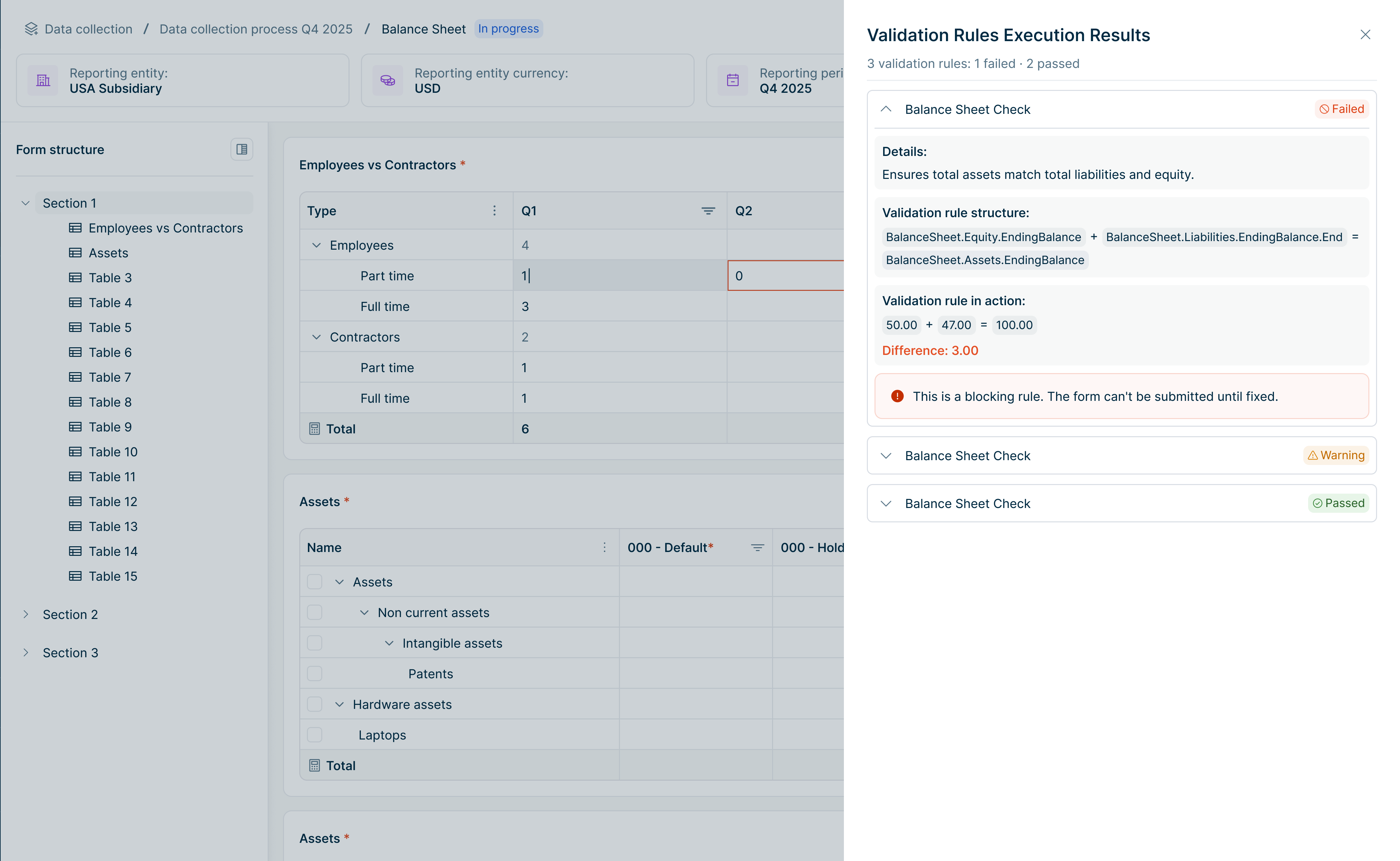
After validation rules are executed, a results panel displays:

  • Blocking – Critical errors that must be resolved before submission
  • Warning – Issues that should be reviewed but do not prevent submission
  • Passed – Rules that completed successfully

To view details for a specific rule, expand the rule row.

The expanded view can include:

  • Details: Business context of the rule
  • Validation rule structure: The configured formula or logical expression
  • Validation rule in execution: Values used during execution and the calculated difference (if applicable)
A detailed view of a validation rule is displayed, showing the details of the error.
Viewing validation rule details

Form elements referenced by failed validation rules are highlighted directly in the form.

Outdated Validation Results

If data is changed after the last validation execution, the existing validation results are no longer up to date. In this case, a Validation outdated warning is displayed below the form header. For users who can execute validation rules i.e. Collectors, the warning includes an Execute validation rules action so they can immediately start a new validation execution.

The warning is removed automatically when:

  • validation is completed successfully and results are up to date, or
  • the form status changes from In Progress to another status.

If intercompany validation is enabled for the reporting package, Collectors can execute intercompany validation at the reporting entity level. Intercompany validation checks that transactions between related reporting entities match — for example, that the total financial amount that Reporting entity A reports against Reporting entity B must equal the total amount that Reporting entity B reports against Reporting entity A — but with opposite signs (one positive, one negative).

To execute intercompany validation, navigate to Data Collection | Data collection, and select Execute IC validation from the three-dot context menu at the end of the reporting entity row.

The 'Execute IC validation' button is displayed.
'Execute IC validation' option

After intercompany validation has been completed, a second notification appears and a View IC validation results option becomes available in the context menu.

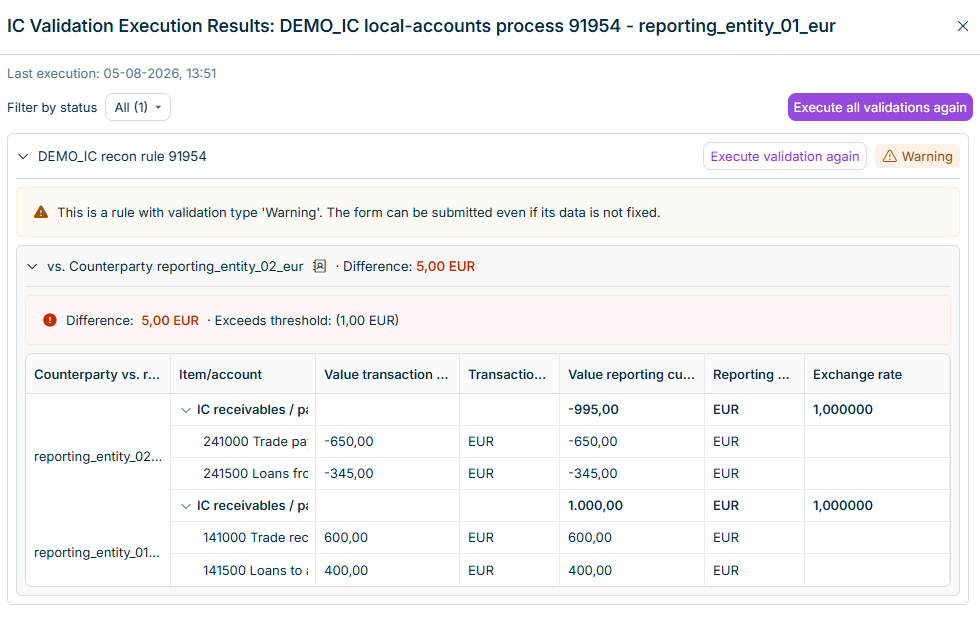
To view the results, select View IC validation results from the context menu. A results panel is displayed, showing each intercompany rule that was executed with its status:

  • Passed – no difference found between the two entities
  • Warning – a difference was found

For each rule, you can see the rule name, the difference (if any), and when the validation was last executed. You can execute all rules again at once using Execute validation again at the top of the results panel, or execute a single rule individually.

Intercompany validation results are displayed.
Intercompany validation results

After entering data and executing validation, Collectors submit forms for approval.

To submit a form:

1

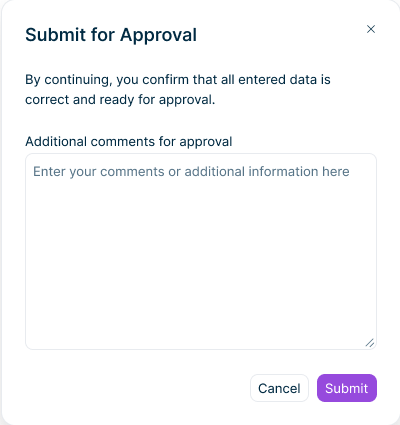
Navigate to the form to be submitted and click Submit for approval in the top right. The Submit for Approval dialog is displayed:

The 'Submit for Approval' dialog is displayed.
'Submit for Approval' dialog
2

Optionally, add comments to provide context for the Approver.

3

Click Submit. The form status changes to Submitted and the form becomes read-only. A notification is sent to the assigned Approvers.

Forms cannot be submitted if:

  • Mandatory fields are not filled in
  • Validation rules have not been executed
  • Blocking validation errors exist

Approvers review submitted forms and either approve them or send them back for corrections.

To approve a form:

1

Open a form with status Submitted.

2

Review the data and any validation of type Warning.

3

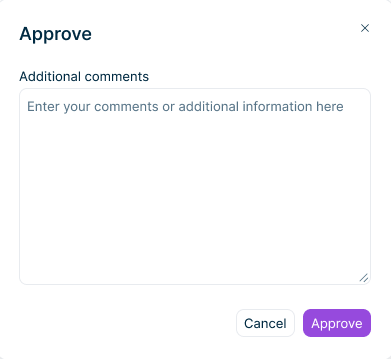
Click Approve in the top right. The Approve dialog is displayed.

The dialog for approving a form is displayed.
'Approve' dialog
4

Optionally, add comments. Click Approve to confirm.

The form status changes to Approved and a notification is sent to the Collector. When all forms in a data collection process are approved, the process status changes to Finalized.

If the data requires corrections, Approvers can send the form back to the Collector.

To send back a form:

1

Open a form with status Submitted.

2

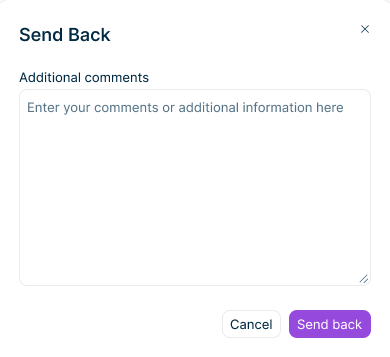
Click Send back in the top right. The Send Back dialog is displayed.

The dialog for rejecting a form is displayed.
'Send Back' dialog
3

Add comments explaining what needs to be corrected.

4

Click Send back to confirm.

The form status returns to In Progress and the Collector can edit and resubmit the form. The Collector can view the rejection comments to understand what needs to be corrected.