The aim of the app Debit/credit shifts in consolidationareas is to automatically standardize the debit/credit presentation of financial values across the consolidated group by generating the necessary shift entries to ensure each balance appears on a single side in the consolidated financial statements.
The debit/credit shifts in consolidation areas are calculated based on the values of an adjustment level group and posted to an adjustment level for consolidation postings that is included in this adjustment level group. Optionally, it is possible to define whether individual consolidation areas should be excluded from execution.
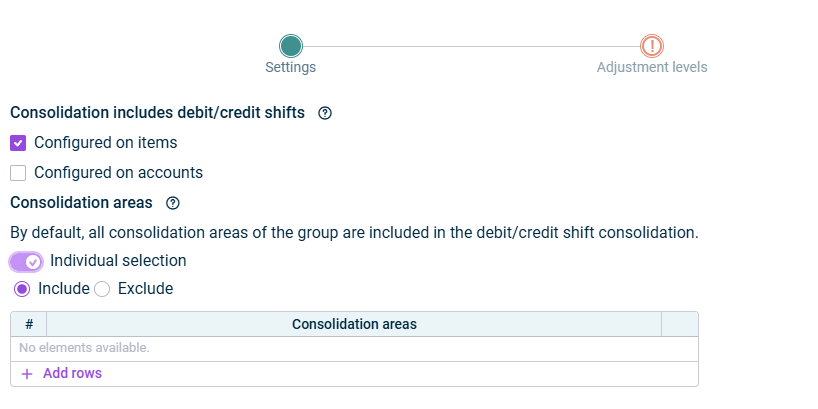
In the Settings step, specify the general settings for the configuration:
Debit/Credit shifts
The following options are available:
Option
Description
Consolidation includes debit/credit shifts
Choose whether the consolidation should include only debit/credit shifts that are configured on items, only those configured on accounts, or both.
Note: If you activate the checkbox Configured on accounts, the app will compare the balances of the debit/credit shift accounts with the balances of the debit/credit shift items configured in the account properties of the debit/credit shift accounts on the Debit/credit shift tab. Activate both checkboxes if you want to take into account debit/credit shifts configured at the account level as well as those configured at the item level during the consolidation.
Consolidation areas
The consolidation areas that are to be included in the app execution. By default, all consolidation areas of the group are included. Choose Individual selection and click Add rows to choose individual consolidation areas in the table that is subsequently displayed. - Include: In the table, select individual consolidation areas to be included. - Exclude: In the table, select the consolidation areas that are to be excluded.
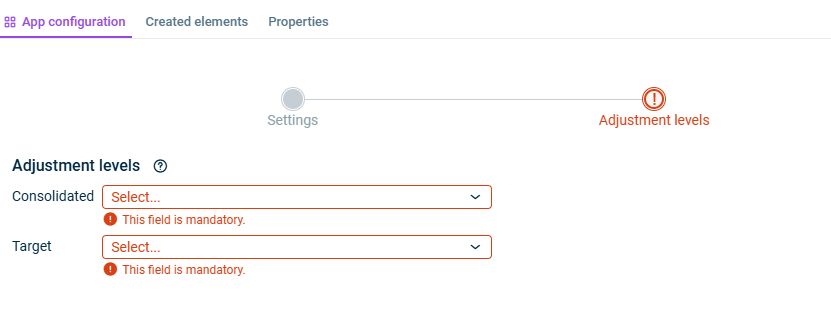
In the Adjustment levels step, specify the adjustment levels that should be taken into account when performing the debit/credit shifts.
The app also carries out postings at adjustment levels that are locked for other postings.
Tab 'App configuration'
The following options are available:
Option
Description
Consolidated
Adjustment level group including all adjustment levels for data imports, proportioning, and consolidation postings. Please ensure that the target adjustment level is included in this adjustment level group. This will be the basis for the consolidation of debit/credit shifts.
Target
Adjustment level for consolidation postings to be used for the debit/credit shift consolidation postings.
As long as a step has not been fully configured and/or configuration errors exist, it is displayed with a red exclamation mark .
Once a step is configured completely and without any errors, it is displayed with a green check mark .
You can close the configuration dialog by clicking the arrow icon at the top left.
To change the name of the app, select the app in the tree view and choose Properties from the context menu.
You can execute the app for the Debit/credit shifts in consolidation areas either separately, together with other apps in an executable folder or as part of consolidated financial statements.
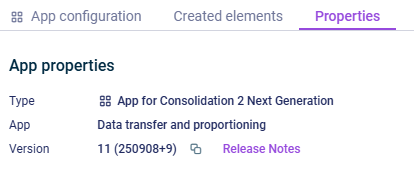
The App properties are displayed on the tab of the same name:
'Properties' tab
The following App properties are displayed:
Type of the element
Function of the App
Version of the element.
New available version
As soon as a new version of the app is available that contains changes to the app configuration and/or the calculation logic of the app, the Refresh command is displayed, allowing you to update the app to the latest version.
Information about the changes to each version can be found in the Release Notes, which can be accessed via the link of the same name.
We strongly recommend to update all apps to the new version as soon as possible because it cannot be guaranteed how long an app with an obsolete version can be executed.
This content was generated using AI and reviewed by Lucanet subject matter experts before publication.