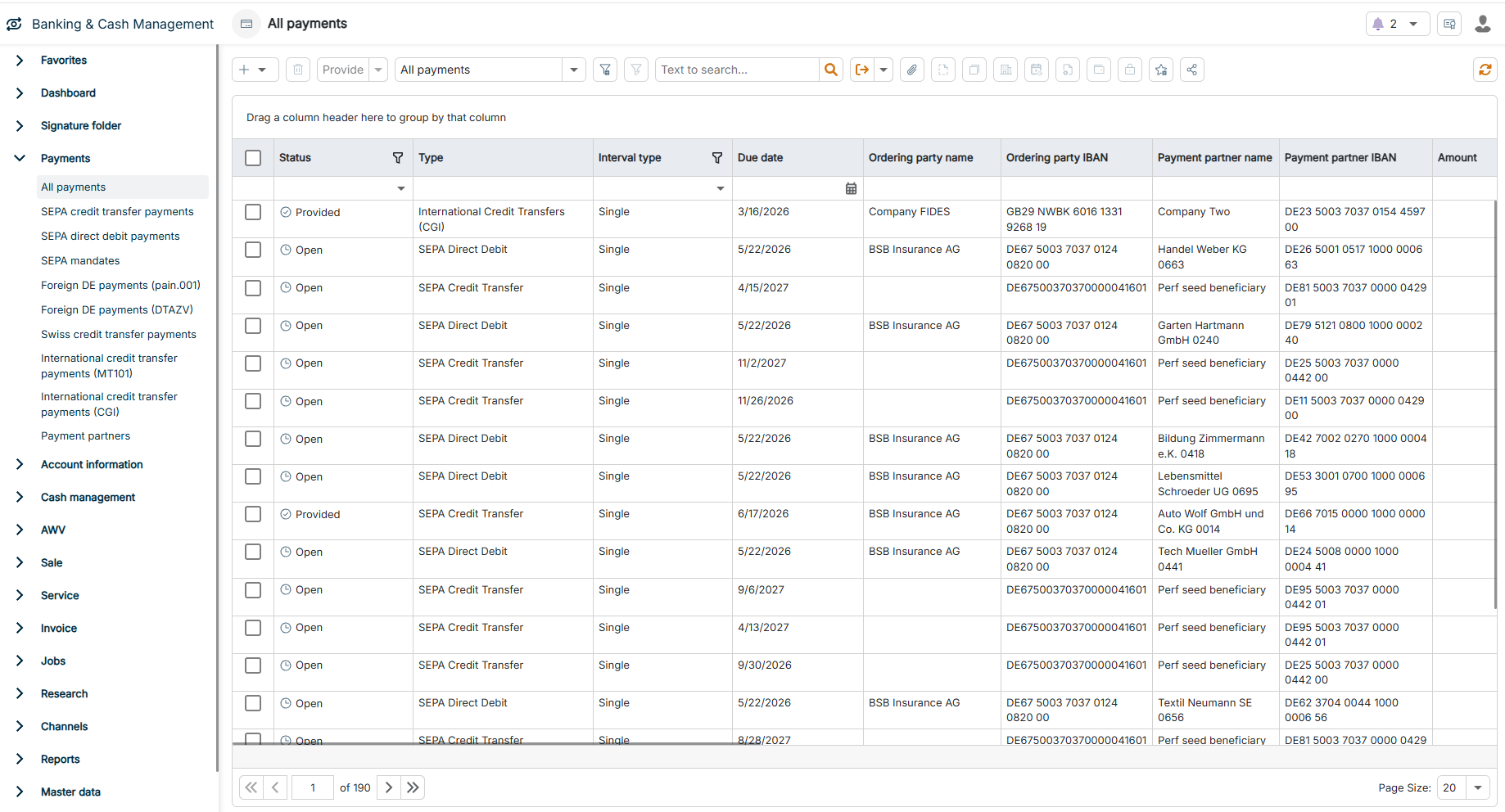
| All payments | Central overview of all payments across all payment types and formats. In this overview, you can view, filter, and sort existing payments and provide them for transmission — in doing so, you hand the payments over to the signature folder.
Using the Plus icon, you create a payment of any available payment type directly from this view. |
| SEPA credit transfer payments | Credit transfers in the pain.001 XML format, currently for Germany and Austria. You cannot currently enter SEPA credit transfers for other countries of the SEPA area. The following payment types are available:
- Credit transfer
- Urgent
- Credit transfer (instant) — SEPA Instant (SCT Inst)
- Salary
- Salary (Instant)
- Employer savings contribution (VWL)
- Charity
- Treasury payment
Within the SEPA area, the BIC is optional and the IBAN is mandatory. An end-to-end reference is generated automatically and, depending on the configuration, can be activated as a mandatory field. Optionally, you transmit the payment as a batch booking or as a single booking. |
| SEPA direct debit payments | Direct debit schemes for SEPA Core and SEPA B2B as well as the legacy scheme COR1, currently for German direct debits only. The pain.008 format is used. For each direct debit, you select a valid SEPA mandate of the debtor.
You select the Sequence type when you create the mandate. After the first execution, BCM automatically switches the sequence type from First direct debit (FRST) to Recurrent direct debit (RCUR). |
| SEPA mandates | Master data for SEPA direct debit mandates. For each mandate, you enter the Creditor, the Debtor account, a unique Mandate reference, the Signature date, and the following settings:
- Validity — recurring or single
- Sequence type — First direct debit (FRST), Recurrent direct debit (RCUR), One-off direct debit (OOFF), or Final direct debit (FNAL)
- Direct debit type — Core direct debit (CORE), Business direct debit (B2B), or Core direct debit (COR1)
Optionally, you store a Predefined amount or Predefined remittance information for the direct debits of the mandate. Mandates that are already referenced by direct debits cannot be deleted. |
| Foreign DE payments (pain.001) | International payments in the standardized pain.001.001.09 XML format in the AZV variant, currently for Germany only. You can enter the payment in any currency. The following payment types are available:
- Credit transfer
- Urgent credit transfer
- Same day value — same-day value date
- Check
You must specify at least one identification of the beneficiary bank: either the BIC in the Payment data area, or, in the Bank data area, a Clearing system code or the bank name with city and country. You define the charges arrangement as SHAR, DEBT, or CRED. |
| Foreign DE payments (DTAZV) | International payments in the German DTAZV format, currently for Germany only. From an equivalent value of EUR 50,000, BCM automatically generates an AWV report, provided that the AWV license option is active. In addition, BCM offers a transformation channel that automatically converts existing DTAZV files into pain.001 AZV.
Warning: German banks are expected to stop accepting the DTAZV format from October 2026. Where possible, create new international payments via Foreign DE payments (pain.001). |
| Swiss credit transfer payments | Switzerland-specific payments in the pain.001 format in versions 03 and 09. The selected payment type determines whether BCM generates the old or the new format. The following payment types of version 09 are available:
- D - National payment
- D - National salary payment
- D - Instant national payment — the Swiss instant payment in CHF
- S - SEPA payment
- X - National payment (foreign currency)
- X - Foreign payment
- C - Bank check/post cash (national / foreign)
The following payment types of version 03 are available:
- 1. ESR payment (national bank)
- 2.1 ES payment (PostFinance)
- 2.2 ES payment (national bank)
- 3. National payment
- 3. Salary payment (national bank)
- 4. Foreign currency (national payment)
- 5. SEPA payment (foreign bank)
- 6. International payment
- 8. Bank check/post cash (national/foreign)
When you import a QR-bill, BCM automatically transfers the beneficiary, the IBAN or QR-IBAN, the amount, and the reference into the payment. Available reference types:
- QRR — QR reference
- SCOR — structured creditor reference
- ESR — ESR reference number
- IPI — structured reference according to IPI
- NON — do not use a reference
The permitted currencies depend on the selected payment type.
Warning: Version 03 is expected to be discontinued in November 2026. |
| International credit transfer payments (MT101) | SWIFT-based international credit transfers in the MT101 format. You can enter the payment in any currency; BCM automatically assigns a Transaction Reference to each payment. Using the Charges Arrangement field — SHA, OUR, or BEN — you define who bears the charges and expenses. Optionally, you configure a Communication bank BIC, a Correspondent bank BIC, up to five Instruction Codes with additional information, and a separate Charges account. |
| International credit transfer payments (CGI) | International credit transfers in the ISO 20022 CGI format (pain.001.001.09) — the modern alternative to MT101. CGI (Common Global Implementation) is a cross-bank standard for global payments; under EBICS 3.0, BCM transmits CGI payments to German banks, for example, using the XG1 order type. You can enter the payment in any currency. The following payment types are available:
- SEPA
- Normal Urgency
- Urgent Payment
- Same Day Value
Using the Charge bearer field — SHAR, SLEV, DEBT, or CRED — you define who bears the charges and expenses. |
| Payment partners | Master data of all payment partners and their bank details. When you create a payment, BCM automatically suggests a suitable payment partner or creates a new one. You can also create payment partners manually as a Beneficiary account, with a linked Company, the account data, and the Bank data of the beneficiary bank.
You control centrally under System | Configuration | Payments whether BCM automatically saves new payment partners from payments, and you can deviate from this setting in each individual payment.
Optionally, payment partners pass through the approval workflow according to the four-eyes principle, activated under System | Configuration | Security for the Beneficiary account data type. The Approval state, Approved on, and Approved by fields display the current state; you process open approvals in the Change sets workspace in the System functional area (see System). If the approval workflow is activated, you can only select payment partners that have already been approved in payments, depending on the configuration. |