There are two main areas for commenting in Lucanet xP&A (Extended Planning & Analysis):
In the spreadsheet, to collaborate with fellow model builders and editors
On the dashboard, to collaborate with your end-users, e.g. your business partners, investors etc
Descriptions, by contrast, are more permanent explanations of a variable/formula — an ongoing guide for anyone looking at the model. This article tells you everything you need to know about comments and descriptions in Lucanet xP&A.
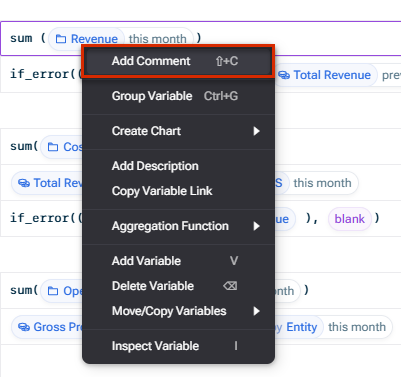
Start a comment thread on a variable in Lucanet xP&A by using Shift+C on your keyboard, or right-clicking and using the command Add comment. You can either comment on the variable as a whole, or comment on a specific cell within the variable (e.g. specific month or dimension item).
Create comment for a variable
If a comment exists, a yellow triangle is displayed in the cell:
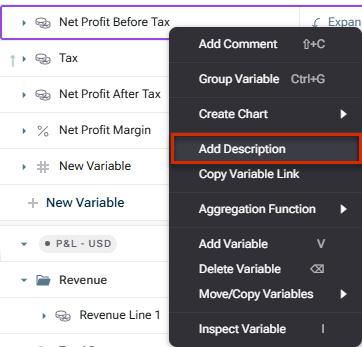
Descriptions in Lucanet xP&A are meant to be more permanent explanations of a variable/formula. You can think of them as an ongoing guide for anyone looking at the model. Add a description by right-clicking and using the command Add Description.
Adding a description to a variable
You can edit an existing description by double-clicking on it.
If you create a description for a variable in the Inputs section, it also appears on the Dashboard.
You can also add comments within your formulas with a double slash //. Everything between the double slash and the end of the line will be ignored by xP&A when calculating.
There are two main areas for comments in Lucanet xP&A: in the spreadsheet, and on the dashboard.
Those with Edit (and above) access to a model can see and interact with all comments across the spreadsheet and the dashboard.
Those with View access only can see/interact with comments on the dashboard.
If you only have access to the dashboard via a public/private link, you cannot see/reply to existing threads or create new.
Comments on the spreadsheet are not shown in a read-only spreadsheet on dashboard.
Comment threads in Lucanet xP&A only show up in the views and/or scenarios they were created in, and only for those who have access to those views and/or scenarios. For example, if you create a comment in the High Spend scenario, only those who have access to the High Spend scenario will be able to see/reply to the thread.
This content was generated using AI and reviewed by Lucanet subject matter experts before publication.