With the REST import API, your ERP system or middleware sends the data of the preliminary VAT return directly to Lucanet VAT (Value Added Tax). The customer system transmits the data as an HTTPS POST with a JSON payload, so no export file is needed. VAT stores every successful request in the Pre-Import of the respective company and period. From there, you transfer the data to the declaration in the Import workspace.

The following guide is intended for customer IT teams and developers who connect a customer system to VAT on the Lucanet CFO Solution Platform. The guide describes the setup, the endpoints, the structure of the requests, the responses, and troubleshooting.

If your customer system creates export files and cannot send HTTP requests, use the file import via SFTP instead.

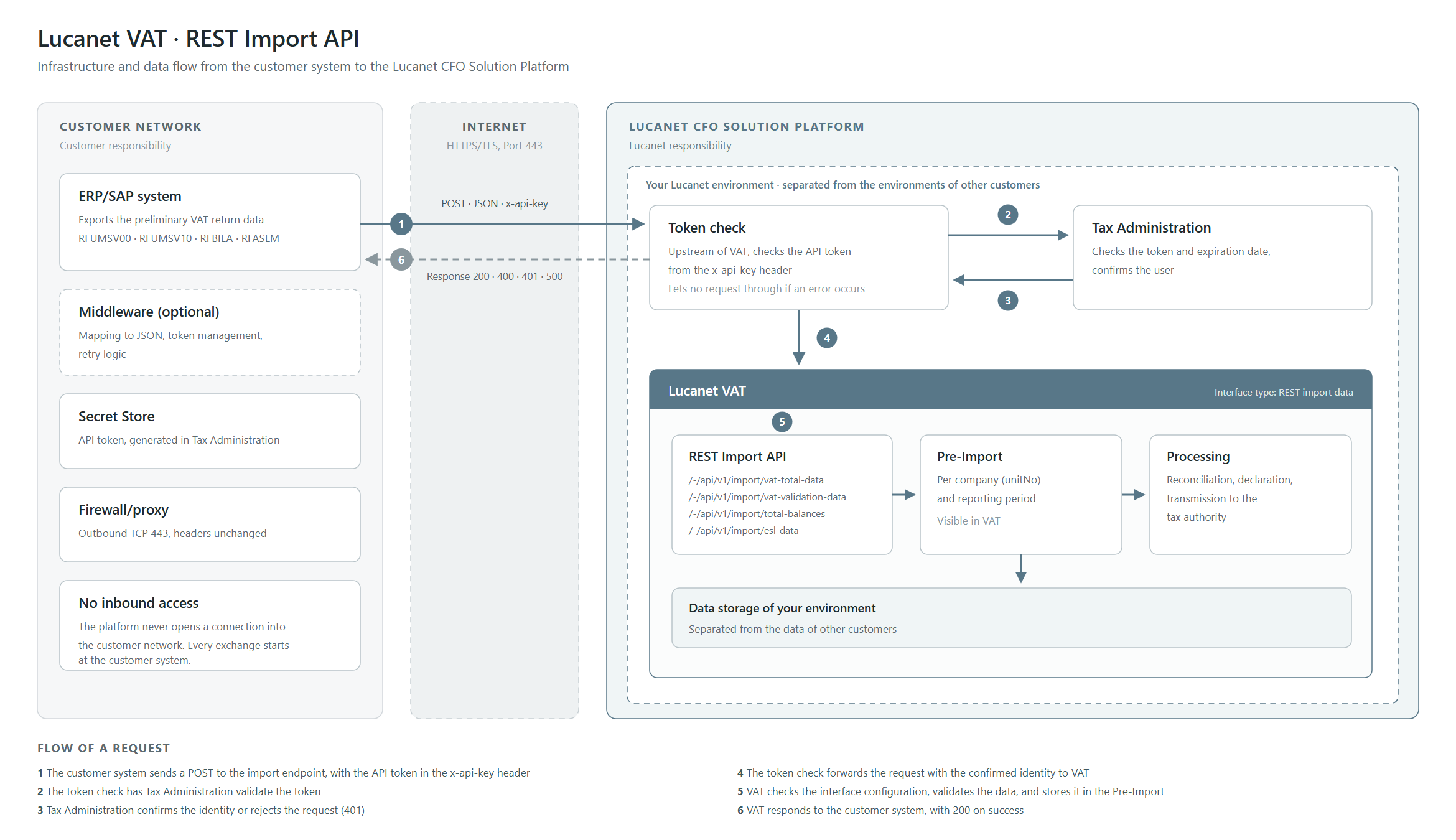
The following diagram shows the infrastructure and the path of a request from the customer system to VAT:

Shows the infrastructure of the REST import API of Lucanet VAT in three zones. On the left, the 'Customer network' with 'ERP/SAP system', 'Middleware (optional)', 'Secret Store', 'Firewall/proxy', and 'No inbound access'; in the middle, the 'Internet' with 'HTTPS/TLS, Port 443'; on the right, the 'Lucanet CFO Solution Platform' with 'Token check', 'Tax Administration', and the 'Lucanet VAT' module with the areas 'REST Import API', 'Pre-Import', 'Processing', and 'Data storage of your environment'. Numbered arrows 1 to 6 show the path of a request from 'POST · JSON · x-api-key' to 'Response 200 · 400 · 401 · 500'.
Infrastructure and data flow of the REST import API in VAT

A request passes through the Lucanet CFO Solution Platform as follows:

  1. The customer system sends a POST to an import endpoint of VAT and transmits the API token in the x-api-key header.
  2. The token check of the platform has Tax Administration validate the API token.
  3. Tax Administration checks the token and its expiration date and confirms the associated user. If the token is invalid, Tax Administration rejects the request with 401.
  4. The token check forwards the request with the confirmed identity to VAT.
  5. VAT checks the interface configuration, validates the data, and stores the data in the Pre-Import.
  6. VAT responds to the customer system, with 200 on success.

The platform never opens a connection into your network. Every exchange starts at the customer system.

The following table summarizes the characteristics of the REST import API in VAT:

CharacteristicDescription
TransportThe customer system sends the data as an HTTPS POST in JSON format.
DirectionThe customer system calls VAT. VAT does not collect any data.
AuthenticationEvery request carries the API token of a Tax Administration user.
TriggerVAT stores the data in the Pre-Import immediately with the request.
MetadataThe JSON header of the request contains the company, the period, and the reporting country.
Interface type in VATVAT uses the REST import data interface type.
Typical useThe API suits SAP and ERP systems with HTTP capability, middleware, and integration platforms.

Make sure that the following prerequisites are met in your company before you send data to VAT via the REST import API:

  • Customer system: A system or middleware can send an HTTPS POST with a JSON body.
  • Network: Firewall and proxy allow outbound HTTPS connections via TCP 443 to the host name of your VAT environment.
  • Secret store: A secret store or password manager holds the API token. The token does not belong in source code or transport requests.
  • Company numbers: A mapping assigns the company numbers of your customer system to the company numbers created in VAT.

You receive the following information from Lucanet:

  • the base URL of your VAT environment, for example https://<customer>.gtc-vat.api.<environment>.lucanet.cloud
  • the list of company numbers created in VAT, against which your customer system matches its data

Lucanet and your IT team share the setup of the REST import API in VAT. The following table shows the steps and the role that executes each step:

StepRoleContent
1LucanetLucanet sends you the base URL of your VAT environment and the company numbers.
2LucanetLucanet creates an interface of the REST import data type in VAT and assigns it to the companies.
3LucanetLucanet creates a technical user in Tax Administration and grants the user the required permissions.
4CustomerYou generate an API token with the technical user and store it in the secret store.
5CustomerYou allow the network connection.
6CustomerYou build the request and send a test request.
7CustomerYou check the result in the Pre-Import of VAT.
8CustomerYou automate the call and set up logging and token renewal.

The handover point lies after step 3. Up to that point, your IT team needs only the base URL. From step 4 onward, it needs access to Tax Administration.

The REST import API accepts data only if an interface of the REST import data type exists in VAT. If this interface is missing, all four endpoints respond with 401, even if the API token is valid. Lucanet creates the interface at the start of the project.

To set up the REST import interface in VAT:

1

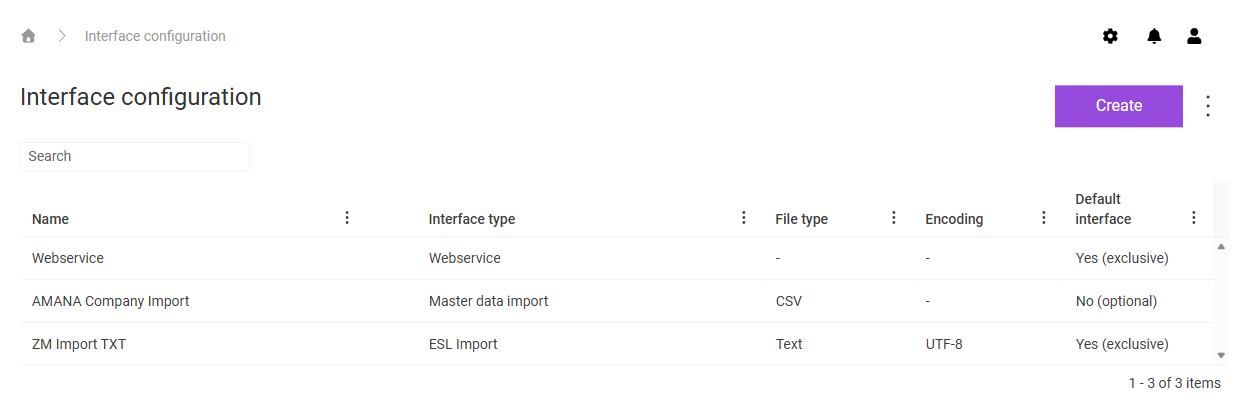
Click the gear icon in the top right corner and navigate to the Interface configuration workspace. The workspace is displayed as follows, for example:

Shows the 'Interface configuration' workspace in VAT with the 'Search' field, the 'Create' button, the three-dot icon, and the columns 'Name', 'Interface type', 'File type', 'Encoding', and 'Default interface', for example with the interface 'Webservice' of the interface type 'Webservice' and the value 'Yes (exclusive)' in the 'Default interface' column.
The 'Interface configuration' workspace
2

Click Create.

3

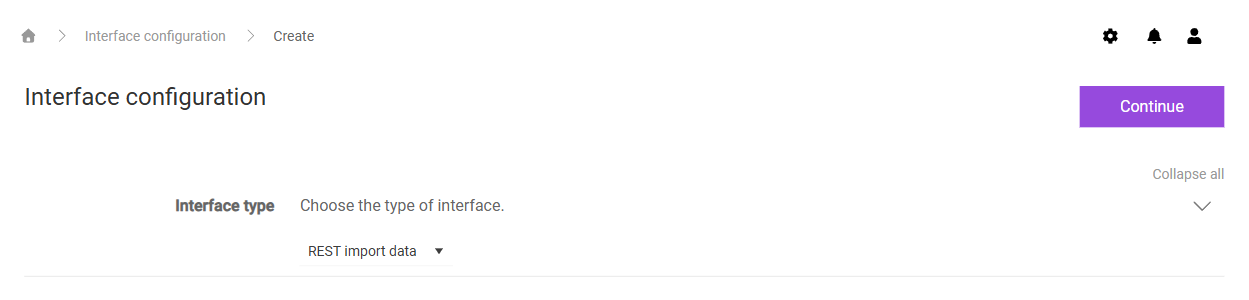
In the Interface type drop-down list, select REST import data:

Shows the page for creating an interface in the 'Interface configuration' workspace in VAT with the 'Continue' button and the 'Interface type' drop-down list with the value 'REST import data'.
Selecting the 'REST import data' interface type
4

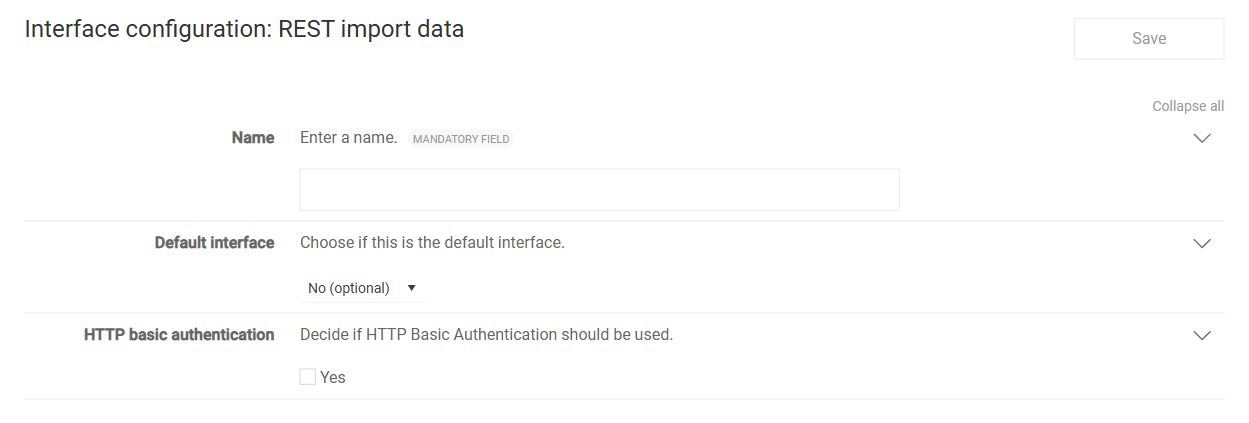
Click Continue. The Interface configuration: REST import data page is displayed:

Shows the 'Interface configuration: REST import data' page in VAT with the 'Save' button, the mandatory 'Name' field, the 'Default interface' drop-down list with the value 'No (optional)', and the deactivated 'Yes' check box under 'HTTP basic authentication'.
The 'Interface configuration: REST import data' page
5

Enter a name for the interface in the Name field.

6

In the Default interface drop-down list, select Yes (exclusive) if the interface is to apply to all companies without their own interface.

7

Leave the Yes check box under HTTP basic authentication deactivated.

8

Click Save.

The HTTP basic authentication option remains deactivated on the Lucanet CFO Solution Platform because the API token authorizes every request. If the option is active, VAT additionally requires a user name and password via HTTP basic authentication and rejects requests without these credentials with 401.

If you leave the value No (optional) in the Default interface drop-down list, assign the interface in the master data of every company that receives data via the REST import API.

Every request to the REST import API in VAT carries an API token. The API token belongs to exactly one Tax Administration user. For an unattended job, use a technical user and not a personal account. This way, the interface remains unaffected when an employee leaves the company.

To generate the API token for the REST import API in VAT:

1

Sign in with the technical user and open the My Profile | API-Tokens area in Tax Administration. The API Tokens page describes the individual fields.

2

Create an API token with an Expiration date and click Save.

3

Copy the API token immediately via the copy icon and store it in the secret store.

Tax Administration displays the API token in plain text only once and afterward stores only a hash value. If you did not copy the API token when you created it, create a new API token and delete the old one.

A user can own several API tokens. To replace an API token without downtime, create a new API token, switch the customer system to the new API token, wait for a successful run, and only then delete the old API token.

Before your customer system sends the first request to the REST import API in VAT, prepare the network and the token storage as follows:

  • Store the API token in the secret store – not in source code, not in a log, and not in a URL.
  • Allow outbound connections via TCP 443 to the host name of your VAT environment. If the traffic passes through a proxy, the proxy must let the host through and forward the headers unchanged.
  • Note the expiration date of the API token and set a reminder before it expires.

The REST import API in VAT provides a separate endpoint for each data type. The following table shows the endpoints and the SAP standard report that corresponds to each data type:

Data typeEndpointSAP report
Totals per tax codePOST /-/api/v1/import/vat-total-dataRFUMSV00
Totals per tax code and G/L accountPOST /-/api/v1/import/vat-validation-dataRFUMSV10
Account balances from the balance sheet and P&LPOST /-/api/v1/import/total-balancesRFBILA
European Sales ListPOST /-/api/v1/import/esl-dataRFASLM

The /-/ prefix is a fixed part of all VAT URLs. The full URL of the most frequently used endpoint is, for example:

text


Only the path of the endpoint determines the report type. The JSON header contains no field for the report type. If you need the report type for your own logging or for a repeated transmission, log the called endpoint or use the uuid field as a meaningful reference, for example 2026-DE-1000-JAN-RFUMSV00.

VAT forwards requests to the unversioned path /-/api/import/ to the versioned path. Use the versioned path /-/api/v1/import/ for new connections.

Every request to the REST import API in VAT is an HTTPS POST with the following headers:

HeaderValue
x-api-keyThe API token in plain text, without a Bearer prefix and without Base64 encoding
Content-Typeapplication/json

The following example sends the request.json file to the /vat-total-data endpoint:

bash


For the first test request, a small data set of a test company for a closed period is suitable. A single entry is enough.

All four endpoints of the REST import API in VAT use the same outer structure. One element in items corresponds to one company for one reporting period. To send several companies, add several elements to items in one request.

json


The items and entries lists must not be empty.

The following table describes the fields in the header of every element in items:

FieldRequiredFormatDescription
unitNoyesmax. 20 charactersSpecifies the company number exactly as it is created in VAT.
periodFromyesdd.MM.yyyySpecifies the first day of the reporting period.
periodToyesdd.MM.yyyySpecifies the last day of the reporting period.
reportingCountryyes2 letters according to ISO 3166-1 alpha-2Specifies the reporting country, for example DE, AT, or FR.
vatIdOwnyes for /esl-datamax. 20 charactersSpecifies the own VAT ID of the reporting company.
uuidnomax. 50 charactersContains your own reference ID for logging and traceability.
usernamenomax. 50 charactersNames the exporting system or the exporting user.
datenomax. 20 charactersContains the export date for information.
timenomax. 20 charactersContains the export time for information.

VAT converts reportingCountry to uppercase and removes leading and trailing spaces from unitNo and from the key fields of the entries.

The REST import API in VAT checks amounts and dates according to the following rules:

  • Decimal separator: A period separates the decimal places, and a maximum of two decimal places is allowed. Valid values are, for example, 1900.00, -500.50, and 0.00. A comma as the decimal separator results in 400.
  • Thousands separator: Thousands separators are not allowed. 10.000,00 and 10,000.00 are both invalid amounts.
  • Amounts as strings: The customer system transmits amounts as JSON strings and not as numbers, for example "taxBaseAmount": "10000.00".
  • Currency: The currencyKey field contains the three-letter ISO 4217 code.
  • Date: The periodFrom and periodTo fields strictly use the dd.MM.yyyy format with leading zeros, for example 01.01.2026.
  • Tax type: The taxType field contains INPUT for input tax or OUTPUT for output tax. The field is not case-sensitive.
  • Character encoding: The request uses UTF-8.

The SAP standard reports output credit amounts with a trailing minus sign, for example 5.263,16-. Your export converts this notation into a leading minus sign with a period as the decimal separator, that is -5263.16. Agree on the sign convention for each field with Lucanet Consulting during the project and verify it with a test request against the source report.

The /vat-total-data endpoint of the REST import API in VAT receives the totals per tax code. The data corresponds to the SAP report RFUMSV00 and forms the main import for the preliminary VAT return. Every line of the report becomes one element in entries.

The following table describes the fields of an entry for the /vat-total-data endpoint:

FieldRequiredFormatDescription
companyCodeyesmax. 10 charactersSpecifies the company code in the customer system.
taxCodeyesmax. 20 charactersSpecifies the tax code.
taxCodeTypeyesmax. 10 charactersSpecifies the tax code type, for example MWS or VST.
taxCodeDescriptionnomax. 255 charactersContains the description that VAT displays.
taxBaseAmountyesdecimalSpecifies the tax base.
taxAmountnodecimalSpecifies the tax amount.
nonPayableNondeductiblenodecimalSpecifies the non-deductible portion.
payableDeductiblenodecimalSpecifies the deductible or payable portion.
currencyKeyno3 lettersSpecifies the currency key.
taxRatenodecimalSpecifies the tax rate in percent.
taxTypeyesINPUT or OUTPUTSpecifies the tax type.

The following example shows a request to the /vat-total-data endpoint:

json


The /vat-validation-data endpoint of the REST import API in VAT receives the totals per tax code and G/L account. The data corresponds to the SAP report RFUMSV10, the supplementary list for the preliminary VAT return. Every element in entries stands for one combination of company code, tax code, and G/L account.

The following table describes the fields of an entry for the /vat-validation-data endpoint:

FieldRequiredFormatDescription
companyCodeyesmax. 10 charactersSpecifies the company code.
taxCodeyesmax. 20 charactersSpecifies the tax code.
accountyesmax. 20 charactersSpecifies the G/L account number.
taxBaseAmountyesdecimalSpecifies the tax base.
currencyKeyno3 lettersSpecifies the currency key.
taxTypeyesINPUT or OUTPUTSpecifies the tax type.

The following example shows a request to the /vat-validation-data endpoint:

json


The /total-balances endpoint of the REST import API in VAT receives the account balances from the balance sheet and P&L without a direct tax reference. The data corresponds to the SAP report RFBILA.

The following table describes the fields of an entry for the /total-balances endpoint:

FieldRequiredFormatDescription
companyCodeyesmax. 10 charactersSpecifies the company code.
accountyesmax. 20 charactersSpecifies the G/L account number.
accountDescriptionyesmax. 255 charactersContains the account description.
amountyesdecimalSpecifies the balance. A credit balance can be negative.
currencyKeyno3 lettersSpecifies the currency key.

The following example shows a request to the /total-balances endpoint:

json


The /esl-data endpoint of the REST import API in VAT receives the data of the European Sales List (ESL). The data corresponds to the SAP report RFASLM. For this endpoint, the vatIdOwn field in the header is also required.

The following table describes the fields of an entry for the /esl-data endpoint:

FieldRequiredFormatDescription
vatIdyesmax. 20 charactersSpecifies the VAT ID of the recipient, with the country code and number combined and without spaces.
typeyes0 or L, 1 or S, 2 or DSpecifies the type of supply.
taxBaseAmountyesdecimalSpecifies the total amount of the supplies in the period.
currencyKeyno3 lettersSpecifies the currency key.

The following table describes the values of the type field:

ValueMeaning
0 or LIntra-Community supplies of goods
1 or SIntra-Community supplies of other services
2 or DIntra-Community triangular transactions as the acquirer

The following example shows a request to the /esl-data endpoint:

json


The REST import API in VAT responds to every request with an HTTP status and, except for 401, with a JSON body. In the customer system, always evaluate both values: the HTTP status and the statusCode field in the body.

VAT responds to a successful request as follows, for example:

json


The response 200 with the statusCode 200 means that the data is in the Pre-Import. In the Import workspace of the respective company and period, VAT displays the new import data. Check there whether the company and the period are correct, and compare the totals with the source report.

VAT responds to a request with incorrect data as follows, for example:

json


The statusMessage field names every incorrect field. Write statusMessage to the log of your customer system so that the cause remains traceable later.

Error responses of the REST import API in VAT come either from the token check of the platform or from VAT itself. The following table shows the most frequent error responses, their causes, and the solutions:

ResponseOriginCauseSolution
401Token checkThe API token is missing, wrong, or expired.Check the x-api-key header name and the token value. Check the expiration date in Tax Administration and generate a new API token if necessary.
500Token checkTax Administration is not reachable. In this case, the token check deliberately lets no request through.Repeat the request after a waiting period. If the error persists, contact Lucanet Support.
401VATNo interface of the REST import data type exists in VAT.Have the interface created as described in the Setting Up the REST Import Interface in VAT section.
401VATThe HTTP basic authentication option is active, but the request contains no basic authentication credentials.Deactivate the HTTP basic authentication option on the Lucanet CFO Solution Platform.
400VATA required field is empty, a value does not match the format, the JSON cannot be read, or items or entries is empty.Evaluate the list of fields in statusMessage.
400 · 565VATA date is invalid or periodFrom is later than periodTo.Check the dd.MM.yyyy format and the order of the dates.
400 · 562/563VATVAT cannot convert an amount, for example because of a comma as the decimal separator or a thousands separator.Use a period as the decimal separator with a maximum of two decimal places.
500 · 567VATA database error occurred during saving.Contact Lucanet Support and provide the time and the uuid of the request.

A 401 response contains no JSON body, regardless of whether the token check or VAT rejects the request. Therefore, the customer system cannot tell where the response comes from. The VAT logs provide clarity: If VAT has logged no entry at the time of the request, the token check rejected the request and the cause lies with the API token. Otherwise, the cause lies in the interface configuration.

The REST import API in VAT works with every HTTP-capable system. The following three approaches are common for SAP landscapes. Which approach fits depends on your existing integration architecture.

If you already operate an integration platform, middleware is the recommended approach. SAP exports the reports as before, and an integration platform such as SAP Integration Suite or SAP PI/PO handles the mapping to JSON, token management, and retry logic. This way, the API token does not reside in the ERP system, and error handling and monitoring already exist.

With this approach, a custom ABAP report reads the data, serializes it to JSON, and sends the POST to VAT. Note the following points:

  • HTTP client: Use cl_http_client=>create_by_url or an RFC destination of type G that you maintain in transaction SM59. The RFC destination is the cleaner option because the host, path prefix, and proxy are then part of the system configuration and not of the code.
  • Headers: Set x-api-key with the token value and Content-Type: application/json.
  • JSON and amounts: Serialize the data, for example with /ui2/cl_json or a custom class. Create amounts as strings with a period as the decimal separator. Depending on the user settings, the ABAP standard output of a CURR field contains a comma and thousands separators, so you cannot use the output without conversion.
  • Sign: Convert the trailing minus sign of the report output into a leading minus sign.
  • Certificate: Store the certificate of the remote server in transaction STRUST in the SSL client PSE of the application. Otherwise, the call aborts with SSSLERR_PEER_CERT_UNTRUSTED.
  • Token storage: Do not store the API token in the report, but in the secure store, in SSF, or in a table with strict authorization protection. Never include the API token in a transport request.

With this approach, the export job saves the report file, and a script, for example in Python or PowerShell, reads the file, builds the JSON, and sends the POST to VAT. This approach suits small landscapes and companies without their own ABAP development.

Regardless of the chosen approach, the following notes apply to the connection to the REST import API in VAT:

  • Company number and company code: The unitNo field contains the company number in VAT, the companyCode field contains the company code in the customer system. Both values can match, but they do not have to. You define the assignment once in the mapping.
  • Several company codes: Several company codes of one company belong in the same entries list, and several companies belong in several elements in items.
  • Payload size: Send one period per request at first and not a whole year. Before going live, clarify with Lucanet which payload size your runs reach.

For the ongoing operation of the REST import API in VAT, embed the call in the export job of your customer system or in the middleware. The following sections describe what to consider during operation.

If an API token has an expiration date, Tax Administration does not renew it automatically. After expiration, the token check rejects every request with 401. Therefore, define an operating process that specifies who renews the API token, when the renewal takes place, and how the customer system receives the new value. Replace the API token without downtime as described in the Generating an API Token for the REST Import API in VAT section.

Write the following information to the log of your customer system for every run:

  • timestamp and called endpoint
  • unitNo, period, and uuid
  • HTTP status, statusCode, and statusMessage

Never log the API token itself. Set up alerting on the HTTP status and on the statusCode of the response, and not only on connection errors.

Whether a new attempt makes sense depends on the response of the REST import API in VAT:

  • 500 from the token check: Repeat the request with increasing intervals and a limited number of attempts.
  • 400: A repetition is pointless because the payload is incorrect. Correct the data first.
  • 401: A repetition is also pointless. Clarify the API token or the interface configuration first.

Do not blindly repeat an aborted run. First check in the Import workspace whether the data of the company and period is already in the Pre-Import.

The following checklist summarizes what your IT team has completed before the REST import API in VAT goes live:

  • [ ] API token generated with the technical user and copied during creation
  • [ ] API token stored in the secret store, not in source code
  • [ ] Expiration date noted and renewal scheduled
  • [ ] Outbound connections via TCP 443 allowed, proxy forwards headers unchanged
  • [ ] Company numbers matched against VAT
  • [ ] Amounts with a period as the decimal separator, without thousands separators, and with a maximum of two decimal places
  • [ ] Date fields in the dd.MM.yyyy format
  • [ ] One successful test request per used endpoint, totals checked against the source report
  • [ ] Logging of endpoint, uuid, HTTP status, and statusCode set up
  • [ ] Alerting on error responses set up

This content was generated using AI and reviewed by Lucanet subject matter experts before publication.