Data Collection provides a role-based permission system to control access to specific functions and data within the solution. Data Collection provides two dedicated application roles that work together to streamline the financial data collection process:

  • Administrator
  • Data Collector

Additionally, users with the Data Collector role can be assigned specific responsibilities at the reporting entity level:

  • Assignment as Collector– responsible for entering and submitting data
  • Assignment as Approver– responsible for reviewing and approving submitted data

By assigning appropriate roles to users, you can establish clear workflows, ensure data integrity through separation of duties, and provide tailored user experiences that align with your organization's data collection requirements.

Data Collection provides two distinct application roles, each with specific permissions across the solution's functional areas:

The Administrator role is designed for users responsible for setting up and managing the Data Collection environment. Administrators configure all elements required before data collection can begin, including form templates, validation rules, and reporting packages.

The Administrator has the following permissions:

Area

Permissions

Configuration of elements

Form templates

View, create, modify, delete, publish

Validation rules

View, create, modify, delete, publish

Reporting entities

View, assign users

Reporting packages

View, create, modify, delete, publish

Data collection

Data collection processes

Create, modify, delete

Forms

View, edit, submit, approve, send back (all reporting entities)

Validation results

View (all reporting entities)

Data import from Consolidation & Financial Planning (CFP)

Execute

Data import from Lucanet.Financial Warehouse

Execute

Data import from Excel

Execute

Administration

User assignment to reporting entities

Assign, unassign

The Data Collector role is designed for users who participate in the data collection process. Data Collectors do not have access to the Administration section (form templates, validation rules, reporting entities, and reporting packages). Depending on their reporting entity-level assignment, Data Collectors can enter data, submit forms for approval, or review and approve submitted data.

The Data Collector has the following permissions:

Area

Permissions

Data Collection

Data collection processes

View (assigned reporting entities only)

Forms

View, edit (assigned reporting entities only)

Validation results

View (assigned reporting entities only)

Data import from CFP

Execute (assigned reporting entities only)

Data import from Lucanet.Financial Warehouse

Execute (assigned reporting entities only)

Data import from Excel

Execute (assigned reporting entities only)

Data export to CFP

No access ( Administrator only)

Workflow Actions

Submit form

Execute (if assigned as Collector)

Approve form

Execute (if assigned as Approver)

Reject form

Execute (if assigned as Approver)

Users with the Data Collector role must be assigned to specific reporting entities to participate in data collection. These assignments determine which reporting entities a user can access and what actions they can perform.

Users assigned as Collector for a reporting entity in a reporting package are responsible for:

  • Entering data into forms for that reporting entity, either manually or via imports
  • Executing validations on collected data and viewing the execution results
  • Submitting forms for approval once data entry is complete and all blocking validations (if any) are resolved
ResponsibilityDescription
View formsSee all forms assigned to the reporting entity
Edit dataEnter and modify values in form fields, or import data into assigned forms
Execute validation rulesExecute validation rules to check data quality
Submit formSend completed form to Approver for review

Users assigned as Approver for a reporting entity are responsible for:

  • Reviewing data submitted by Collectors
  • Verifying data accuracy and completeness
  • Approving or rejecting submitted forms
ResponsibilityDescription
View formsAccessing and viewing all forms assigned to the reporting entity
View submitted dataReview data entered by Collectors
View validation resultsCheck validation status before approval
Approve formConfirm data is correct and complete
Reject formReturn form to Collector for corrections

A user can be assigned as both Collector and Approver for the same reporting entity. However, for proper separation of duties, it is recommended to assign different users to these roles.

When a user has both assignments for the same reporting entity:

  • The Send back button is not available. Since the user submitted the form themselves, they can edit it directly instead of sending it back.
  • The user can approve a form that is still in the In Progress status. The system automatically submits and approves the form in a single action.
For more information on form and process statuses, see Entering, Validating, and Approving Data.

Administrators can assign users to reporting entities from the Reporting Entities workspace.

To assign users to reporting entities:

1

Navigate to Data Collection | Reporting Entities.

2

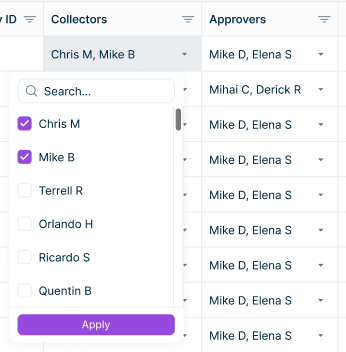
In the Collectors or Approvers column for the relevant reporting entity, click Select users and select the users you want to assign.

A drop down menu with a list of users available for assigning as collectors or approvers is displayed.
Assigning users to reporting entities

Users can be assigned to multiple reporting entities, and multiple users can be assigned to the same reporting entity. These assignments serve as defaults and must be confirmed or modified when configuring a reporting package.

Use the Administration section of the Lucanet CFO Solution Platform to assign user roles (see Creating and Editing Users for the Lucanet CFO Solution Platform).