Reporting entities represent the organizational units (e.g., companies, subsidiaries) for which financial data is collected. In Data Collection, reporting entities are imported from Consolidation & Financial Planning (CFP) to ensure consistency across both solutions.

Once imported, reporting entities can be:

  • Assigned to data collectors and approvers
  • Referenced in reporting packages and data collection processes
Before you can start collecting data, you must import reporting entities from CFP.

To import reporting entities:

1

Navigate to Data Collection | Reporting entities.

2

Click + Import reporting entities at the top right. The system retrieves the current list of reporting entities from CFP.

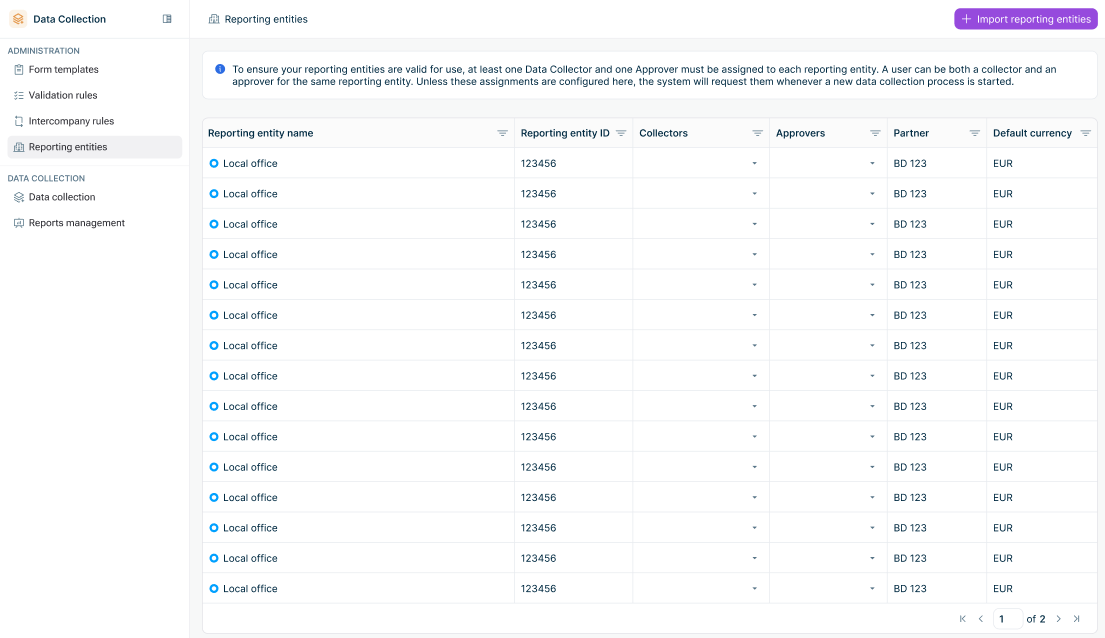
After importing, the reporting entities list displays the following columns:

A list of imported reporting entities is displayed.
Imported reporting entities
ColumnDescription
Reporting entity nameName of the reporting entity as defined in CFP
Reporting entity IDUnique identifier from CFP
CollectorsUsers assigned as data collectors for this reporting entity
ApproversUsers assigned as approvers for this reporting entity
PartnerPartner code associated with the reporting entity
Default currencyDefault currency for the reporting entity
FWH reporting entityOptional link to the corresponding company (reporting entity) in Lucanet.Financial Warehouse. Selecting a value enables the Lucanet. Financial Warehouse import option for this reporting entity's forms. The linked FWH reporting entity's local currency must match this reporting entity's default currency.

If a reporting entity is modified in CFP (e.g., name, partner, or default currency), the changes are automatically applied in Data Collection to ensure data consistency.

If a reporting entity is deleted from CFP:

  • If the reporting entity has never been assigned to a reporting package, it is automatically deleted from Data Collection.
  • Otherwise, the reporting entity is no longer displayed in the reporting entities list but is retained in the system for historical reference.

After importing reporting entities, an Administrator must assign users to enable data collection. Each reporting entity requires at least one data Collector and one Approver to be used in a data collection process.

A user can be assigned as both Collector and Approver for the same reporting entity.

1

Navigate to Data Collection | Reporting entities.

2

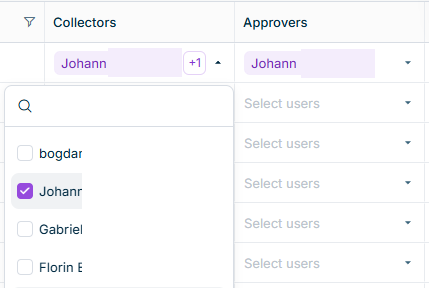
In the Collectors or Approvers column for the relevant reporting entity, click the drop-down list and select the users you want to assign.

A drop down menu with available collectors is displayed.
Assigning Collectors

Users assigned as Collectors can:

  • View and edit forms for the assigned reporting entity
  • Run validations on entered data and view the results
  • Submit forms for approval

Users assigned as Approvers can:

  • View forms and submitted data for the assigned reporting entity
  • Review validation results
  • Approve or reject submitted forms

Users can be assigned to multiple reporting entities, and multiple users can be assigned to the same reporting entity. These assignments serve as defaults and must be confirmed or modified when configuring a reporting package.