General display settings, which you only have to configure once, can be defined for ledgers and schedules. The display settings automatically apply to all ledgers and schedules in the Reporting and analyzing workspace.
The following video gives you an overview of the display settings:
Video — https://player.vimeo.com/video/858589589?muted=false&autoplay=false&loop=false&playsinline=true&controls=true&portrait=false&byline=false&title=false
The video also offers Spanish subtitles. To enable Spanish subtitles, click the CC button in the bottom-right corner, then use the gear icon (Settings) to select Español.
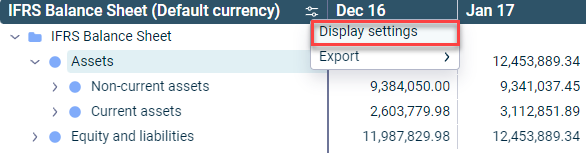
The display settings for ledgers and schedules are opened via the context menu of the three dots icon in the header of the first column of a ledger or schedule:
Context menu used to open the display settings
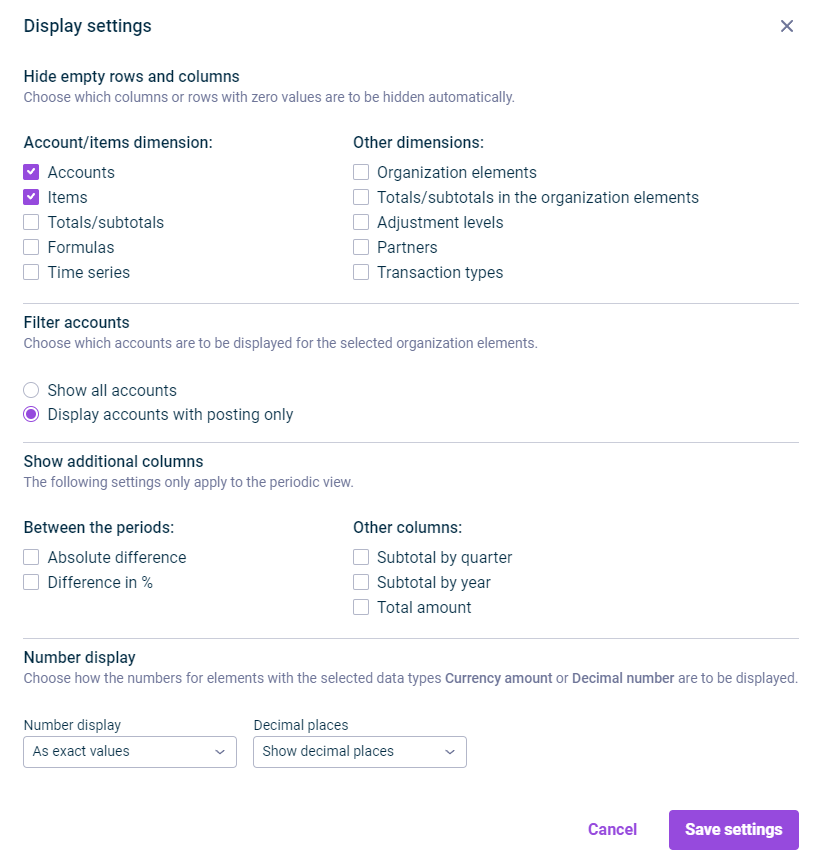
The Display settings dialog is then displayed as follows, for example:
The following options are available in the Display settings dialog:
Option
Description
Hide empty rows and columns
- Accounts/items dimension — elements whose rows or columns are to be hidden if they contain zero values - Other dimensions — additional dimension elements whose rows or columns are to be hidden if they contain zero values
Note: If any check box under Hide empty rows and columns is activated and you then use the search for elements in a ledger or a schedule, a dialog asks whether to turn off this setting so all search results become visible. For details, see Searching in Ledgers and Schedules.
Filter accounts
Defines the display of accounts: - Show all accounts — Accounts without postings are also displayed. - Display accounts with posting only
Show additional columns
Defines whether and which additional columns are to be displayed in the periods view: - Between the periods — display of differences between the periods - Other columns — display of subtotals and/or the total amount
Number format
Defines the display of numbers: - Number display in — formatting of the displayed values - Decimal places — number of displayed decimal places
This content was generated using AI and reviewed by Lucanet subject matter experts before publication.