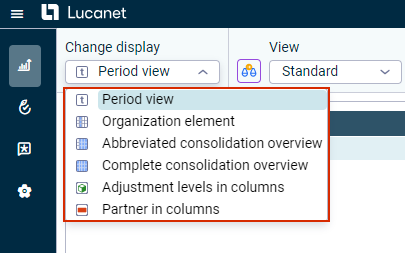
The following display modes are available for ledgers and schedules:
Option
Description
Period view
The tree view is displayed as a period view. All periods of the chosen time period are displayed in the columns of the view.
Organization element
Only the organization element currently chosen in the dimension bar is displayed. The values of the last chosen period under consideration are displayed in a column.
Abbreviated consolidation overview
Activates the abbreviated consolidation overview; only the columns for the subtotals and the group total of the chosen element from the Organization elements workspace are displayed.
Complete consolidation overview
Activates the complete consolidation overview; all elements from the Organization elements workspace are displayed that are directly subordinate to the organization element chosen in the dimension bar.
Adjustment levels in columns
All adjustment levels of the value range are displayed.
Partner in columns
All of the created partners of the value range are displayed.
This content was generated using AI and reviewed by Lucanet subject matter experts before publication.