The Accruals and deferrals accounting rule type is used to enter business transactions for the appropriate period in Lucanet. Using this accounting rule type, for example, it is possible to plan business transactions in which the services are purchased or sold in advance whereas the payment is made as a one-off payment in advance.

If the accruals and deferrals process is repeated at particular intervals and with a specific amount, then the planning can be repeated automatically. This is practical when recurrent business transactions are involved, e.g. insurance premiums that have to be paid annually in advance.

To configure an accounting rule of the type Accruals and Deferrals:

1

In the dimension bar, select the combination of data level and reporting entity for which the accounting rule should apply.

2

In the tree view, select the desired element (ledger, account, or item).

3

Click Edit in the top right to open editing mode.

4

If you selected a ledger, open the Balance with carry forward from previous period tab.

5

Select Accruals and deferrals as the accounting rule from the Type drop-down list.

6

Add or delete a time period to, e.g., configure seasonal differences within a planning period.

Notes on the add/delete time period options:

  • Newly added time periods are displayed on the Configuration tab.
  • When deleting a time period, the currently selected tab is always deleted.
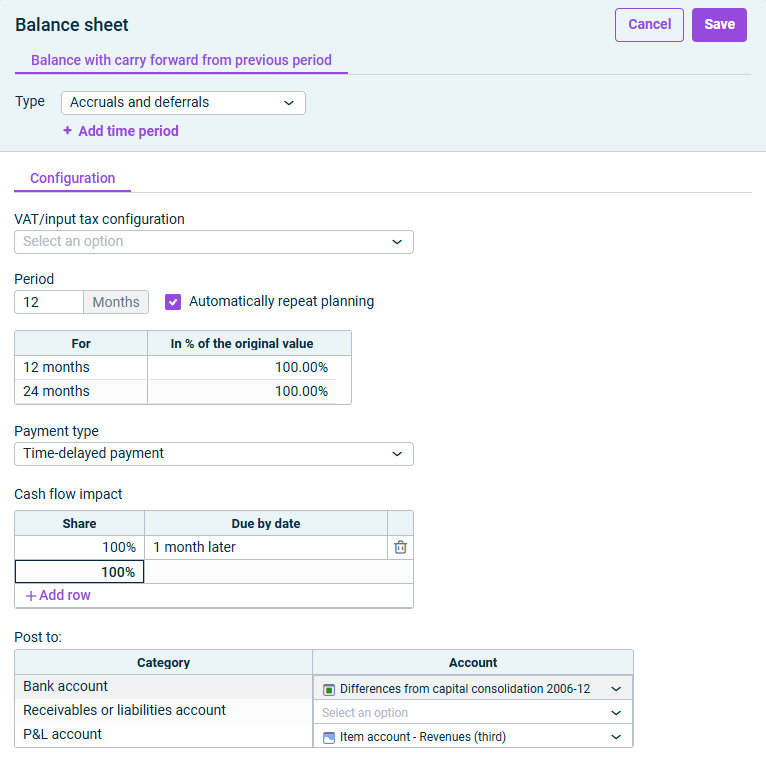
The dialog for configuring accruals and deferrals is displayed.
Configuration options for Accruals and deferrals

The following options are available on the Configuration tab:

Optionally, you can select a VAT/input tax configuration from the drop-down list (see VAT/input tax administration).

In the Period field, specify the period in months during which the prepaid expenses/deferred charges should be resolved.

Activate the Automatically repeat planning check box if the accruals and deferrals process is repeated at particular intervals and with a particular amount.

Once the checkbox is activated, you can enter a percentage relative to the original value. This allows you to account for both price increases and reductions.

The following payment types are available:

Payment typeDescription
With immediate cash flow impactIf the payment will be received or made within the same month
Time-delayed paymentIf the incoming or outgoing payments are made at different times
Down payment transactionIf a down payment is required when the transaction is completed

The Cash flow impact section is only visible if you selected Time-delayed payment or Down payment transaction from the payment type drop-down list.

In the Cash flow impact section, specify a due date for the payment, along with percentage of the outstanding receivable or liability to be paid in each case.

  • Enter 0 for immediate payments.
  • Enter a positive number for a subsequent payment, e.g. 2 = 2 months later.
  • Enter a negative number for an earlier payment, e.g. -2 = 2 months earlier.

To see an example of how average incoming payments can be entered on the Month basis, check Cash Flow Example.

Enter what percentage of the outstanding receivable or liability will be paid by the specified date.

Example

Setting

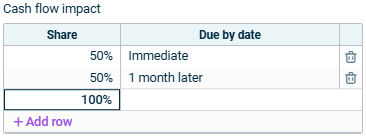
Customers pay after 15 days on average

Cash flow impact section with an example setting is displayed.
Example setting for the cash flow impact

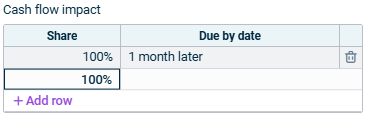
Customers pay after 30 days on average

Cash flow impact section with an example setting is displayed.
Example setting for the cash flow impact

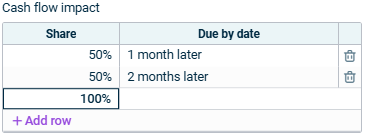
Customers pay after 45 days on average

Cash flow impact section with an example setting is displayed.
Example setting for the cash flow impact

Specify the accounts to which postings will be made in the Post to section.

The accounts to be specified depend on the chosen payment type.

  • Bank account: An account for the contra entry
  • P&L account: An account to which the accrued account is posted
  • Bank account: An account for the contra entry
  • Receivables or liabilities account: An account to which the corresponding value is posted until the cash flow impact takes effect
  • P&L account: An account to which the accrued amount is posted