The video provides you with the most important information on the topic of defining a data source, creating execution settings, and executing the data import:
Video — https://player.vimeo.com/video/1201751079?muted=false&autoplay=false&loop=false&playsinline=true&controls=true&portrait=false&byline=false&title=false
Uploading scripts and configuring data transformations are not covered in the video. For the complete sequence of steps, see All Steps at a Glance.
An ETL process (ETL = Extract, Transform, Load) is used to import data from a different system into Lucanet. The data are first extracted from the source system, then transformed, and finally loaded to Lucanet.Financial Warehouse.
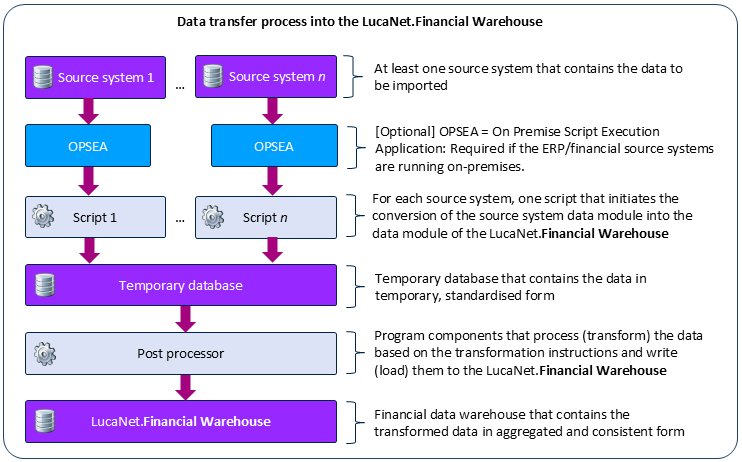
When importing data into Lucanet.Financial Warehouse, the data are initially imported into the temporary Lucanet.Financial Warehouse. The transformation rules (see Creating and Configuring Data Transformations) are then applied to the data and the data are subsequently written into the persistent Lucanet.Financial Warehouse.
The following figure indicates how the data import into Lucanet.Financial Warehouse is performed:
Process for the Data Import into Lucanet.Financial Warehouse
This content was generated using AI and reviewed by Lucanet subject matter experts before publication.