With the app for elimination of intercompany debt, the receivables and liabilities among the consolidation units of a group are eliminated for consolidated financial statements.
The app eliminates the intercompany transactions for all consolidation units of a consolidation area across all selected accounts based on the given partner information. Any differences from the consolidation are recognized in the second consolidation unit.
In addition, it is possible to generate a report on differences that may arise when executing the app. The report shows the differences with the corresponding difference accounts.
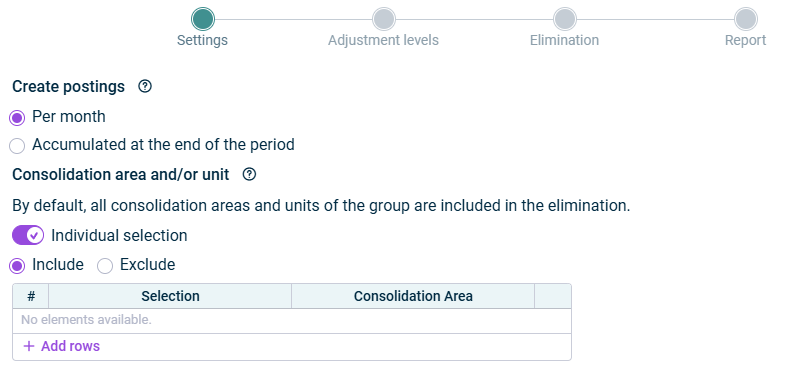
In Settings step, specify the time and the relevant consolidation areas and/or units for consolidation:
Step 'Settings'
The following options are available on the Settings step:
Option
Description
Create postings
Time of consolidation. - Per month: The app eliminates the intercompany transactions in each month of the consolidation period and creates monthly consolidation postings. - Accumulated at the end of the period: The app eliminates the intercompany transactions accumulated in the last month of the consolidation period and creates a consolidation posting only in the last month of the consolidation period.
Note: For each consolidation unit that is deconsolidated during the consolidation period, an accumulated consolidation posting is carried out in the last month of inclusion in the consolidation area.
Consolidation area and/or unit
Consolidation groups and/or units of the selected group for which the consolidation is to be performed. By default, all consolidation areas and units within the group are included in the consolidation. If you only want to include certain consolidation groups and units in the consolidation, activate the Individual selection check box and select one of the following options: - Individual: In the table, select individual consolidation areas and/or consolidation units to be considered in the consolidation. - Exclude: In the table, select the consolidation areas and/or consolidation units that are to be excluded from consolidation.
Note: If you choose Individual or Exclude, the app will perform no eliminations for intercompany transactions of the excluded consolidation units.
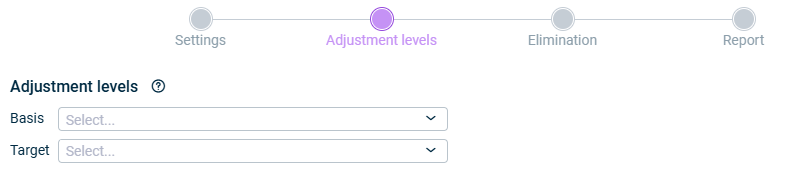
In the Adjustment levels step, sepcify the adjustment levels for consolidation.
Step 'Adjustment levels'
The following options are available on the Adjustment levels step:
Option
Description
Basis
Adjustment level group that contains all adjustment levels for data imports and adjustment postings to be considered in the consolidation. Please ensure that the adjustment level for the proportioning is included in this adjustment level group.
Target
Adjustment level for consolidation postings to be used for the postings.
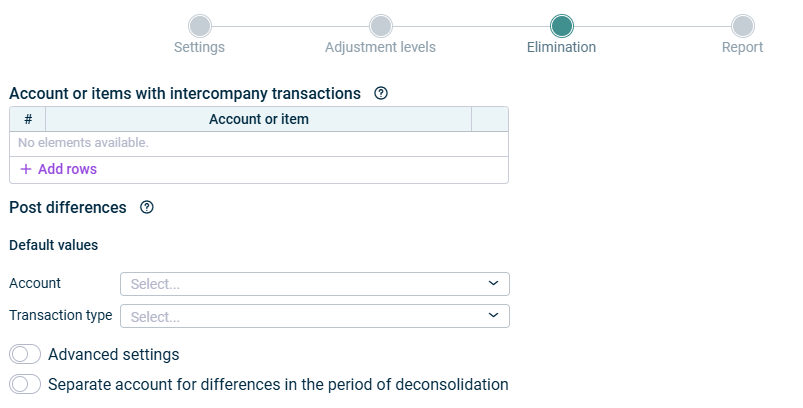
Account and transaction type that are to be used by default for postings of differences that arise during consolidation.
The account itself must not contain any intercompany transactions to be consolidated.
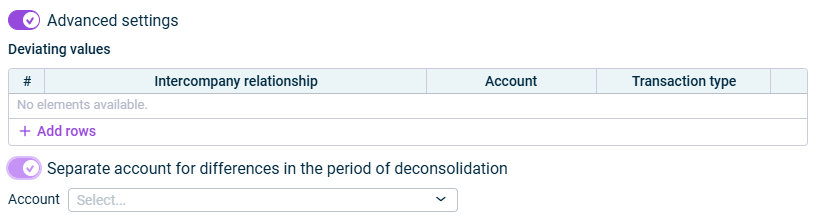
Deviating values
Advanced settings
If you want to define different accounts or transaction types for certain intercompany relationships, activate the option Advanced settings.
After that, in the Intercompany relationship column, select the two related companies for which you want to define different values and configure a deviating account and/or a deviating transaction type.
Separate account for differences in the period of the deconsolidation
Activate this option to specify a separate account for posting differences in the period of the deconsolidation.
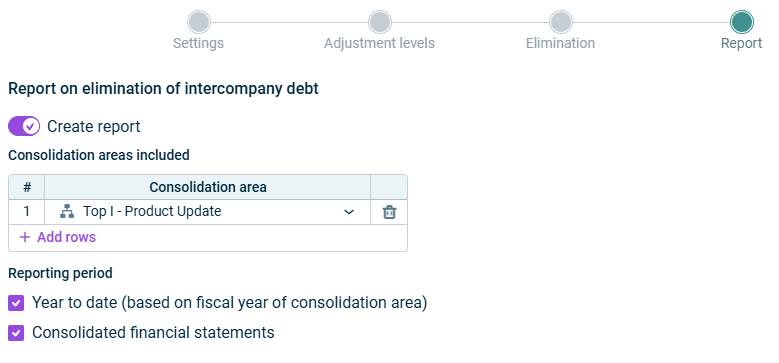
In the Reports step, you can specify the consolidation area(s) and period for which a report on differences should be generated if any arise when executing the app.
The report shows the differences with the corresponding difference accounts and how the differences arose.
Report step
The following options are available on the Report step:
Option
Description
Generate report
Activate the option to create a Report on the difference amounts when executing the app.
Consolidation areas included
Consolidation areas for which the report should be generated
Reporting period
Period for the report. - Year to date (based on fiscal year of consolidation area): The report is created for the period starting from the beginning of the consolidation area's fiscal year and ending with the final period of the current consolidated financial statements. - Consolidated financial statements: The report is generated for the period of the current consolidated financial statements.
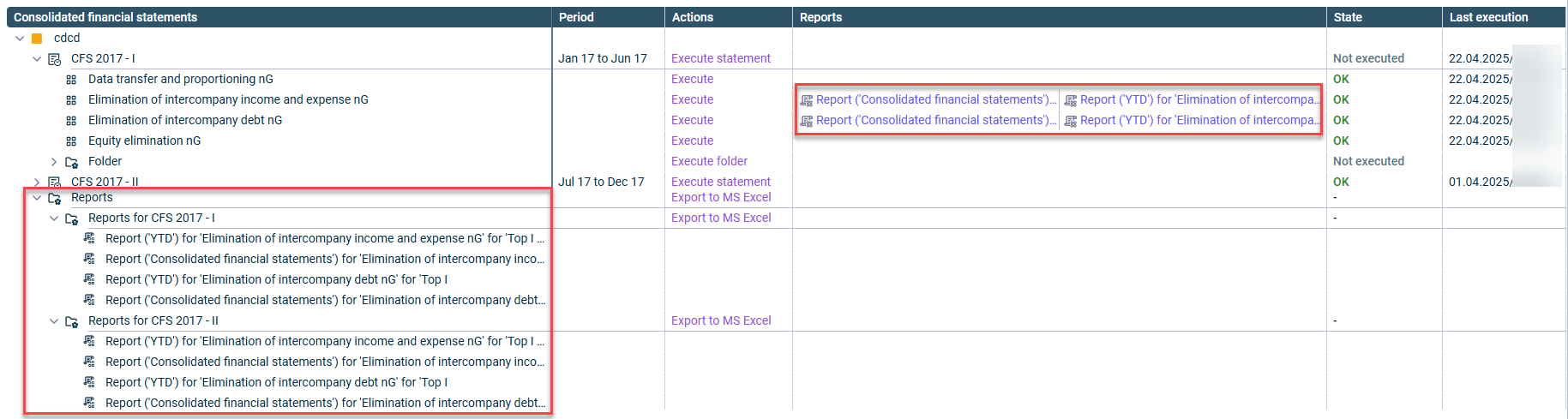
The report is created in an executable folder named Reports for name of the consolidated financial statements element when executing the app and is linked in the detail view of the Consolidated financial statements workspace in the Report column.
Each created report can be exported in Excel format.
Linked reports in the consolidated financial statements overview
As long as a step has not been fully configured and/or configuration errors exist, it is displayed with a red exclamation mark .
Once a step is configured completely and without any errors, it is displayed with a green check mark .
You can close the configuration dialog by clicking the arrow icon at the top left.
To change the name of the app, select the app in the tree view and choose Properties from the context menu.
You can execute the app for elimination of intercompany debt either separately, together with other apps in an executable folder or as part of consolidated financial statements.
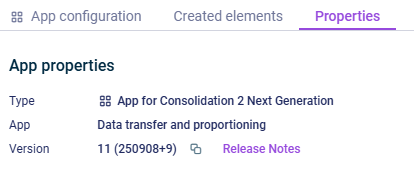
The App properties are displayed on the tab of the same name:
'Properties' tab
The following App properties are displayed:
Type of the element
Function of the App
Version of the element.
New available version
As soon as a new version of the app is available that contains changes to the app configuration and/or the calculation logic of the app, the Refresh command is displayed, allowing you to update the app to the latest version.
Information about the changes to each version can be found in the Release Notes, which can be accessed via the link of the same name.
We strongly recommend to update all apps to the new version as soon as possible because it cannot be guaranteed how long an app with an obsolete version can be executed.
This content was generated using AI and reviewed by Lucanet subject matter experts before publication.