Lucanet.Script Execution Application (SEA for short) is a Lucanet application that you need if you operate ERP/financial source systems on-premises and want to import data from these systems into the Lucanet CFO Solution Platform using an ETL script.

This page provides the technical information that your IT department needs to prepare a SEA installation: the system architecture (topology), the system requirements, and the network and firewall configuration (ports and endpoints to allow).

For the step-by-step installation instruction, see Installing and Updating Lucanet.Script Execution Application. To generate the required certificates, see Generating and Downloading SEA Certificates.

SEA runs as a system service inside your local network, in the same environment as your source system. It executes ETL scripts locally to extract, transform, and load data from your on-premises ERP/financial systems, and then transfers the results securely to Lucanet.Financial OLAP Server or Lucanet.Financial Warehouse in Lucanet.Cloud (AWS).

Because Lucanet.Cloud cannot initiate connections into your network, SEA establishes all connections outbound: it connects to AWS IoT Core to receive its tasks and to Lucanet.Financial OLAP Server to exchange data. SEA is in turn the only component that accesses your ERP/source system inside your network.

Depending on whether your source system offers an interface or only export files, one of the following topologies applies.

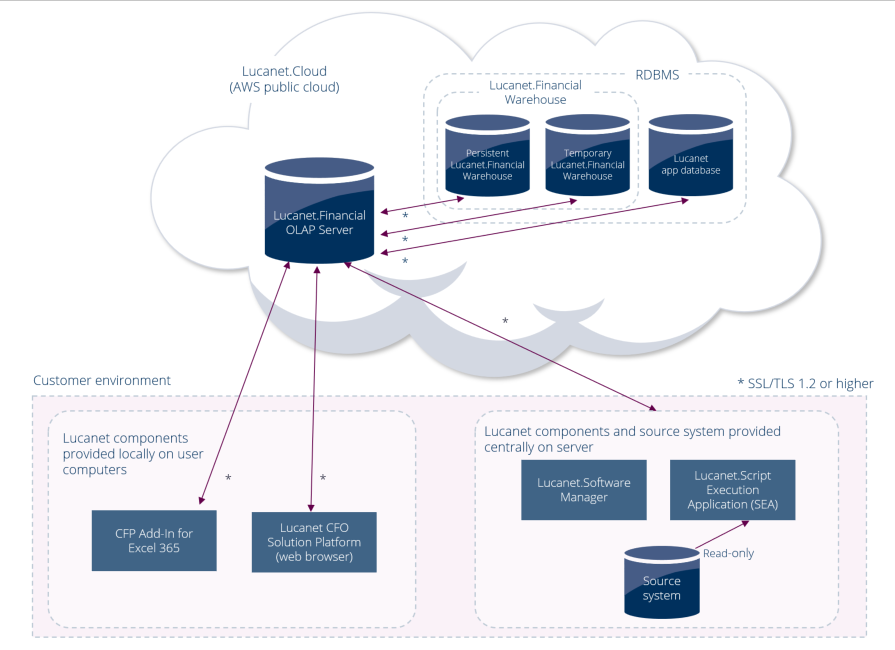
If your source system has an interface that allows access to its database or application server, SEA accesses the source system directly, reads the data via an ETL script, and transfers it to Lucanet.Financial Warehouse. While doing so, SEA must be connected to Lucanet.Financial OLAP Server in Lucanet.Cloud via HTTPS (SSL/TLS).

Topology diagram: Lucanet SEA accessing an on-premises source system via interface and transferring data to Lucanet.Cloud
Lucanet SEA — data access via interface

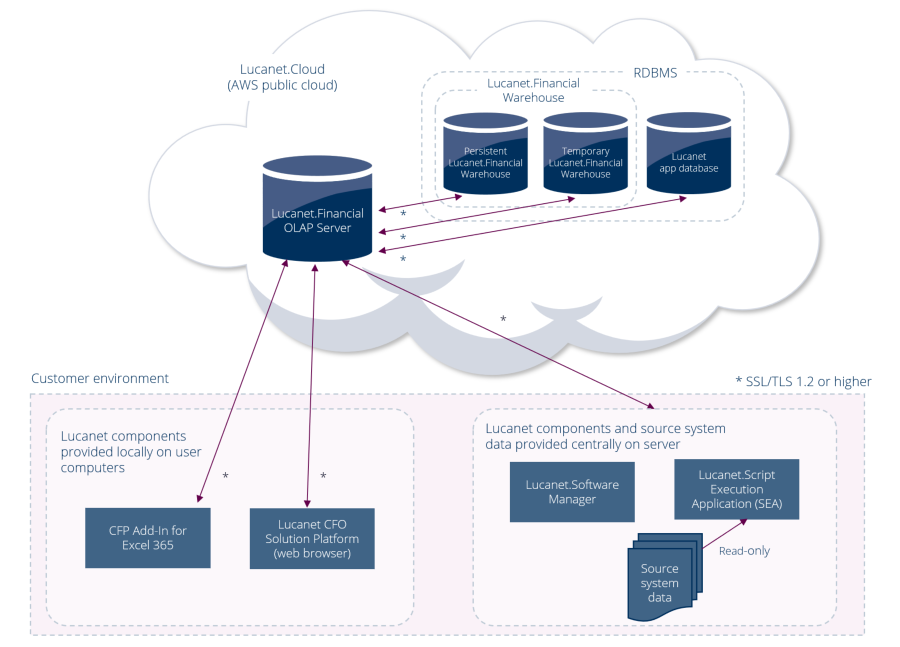
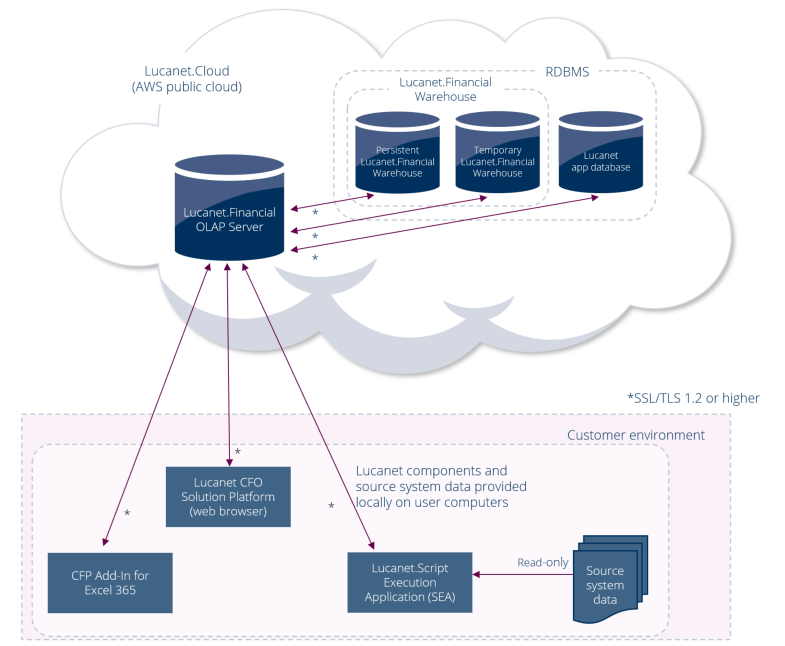
If your source system does not offer such an interface, the data must be extracted from the source system using export files. Because export files cannot be stored in Lucanet.Cloud, they must be stored locally in your environment. During the ETL process, SEA must be able to access the export files and be connected to Lucanet.Financial OLAP Server in Lucanet.Cloud via HTTPS (SSL/TLS).

Topology diagram: Lucanet SEA reading local export files and transferring data to Lucanet.Cloud
Lucanet SEA — using export files

In both topologies, the connection between SEA and Lucanet.Financial OLAP Server is encrypted with SSL/TLS (1.2 or higher), marked with an asterisk (*) in the diagrams. In addition, SEA connects to AWS IoT Core over port 8883 (or port 443 over WebSockets); see the Network and Firewall Configuration section below.

Before you can install SEA, the following prerequisites must be met:

The minimum hardware requirements for each computer running SEA are:

ComponentMinimum requirement
CPUAt least 2 CPU cores (4 CPU cores recommended)
RAMAt least 8 GB
Internal network connectionAt least a 1 Gbit connection (10 Gbit recommended)
Internet connectionAt least a 16 Mbit connection
Storage/hard drive500 MB or more

SEA runs on the following operating systems:

  • Microsoft Windows: all currently supported operating system versions
  • Unix/Linux: all common maintained distributions, especially CentOS, Debian (version 7 and later), and SUSE

SEA and Lucanet.Software Manager (which is used to install and update SEA) only establish outbound connections. To install and operate SEA, your IT department must allow the following connections through the firewall and through any proxy or endpoint-security software.

Connection (outbound)Target addressPortNotes
AWS IoT Core (task queue)Region-specific AWS IoT Core endpoint on amazonaws.com (see note below)8883 (or 443)MQTT over TLS (port 8883), or MQTT over WebSockets with TLS (port 443). Required: SEA registers with AWS IoT Core over port 8883.
Lucanet.Financial OLAP Serverplatform.lucanet.cloud, lucanet.cloud443HTTPS (TLS 1.2 or higher). Used during script execution.
ERP/source systemCustomer-internal address (varies)Depends on source systemSEA connects directly within your network.
Lucanet.Financial WarehouseTunneled through Lucanet.Financial OLAP ServerNormally no separate firewall rule required.
Installation and updates (Lucanet.Software Manager)youniverse.lucanet.com, cdn.lucanet.com (cdn.lucanet.cn)443HTTPS (TLS). Used by Lucanet.Software Manager to download and update the SEA program components. Required for installation and updates, not at runtime.

The AWS IoT Core endpoint is not the same for every installation. It follows this pattern, where <prefix> and <region> are placeholders:

<prefix>-ats.iot.<region>.amazonaws.com

  • <prefix> is unique per AWS account, for example a1b2c3d4e5f6g7.
  • <region> is the AWS region where your environment is hosted, for example eu-central-1 for Frankfurt.

For an environment hosted in Frankfurt, the full endpoint is therefore, for example, a1b2c3d4e5f6g7-ats.iot.eu-central-1.amazonaws.com. The prefix and region are specific to your installation.

If your firewall cannot allow individual, dynamically generated endpoints, allow the pattern *-ats.iot.<region>.amazonaws.com instead.

Proxy and PAC (auto-configuration) scripts must not block or rewrite the connections listed above.

To prevent antivirus or endpoint-security software from interfering with SEA, exclude the following directories:

text


These are the default Lucanet installation directories.

  • SEA only executes specific, approved tasks.
  • A one-time code/session token is used for each ETL script execution.
  • All communication is encrypted (to AWS IoT Core and to Lucanet.Financial OLAP Server in the cloud).
  • Data processing takes place entirely within your network. Only the aggregated result data is transferred to Lucanet.Financial OLAP Server.