Lucanet Script Execution Application ( SEA for short) is a Lucanet application that you need if you operate ERP/financial source systems on-premises and want to import data from these systems into the Lucanet CFO Solution Platform using an ETL script.

The Certificates workspace allows administrators to generate and download SEA certificates using instances. These certificates are used to install SEA in Lucanet.Software Manager and to configure SEA applications in Consolidation & Financial Planning solution of the Lucanet CFO Solution Platform.

To open the Certificates workspace:

1

Click Administration in the main menu of the CFO Solution Platform.

2

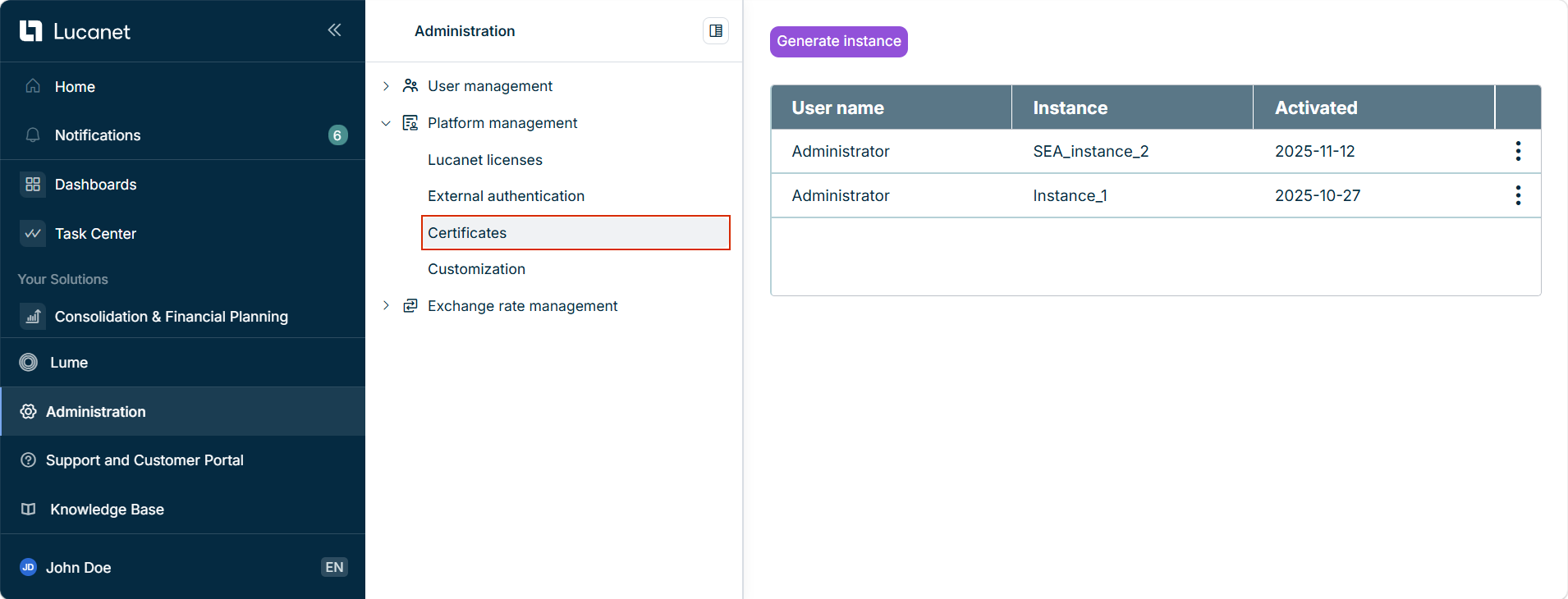
Open the Platform Management area and click Certificates. The Certificates workspace is displayed as follow:

Displays the 'Certificates' workspace
'Certificates' workspace

When generating an SEA instance, the respective certificates are generated for the instance and can be downloaded. To create an SEA instance:

1

Click Generate instance.

2

In the displayed Generate Instance dialog, enter the name of the instance.

3

Click Generate.

The instance name must adhere to the following criteria:

  • The instance name must be unique.
  • Only alphanumeric characters and the special characters '-' and '_' are allowed.
  • The maximum length is 50 characters.

After an instance is generated, it is displayed in the overview table. The following information is available in the overview table:

ColumnDescription
User nameThe user who created the instance.
InstanceThe name of the SEA instance
ActivatedThe date the instance was created. Once an instance is created, the instance is automatically activated.

Click the icon to download the certificates. The following options are available:

OptionDescription
Download senderDownload the sender certificate for the instance as a ZIP file. This certificate is required for the configuration of the instance in the Scripts workspace in the Import and Journals functional area in the Consolidation & Financial Planning solution.
Download receiverDownload the receiver certificate for the instance as a ZIP file. This certificate is required for the installation of SEA in Lucanet.Software Manager.

For more information on how to install and update SEA, see Installing and Updating Lucanet.Script Execution Application.