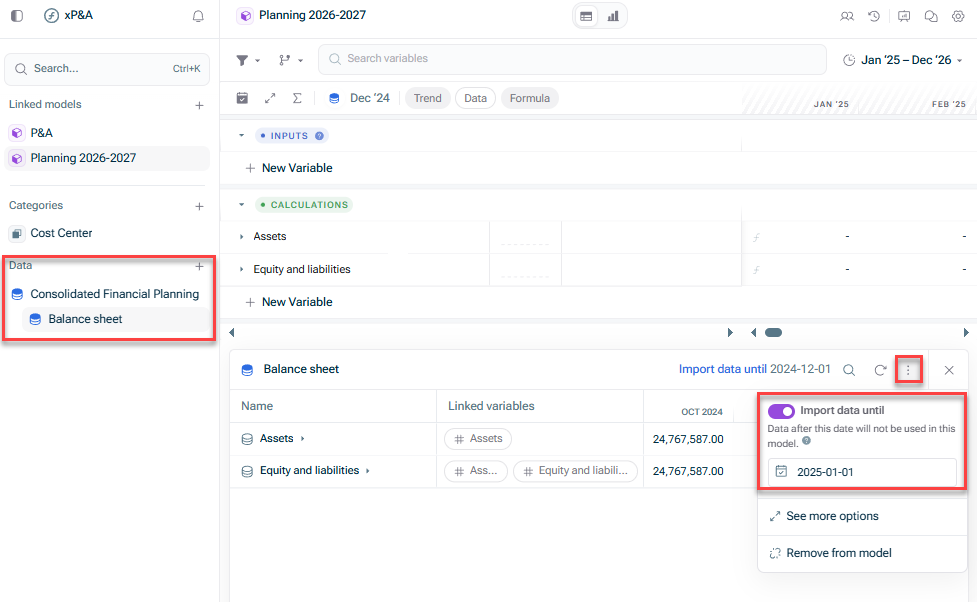
To exclude certain months from a specific data source:
Suppose most of your data sources are reliable up to the , but one data source contains incorrect or incomplete recent data.Last actual date
You can use to stop pulling data from that source earlier (e.g., one month before theImport data until ) while still importing full data for the others.Last actual date To include forecast data for a specific data source:
If a data source contains forecasted values beyond the Last actual date (e.g., if you're forecasting revenue in an external tool), you can extend "Import data until" for that source only.
This allows you to combine real historical data with external forecasted data in the same model.
Your in yourSnowflake user data model has anRevenue ofImport data until .December 2024 Your also used in yourQBO P&L data model hasRevenue set.no Import data until Your isLast actual date , but you drag it forward toDecember 2024 .January 2025
will stay cut off atSnowflake user data .December 2024 will be pulled into the model up untilQBO P&L data (if present).January 2025

What if my 'forecast' data is used in a model that has no other data sources? Do I still need to use the 'Import data until' function?
What if my historic data source that has less months of useable data than my other historic data sources is used in a model with no other data sources? Do I still need to use the 'Import data until' function?
Last updated on Aug 16, 2023