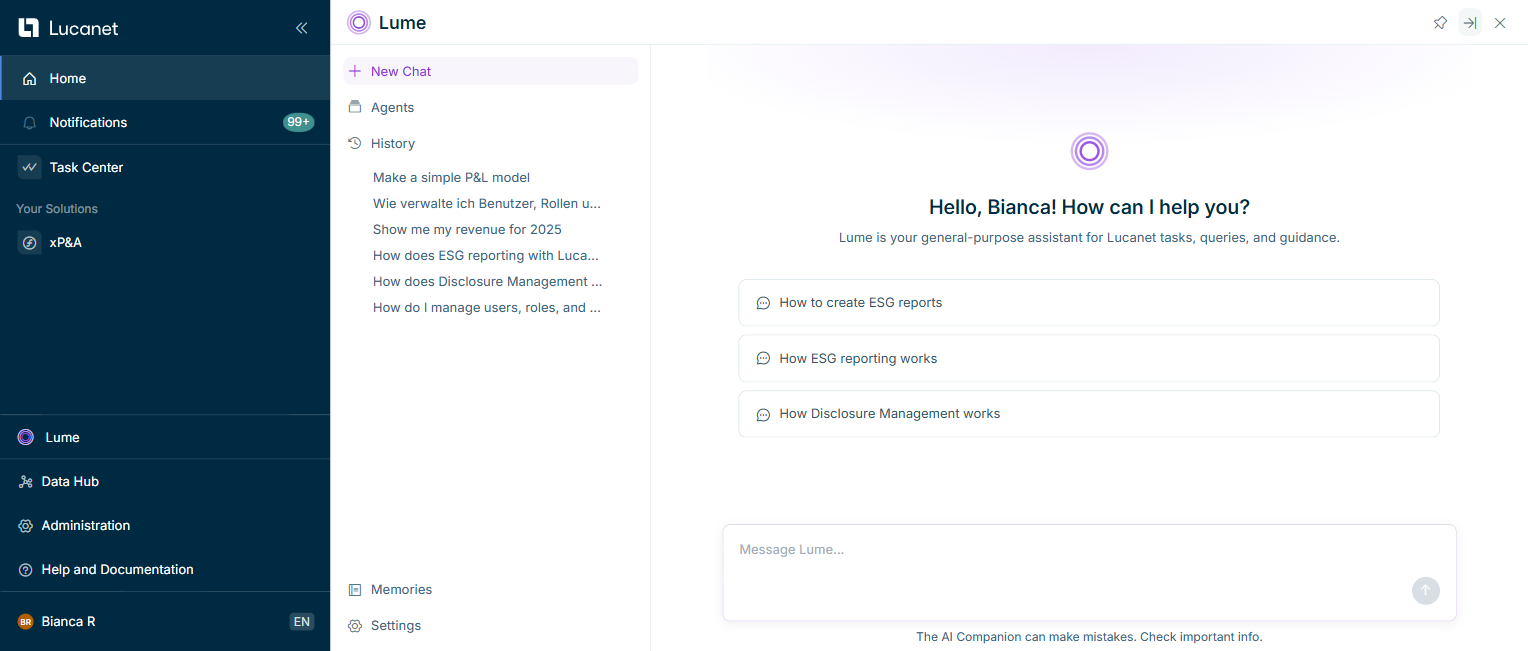
The Lucanet Lume chat interface lets you have natural-language conversations with the Lucanet CFO Solution Platform. All conversations are saved as searchable threads so you can return to any previous discussion at any time.
When opened in full-screen mode, the Lume window is displayed as follows:
The following chat functions are available to you regardless of which solution you are using.
Function
Description
Suggested prompts
When you open Lume, a welcome screen with suggested prompts is displayed to help you get started.
Start a new chat
Use the + button in the sidebar to start a new conversation without losing your previous threads.
Stop a response
While Lume is generating a response, click Stop to end the process immediately. The partial response stays in the conversation, marked as stopped, and any text you started typing while Lume was answering remains in the input field. You can send your next message once the response has stopped.
Browser notifications
When a chat finishes processing a request, Lume sends a browser notification. You receive the notification when you have minimized the browser or switched to another tab or application outside the Lucanet CFO Solution Platform. The notification includes the chat's title or a short summary; clicking it opens the corresponding chat directly. On first use, Lume asks for permission to show notifications; if you deny permission, you are not asked again.
Conversation history
All your conversations are saved as separate threads. The history panel is searchable and grouped by recency. A chat remains accessible for up to 30 days. After 30 days, a chat is automatically deleted from your history.
Rename a thread
Threads are automatically named after your first message. If you want to rename a chat, open the chat from the history, hover over the three-dot menu, and choose Rename.
Delete a thread
If you want to permanently remove a chat, open the chat from the history, hover over the three-dot menu, and choose Delete.
Full-screen mode
Select the expand icon in the top toolbar to expand the Lume panel to full screen for more space during longer or more complex conversations.
The following chat functions are only available in specific solutions.
Function
Description
Referencing dimensions and models
In Analyst Agent, use a forward slash ("/") to reference Consolidation & Financial Planning dimensions or xP&A models, dimensions, and dimension items. Select the relevant elements from the drop-down lists to add precise references to your question. For more information, see Asking Analyst Agent a Question.
Transferring user roles
In Disclosure Management, you can ask Lume to transfer a user's document- and chapter-level roles to another user. Lume first shows a preview of the changes, then, once you confirm, adds the missing roles to the target user; the target user's existing roles and global roles are not affected. For more information, see Transferring User Roles to Another User with Lucanet Lume.
Re-pointing references
In Disclosure Management, you can ask Lume to re-point references to a different source document, for example when the original source document has been updated. Lume re-points all references that point to the same old source document together to the new source document. For more information, see Re-Pointing Word References with Lucanet Lume to a New Source Document.
This content was generated using AI and reviewed by Lucanet subject matter experts before publication.