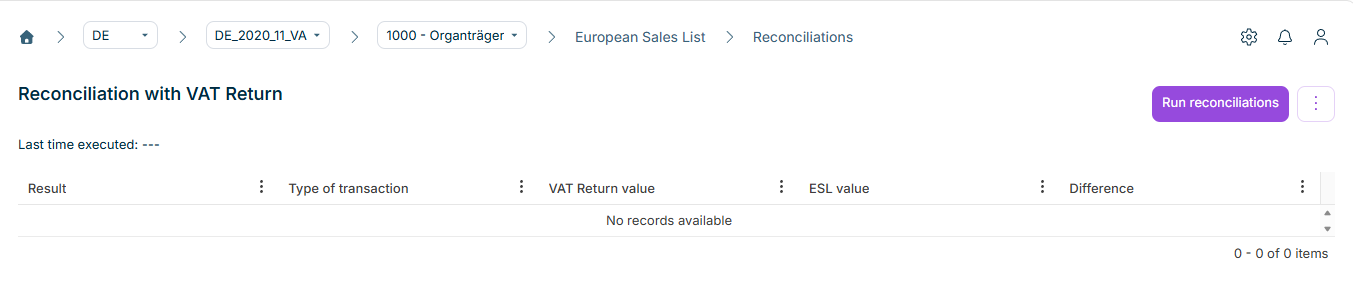
The Reconciliations workspace under European Sales List (ESL) in Lucanet VAT (Value Added Tax) is used for the qualitative monitoring of the European Sales List. Currently, the Reconciliation with VAT Return is available, that is, reconciliation 9, which compares the values of the European Sales List with the values of the preliminary VAT return (see section Reconciliation 9: Reconciliation with ESL).
To use the Reconciliations workspace under European Sales List in VAT, the following prerequisites must be fulfilled:
Prerequisite
Description
Reconciliation 9 activated
The reconciliation with the European Sales List, that is, reconciliation 9, is activated in the master data of the company, and its execution is configured for the European Sales List context.
European Sales List used
The Submits ESL check box is activated in the master data of the company. Otherwise, the European Sales List functional area is not displayed.
In the master data, you define whether you execute this reconciliation in the Value Added Tax functional area, in the European Sales List functional area, or in both functional areas. If the reconciliation is only configured for the VAT return, it is not displayed under the European Sales List – and vice versa.
You configure the reconciliations in the Master data functional area in the Reconciliations workspace.
The heading of the workspace is Reconciliation with VAT Return. VAT compares the totals per type of transaction – intra-Community supplies, services, and intra-Community triangulations – and displays differences between the preliminary VAT return and the European Sales List.
Below the Run reconciliations button, a note on the preliminary VAT return and the information on the last execution can be displayed. The results are presented in a table.
The result table of the reconciliation of the European Sales List in VAT contains the following columns:
Column
Description
Result
Evaluation of the reconciliation for the respective row, e.g. Error if the difference is outside the tolerance.
To start the reconciliation of the European Sales List in VAT, click Run reconciliations in the top right corner.
VAT determines the values from the preliminary VAT return and from the European Sales List and updates the table. If the reconciliation has already been executed, VAT displays the date, time, and user name of the last execution.
Finalize the preliminary VAT return of the same period before you execute the reconciliation. As long as the VAT return is open, the values from the VAT return may be incomplete; VAT displays a message in this case.
The Result column uses the same status values as the overview table in the Reconciliations workspace under Value Added Tax for reconciliation 9. Each row – one type of transaction – corresponds to one reconciliation item.
The possible status values of the reconciliation of the European Sales List are:
Status
Meaning
Plausible
The reconciliation item is free of errors.
Error
The reconciliation item has a deviation outside the tolerance.
Not started
The reconciliation has not been executed yet.
Absolute or percentage-based tolerance limits can be stored in the master data. Deviations within these limits are considered uncritical.
The overall status of the Reconciliations step in the Status workspace is derived from these results. Details are displayed there in the Log column.
The rows of the result table correspond to the three reportable types of transaction according to the scheme of the European Sales List. In terms of content, the same transactions are covered as in the reconciliation Reconciliation with ESL in the Value Added Tax functional area. The following table describes the assignment of the types of transaction in VAT:
Type of transaction (display)
Assignment
Intra-Community supplies
Comparison of the values for supplies; in the preliminary VAT return aggregated from fields 41 and 77, among others; in the European Sales List, the entries with type of transaction 0.
Intra-Community services
Comparison of the services; in the preliminary VAT return field 21, among others; in the European Sales List, type of transaction 1.
Intra-Community triangulations
Comparison of the triangulations; in the preliminary VAT return field 42, among others; in the European Sales List, type of transaction 2.
Notes on typical differences
In the reconciliation of the European Sales List in VAT, differences typically arise for the following reasons:
Full euros in the ESL: Values of the European Sales List are transmitted in full euros without decimal places. VAT truncates the decimal places and does not round. With many rows, this can result in noticeable differences from the VAT return; tolerances in the master data often account for this.
Import and saving: The ESL values are based on the data imported and saved in the Import workspace. Without imported and saved ESL data, the values in the ESL value column are missing or deviate.
VAT return: Only when the preliminary VAT return for the same period and company exists and is finalized are the values in the VAT Return value column fully reliable.
Resolve the causes of the differences in the declarations or in the source data, and then execute the reconciliation again.
This content was generated using AI and reviewed by Lucanet subject matter experts before publication.