When all required configurations and data are present, you can transmit the tax balance sheet as an e-balance sheet to the tax office in Tax Balance. The sheet is transmitted electronically in the E-Balance workspace.

In addition, you can do the following in Tax Balance:

  • Save the tax balance sheet transmitted to the tax office as an instance in XML format and, if necessary, visualize it subsequently in the Reporting functional area as an instance report in XLS format
  • Display the history of all transmitted e-balance sheets and download the transmission protocol and instance documents

To transmit the e-balance sheet, an ELSTER certificate must be assigned to you in the Tax Administration module. How to proceed is described in Certificates.

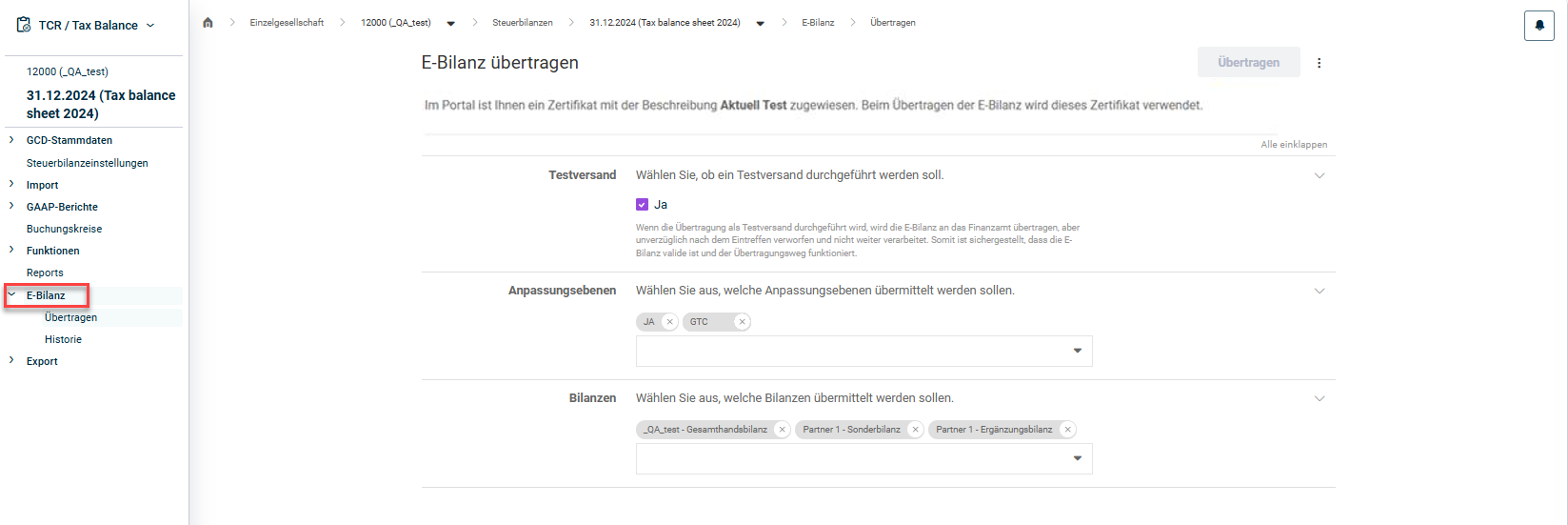
The E-Balance workspace in Tax Balance is displayed in the tree view as soon as you open a tax balance sheet under Company:

Shows the 'E-Bilanz übertragen' page in Tax Balance with German UI labels for the tax balance sheet '31.12.2024 (Tax balance sheet 2024)' of the company '12000 (_QA_test)', with the 'Übertragen' button, the 'Testversand' section with the 'Ja' checkbox selected, the 'Anpassungsebenen' section with 'JA' and 'GTC' selected, and the 'Bilanzen' section with '_QA_test - Gesamthandsbilanz', 'Partner 1 - Sonderbilanz', and 'Partner 1 - Ergänzungsbilanz' selected. Highlighted in red is the 'E-Bilanz' entry in the tree view, with the sub-entries 'Übertragen' and 'Historie'.
'E-Balance' workspace

To transmit the e-balance sheet in Tax Balance:

1

Navigate to the E-Balance | Transmit workspace.

2

Select whether you want to perform a test transmission first.

Notes:

  • In a test transmission, the e-balance sheet is transmitted to the tax office and validated, but is discarded immediately after receipt and not processed further. This ensures that the e-balance sheet is valid and that the transmission path works.
  • If the Test transmission option is not activated, the e-balance sheet will be officially transmitted to the tax office.
3

Choose the adjustment levels you want to transmit from the drop-down list or remove the adjustment levels not to be transmitted by clicking the x.

4

Partnerships only: Choose the balance sheets you want to transmit from the drop-down list or remove the balance sheets not to be transmitted by clicking the x.

Note: The balance sheets drop-down list is only displayed if a partnership is stored in the Legal form type field in the GCD master data of the tax balance sheet. You can then choose between the balance sheet of the overall company, the special balance sheets and the supplementary balance sheets.

5

Click Transmit.

You can save the tax balance sheet transmitted to the tax office as an instance in XML format in Tax Balance.

To do this, in the Transmit workspace, click More actions | Create as file.

Shows the top of the 'E-Bilanz übertragen' page in Tax Balance with German UI labels, with the 'Übertragen' button and the opened 'Weitere Aktionen' menu. Highlighted in red is the 'Als Datei erzeugen' command.
Creating XML file

The XML file of the tax balance sheet can then be downloaded via the job monitor at the top right edge and, if necessary, visualized and saved as an instance report in XLS format in the Reporting functional area.

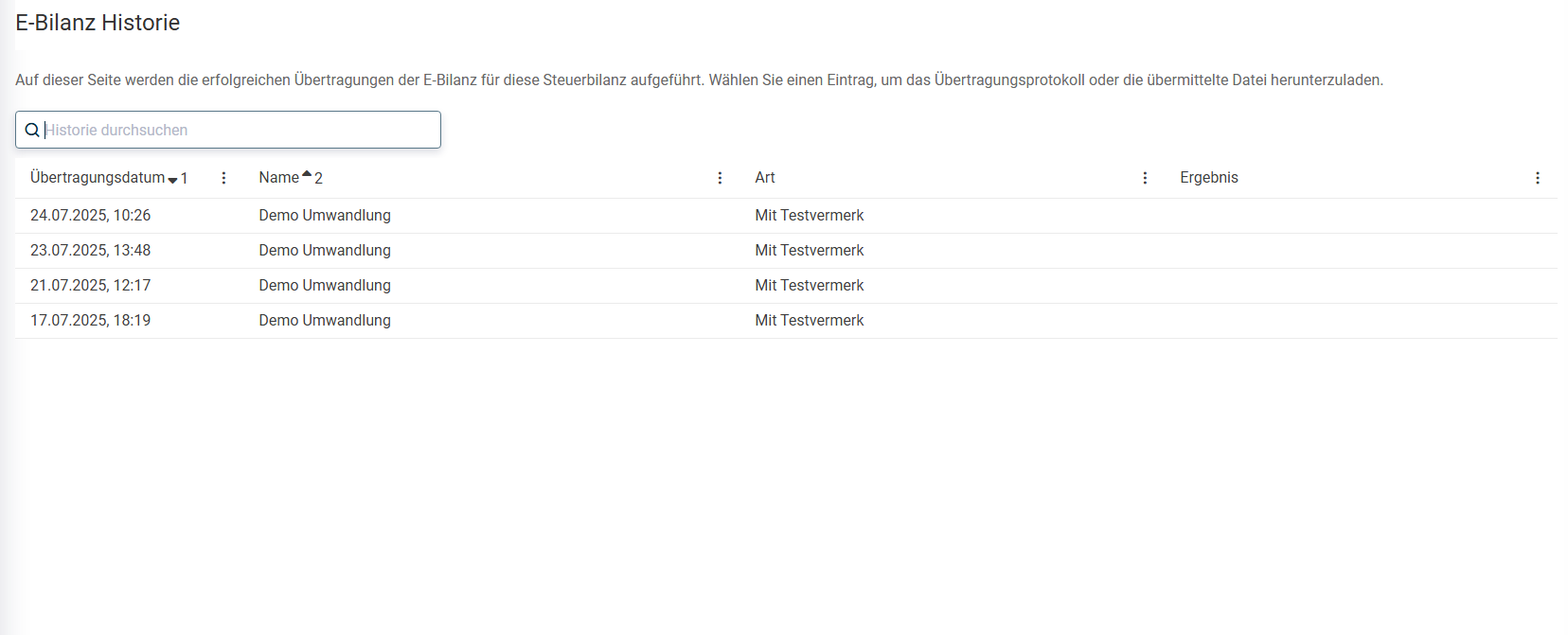
In the E-Balance | History workspace in Tax Balance, you can display a history of all successfully transmitted e-balance sheets for the tax balance sheet in question:

Shows the 'E-Bilanz Historie' page in Tax Balance with German UI labels, with the 'Historie durchsuchen' search field and a table with the columns 'Übertragungsdatum', 'Name', 'Art', and 'Ergebnis'. The table lists four transmissions from '24.07.2025, 10:26' to '17.07.2025, 18:19', each with the name 'Demo Umwandlung' and the type 'Mit Testvermerk'.
History of transmitted e-balance sheets

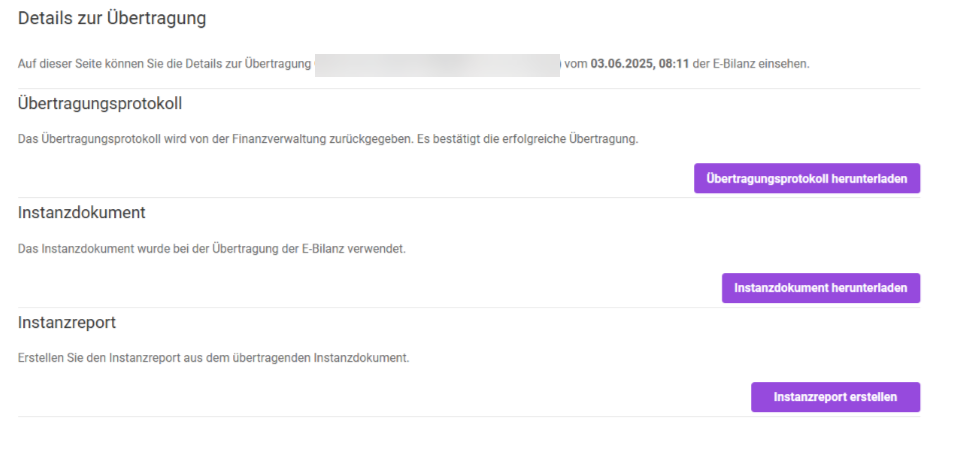
You can choose one of the following additional functions in Tax Balance by clicking a transmitted e-balance sheet in the history:

  • Download transmission protocol
  • Download instance document of the transmitted e-balance sheet in XML format
  • Download instance report of the transmitted e-balance sheet in XLS format
Shows the 'Details zur Übertragung' page in Tax Balance with German UI labels for a transmission of the e-balance sheet on '03.06.2025, 08:11', with the sections 'Übertragungsprotokoll', 'Instanzdokument', and 'Instanzreport' and the buttons 'Übertragungsprotokoll herunterladen', 'Instanzdokument herunterladen', and 'Instanzreport erstellen'.
Transmission details

This content was generated using AI and reviewed by Lucanet subject matter experts before publication.