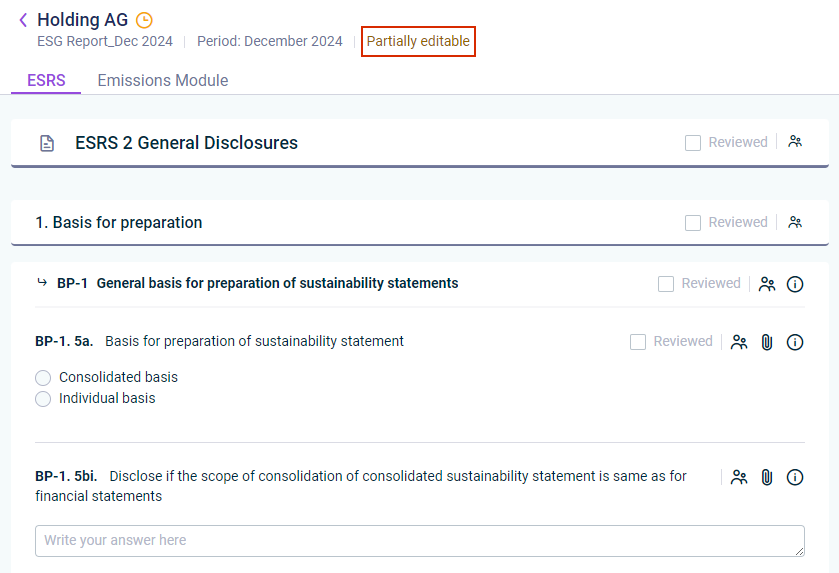
The type of access to the ESG report depends on your user role and whether you have been assigned as an editor and/or a reviewer. A status message at the top of the data collection page indicates the type of access:
If you, as an ESG Administrator, have been assigned as a reviewer and/or an editor to certain parts of the questionnaire, one of the following status messages will be displayed:
Status message
Description
Read-only
The user is exclusively assigned as a reviewer and has read access to the whole questionnaire.
Partially editable
The user is partially assigned as a reviewer and partially assigned as an editor, i.e. they can only edit the parts of the questionnaire to which they have been assigned as editor, but have read access to the rest.
After the questionnaire has been configured, the ESG Administrator can assign you as an ESG Data Collector to certain parts of the questionnaire as editor/and or reviewer (see Assigning Users as Editors or Reviewers). For this reason, you may not see the whole questionnaire, but only parts of it. A status message at the top of the data collection page indicates the type of access:
Status message
Description
Read-only
The user is exclusively assigned as a reviewer to a part of the questionnaire and only has read access to the part that they have been assigned to.
Partially editable
The user is partially assigned as a reviewer and partially assigned as an editor. The user only has read access to the parts for which they are assigned as reviewer and has write access to the part that they have to edit.
Before you can review a question, the ESG Data Collector must have activated the Mark as completed check box for the question.
Note: If the ESG Data Collector deactivates the Mark as completed check box after you have started the review, the question is no longer available for review until the ESG Data Collector marks it as completed again.
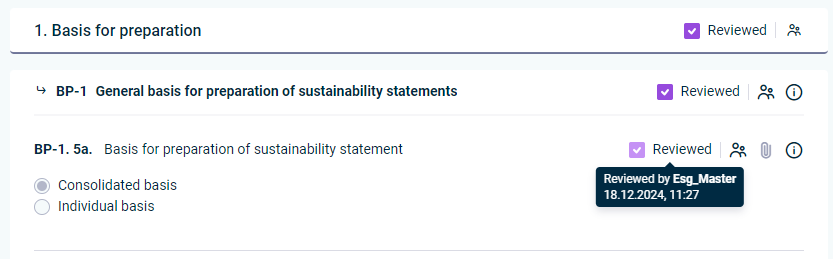
As soon as an answer has been provided for a standard, section, disclosure requirement, or question, and the data collector has marked the question as completed, you can review the data. To mark the element as reviewed, activate the Reviewed check box at the top right side of the element:
Mark an answer of a question as reviewed
If necessary, deactivate the check box to revoke the review.
Note: The ESG Administrator may have added additional guidance to support data collection, e.g. company-specific instructions, examples, or internal references. The icon indicates that additional guidance has been added for a question.
When the ESG Administrator adds, changes, or deletes additional guidance for a question, the status of that question is reset for the assigned reporting entities — including questions that have not yet been answered. This ensures that:
unanswered questions are presented with the updated guidance from the start, and
previously answered questions need to be edited and reviewed again so that the answer can be reconfirmed against the updated guidance.
Note: Formula-based KPIs are visible in the review context as well, but they are not reviewed separately. A KPI is calculated from the answers it refers to and stays read-only; it has no review action of its own (see Adding Formula-Based KPIs).
This content was generated using AI and reviewed by Lucanet subject matter experts before publication.