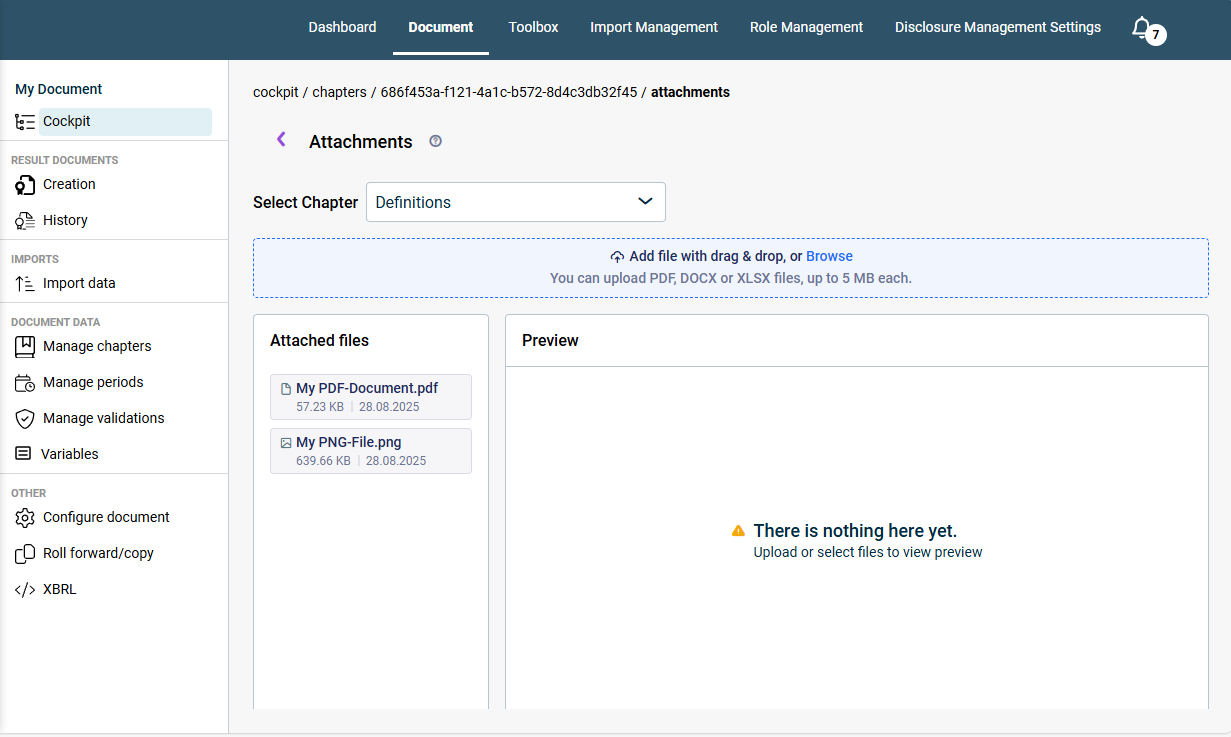

Additional information in the form of attachments can be added to all chapters of a Disclosure Management document. This functionality allows you to link important supplementary documents directly with your reports, thereby collecting all relevant information in one place.

A document's attachments are managed centrally in a dedicated area.

You can upload PDF, DOCX, XLSX files and images (e.g., PNG, JPEG) up to 5 MB each as an attachment to a chapter.

1

If necessary, open the document to which you want to add attachments.

2

In the Cockpit, click the desired link in the Attachments column. The Attachments area will be displayed:

Displays the 'Attachments' area in the Disclosure Management Cockpit
The attachments for all chapters can be managed centrally in the ‘Attachments’ area
3

Select the desired chapter from the Select chapter drop-down list.

4

Add the desired attachment via Drag & Drop or click Browse and select the desired attachment.

A preview can be displayed for some file types. To activate a preview:

1

Hover your mouse over the desired entry in the Attached Files list. If a preview can be displayed for the file type, a preview icon will be displayed:

The functions for an attachment are displayed. The preview icon (a stylized eye) is outlined in red.
Opening the preview
2

Click the icon to display the preview.

Last updated on Aug 16, 2023