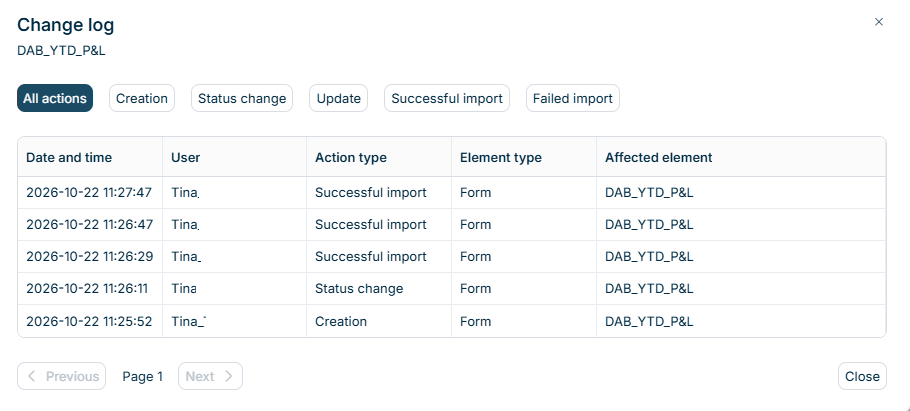
In Lucanet Data Collection, the change log records the actions on forms, form templates, reporting packages, validation rules, and reporting entities. Each action creates one entry in the change log. Each entry displays when the action took place, which user executed the action, and which element the action affected. An entry does not display which values changed. You cannot change the entries in the change log.
The following table describes which actions the change log in Data Collection records for each element type:
Element type
Recorded actions
Form
Creation, Status change, Update, Successful import, Failed import
Form template
Creation, Status change, Update
Reporting package
Creation, Status change, Update
Validation rule
Creation, Status change, Update
Reporting entity
Update, Successful import, Failed import
The change log records the actions as follows:
Data Collection saves the changes in a form automatically. Each saved change creates a separate Update entry, so editing several cells creates several entries.
An import into a form creates one Successful import or Failed import entry. The cells that the import changes create no additional Update entries.
A Status change entry records that the status changed.
For reporting entities, Update entries record changes to the collectors, the approvers, and the Lucanet.Financial Warehouse reporting entity. Import entries record imports of reporting entities and retrievals of Lucanet.Financial Warehouse reporting entities.
To display the change log of an element in Data Collection, open the workspace of the element, for example Form templates or Validation rules, and select View change log in the three-dot menu at the end of the element's row.
In the Reporting entities workspace, you have two options to open the change log:
To display the changes of a single reporting entity, select View change log in the three-dot menu at the end of the reporting entity's row.
To display the changes to all reporting entities, including imports of reporting entities, click View change log in the top right corner.
Administrators can open all change logs. Collectors can open only the change logs of the forms assigned to them.
In the Data collection workspace, only form rows have a change log. Process rows and reporting entity rows have no change log.
The Change log dialog displays the entries for the selected element, with the newest entries first:
'Change log' dialog
The following table describes the columns of the Change log dialog in Data Collection:
Column
Description
Date and time
Displays when the action took place.
User
Names the user who executed the action.
Action type
Names the action, for example Status change or Successful import.
Element type
Names the type of the element, for example Form or Reporting package.
Affected element
Names the element that the action affected.
To display the entries of one action type only, click the action type above the table, for example Update. All actions displays all entries again. The available action types depend on the element type.
The dialog displays 10 entries per page. Click Next and Previous to move between the pages. The current page number is displayed between the two buttons.
This content was generated using AI and reviewed by Lucanet subject matter experts before publication.