To describe in detail which costs have resulted where, it is possible to divide a reporting entity into cost centers. By using cost center groups, it is possible to group cost center sub-groups and/or cost centers together.
When cost centers are used, it is always necessary to create a default cost center in Lucanet. All values which do not contain cost center information are posted to this cost center. The name of the default cost center can be selected as required.
To create a cost center or a cost center group:
1
Right-click a reporting entity or a cost center group.
2
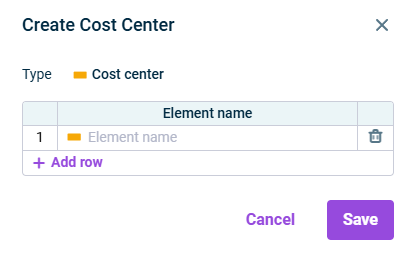
Select Create | Cost center or Cost center group from the context menu. The Create Cost Center dialog is displayed: Creating a cost center
3
Specify the element name and, optionally, add cost centers.
4
Click Save.
If you create a default cost center in a reporting entity in which postings have already been made, the message The changes shown in red will take effect only after exporting and importing the database is displayed. This means the default cost center will not become visible until you reimport the current database. If needed, contact your Lucanet administrator.