In Consolidation & Financial Planning (CFP), references are links to elements that were previously defined in the Reporting entities or the Groups workspace. Each object can be referenced a multiple number of times, which means that it is possible to set up several structures in the Organization elements workspace.

The following table describes the references that can be created in CFP:

ElementDescription
Reporting entityUsed for creating references to reporting entities and consolidation reporting entities from the Reporting entities workspace
Cost centerUsed for creating references to cost centers from the Reporting entities workspace
Cost center groupUsed for creating references to cost center groups from the Reporting entities workspace:
- Drill down by cost centers - default hierarchy of the reporting entity — Used for applying the hierarchy of the cost centers and cost center groups of the reporting entity
- Drill down by cost centers - specify hierarchy individually — The hierarchy of the cost centers and cost center groups is created individually or converted to individual hierarchy. In doing so, all the cost center groups of the default hierarchy (= hierarchy in the reporting entity) are created as organization groups and all the cost center references are sorted in accordance with the default hierarchy.
Consolidation areaUsed for creating references to consolidation areas from the Groups workspace
Consolidation unitUsed for creating references to consolidation units from the Groups workspace
Consolidation unit - CancellationThis reference is automatically created when selecting the nested display in the Organization elements workspace. It serves as a reference to a canceled consolidation unit from the Groups workspace.
Consolidation unit groupUsed for creating references to consolidation unit groups from the Groups workspace
Total lineReferences to total lines are created automatically if a reference to the consolidation area, consolidation unit group, reporting entity, or cost center group containing the total line is created in the Organization elements workspace.

To create one or more references in CFP:

1

Right-click the root folder Organization elements, a folder, or an organization group.

2

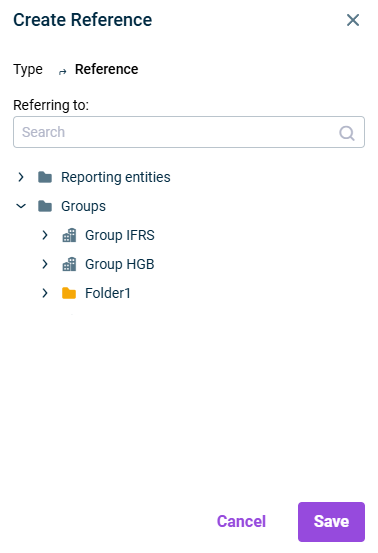
Choose Create | Reference from the context menu. The Create Reference dialog is displayed:

Shows the 'Create Reference' dialog in CFP with the type 'Reference', the 'Referring to' search bar, and a tree with the folders 'Reporting entities' and 'Groups', where 'Groups' is expanded and contains 'Group IFRS', 'Group HGB' and 'Folder1'. The dialog also contains the 'Cancel' and 'Save' buttons.
Creating a reference
3

Choose all the elements in the displayed drop-down list that are to be inserted as references, or search for specific items under Referring to in the search bar.

4

Click Save.

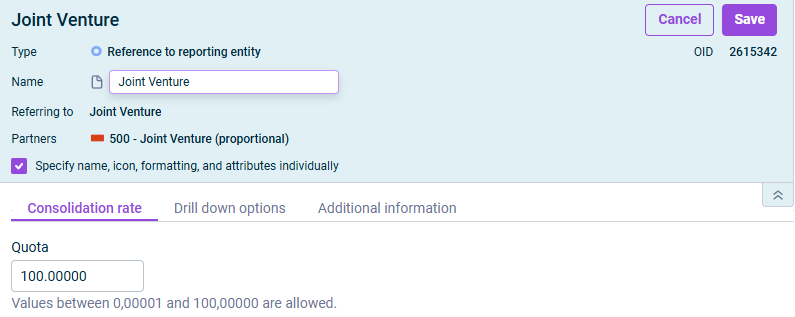
To configure a reference in CFP, click the name of the reference and then click Edit in the top right corner.

Shows the editing mode of the reference 'Joint Venture' in CFP with the type 'Reference to reporting entity', the 'Name' field, 'Referring to' set to 'Joint Venture', the partner '500 - Joint Venture (proportional)', and the activated 'Specify name, icon, formatting, and attributes individually' check box. Below, the 'Consolidation rate', 'Drill down options' and 'Additional information' tabs are displayed, and the 'Consolidation rate' tab contains the 'Quota' field with the value '100.00000'.
Edit a reference to reporting entity

In the editing mode in the header, you can change the name of the reference by activating the check box Specify name, icon, formatting, and attributes individually.

Currently, only the name of the element can be edited.

For direct references to consolidation units and consolidation unit groups, you can, if necessary, change the adjustment level(s) to be displayed for the reference. Choose one of the following options from the Adjustment levels drop-down list:

  • Consolidated financial statements and consolidation postings: All postings from the adjustment level containing the postings for the consolidated financial statements and from the adjustment level for consolidation postings containing the consolidation postings are displayed.
  • Consolidated financial statements: All postings from the adjustment level containing the postings for the consolidated financial statements are displayed.
  • Consolidation postings: All postings from the adjustment level for consolidation postings containing the consolidation postings are displayed.

Depending on the selected reference, additional tabs may be displayed under the general information. Configure the tabs as follows:

If applicable, change the consolidation rate on the Consolidation rate tab.

  • The consolidation rate is only available for references to reporting entities and cost center groups.
  • This setting is only relevant if you perform consolidation using Consolidation 1. You can specify a value between 1 and 100 that determines with which percentage share the reporting entity is included in the consolidation.
The drill down determines whether and how the cost centers and cost center groups of a reporting entity are inserted into the organization elements.

The following table describes the drill down options for references to cost center groups and reporting entities in CFP:

OptionDescription
—This setting applies for reporting entities and/or cost center groups without cost centers (cost center groups) or can be selected so that the cost centers and cost center groups of the reporting entity and/or cost center group are not adopted in the structure.
Drill down by cost centers – default hierarchy of the reporting entityThe hierarchy of the cost centers and cost center groups of the reporting entity is applied.
Drill down by cost centers – specify hierarchy individuallyThe hierarchy of the cost centers and cost center groups is created individually or converted to individual hierarchy. In doing so, all of the cost center groups of the default hierarchy (= hierarchy in the reporting entity) are created as organization groups and all of the cost center references are sorted in accordance with the default hierarchy.

Note: The setting has no effect on reporting entities and/or cost center groups without cost centers and cost center groups. If cost centers and/or cost center groups are created afterwards under the reporting entity or the cost center group, then these will be included in the organization elements in accordance with the setting.

The drill down determines whether and how the adjustment levels of a consolidation area are inserted in the organization elements.

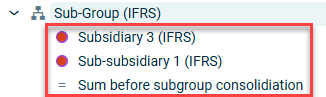
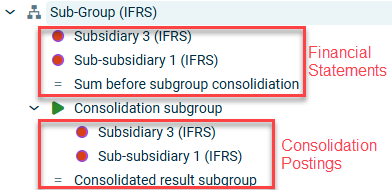
The Financial statements and Consolidation postings adjustment levels for consolidation units and consolidation unit groups of a given consolidation area are displayed as two separate blocks, for example:

Shows the drill down option 'Adjustment levels separated – default hierarchy of the consolidation area' for 'Sub-Group (IFRS)' in the tree view in CFP. Highlighted in red are the first block with 'Subsidiary 3 (IFRS)', 'Sub-subsidiary 1 (IFRS)' and the total line 'Sum before subgroup consolidation', labeled 'Financial Statements', and the second block in the organization group 'Consolidation subgroup' with 'Subsidiary 3 (IFRS)', 'Sub-subsidiary 1 (IFRS)' and the total line 'Consolidated result subgroup', labeled 'Consolidation Postings'.
Drill down option ‘Adjustment levels separated – default hierarchy of the consolidation area’

The references of the first block contain the consolidation units with the Financial statements adjustment level. The references of the second block can be found in the automatically created organization group Consolidation name of consolidation area and contain the consolidation units with the Consolidation postings adjustment level.

  • The total lines Total Name of consolidation area each display the total of all postings of the adjustment levels Financial statements and Consolidation postings.
  • The total line Total before consolidation Name of consolidation area shows the total of all postings before the consolidation.
  • The Group result Name of consolidation area total line shows the total of all postings after the consolidation.
  • The total lines are displayed in ledgers if you click Abbreviated consolidation view iconabbreviated consolidation view or Complete consolidation overview iconcomplete consolidation overview on the toolbar of the respective ledger.

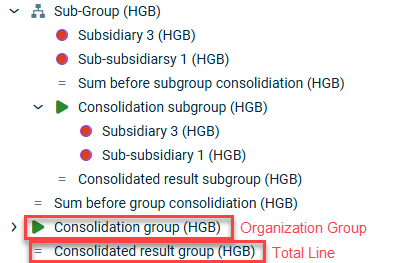
The consolidation area is displayed in the same way as the Adjustment levels separated – default hierarchy of the consolidation area drill down. In this drill down, you may create new organizational groups and total lines under the consolidation area as needed. The hierarchy of the consolidation units and consolidation unit groups is created individually or converted to an individual hierarchy. The drill down is displayed as follows, for example:

Shows the drill down option 'Adjustment levels separated – specify hierarchy individually' for 'Sub-Group (HGB)' in the tree view in CFP with the references 'Subsidiary 3 (HGB)' and 'Sub-subsidiarsy 1 (HGB)', the total lines 'Sum before subgroup consolidation (HGB)', 'Consolidated result subgroup (HGB)' and 'Sum before group consolidation (HGB)', and the organization group 'Consolidation subgroup (HGB)'. Highlighted in red are the organization group 'Consolidation group (HGB)', labeled 'Organization Group', and the total line 'Consolidated result group (HGB)', labeled 'Total Line'.
Drill down option ‘Adjustment levels separated – specify hierarchy individually’

The Financial statements and Consolidation postings adjustment levels for consolidation units and consolidation unit groups of a given consolidation area are displayed together, for example:

Shows the drill down option 'Adjustment levels together – default hierarchy of the consolidation area' for 'Sub-Group (IFRS)' in the tree view in CFP. Highlighted in red is one block with the references 'Subsidiary 3 (IFRS)' and 'Sub-subsidiary 1 (IFRS)' and the total line 'Sum before subgroup consolidation'.
Drill down option ‘Adjustment levels together – default hierarchy of the consolidation area’

The references to the consolidation units contain all postings for the Financial statements and Consolidation postings adjustment levels.

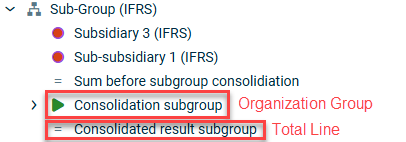
The consolidation area is displayed in the same way as the Adjustment levels together – default hierarchy of the consolidation area drill down. In this drill down, you may need to create new organization groups and total lines under the consolidation area. The hierarchy of consolidation units and consolidation unit groups is generated individually or converted to an individual hierarchy. The drill down is displayed as follows, for example:

Shows the drill down option 'Adjustment levels together – specify hierarchy individually' for 'Sub-Group (IFRS)' in the tree view in CFP with the references 'Subsidiary 3 (IFRS)' and 'Sub-subsidiary 1 (IFRS)' and the total line 'Sum before subgroup consolidation'. Highlighted in red are the organization group 'Consolidation subgroup', labeled 'Organization Group', and the total line 'Consolidated result subgroup', labeled 'Total Line'.
Drill down option ‘Adjustment levels together – specify hierarchy individually’

The drill down determines whether and how the consolidation units of a consolidation unit group are inserted into the organization elements.

The following table describes the drill down options for references to consolidation unit groups in CFP:

OptionDescription
—This setting applies to consolidation unit groups without consolidation units or can be selected to prevent the consolidation units from being added to the structure.
Default hierarchy of the reporting entityThe hierarchy of the consolidation units of the consolidation area is applied.
Specify hierarchy individuallyThe hierarchy of the consolidation units is created individually or converted to an individual hierarchy.

This content was generated using AI and reviewed by Lucanet subject matter experts before publication.