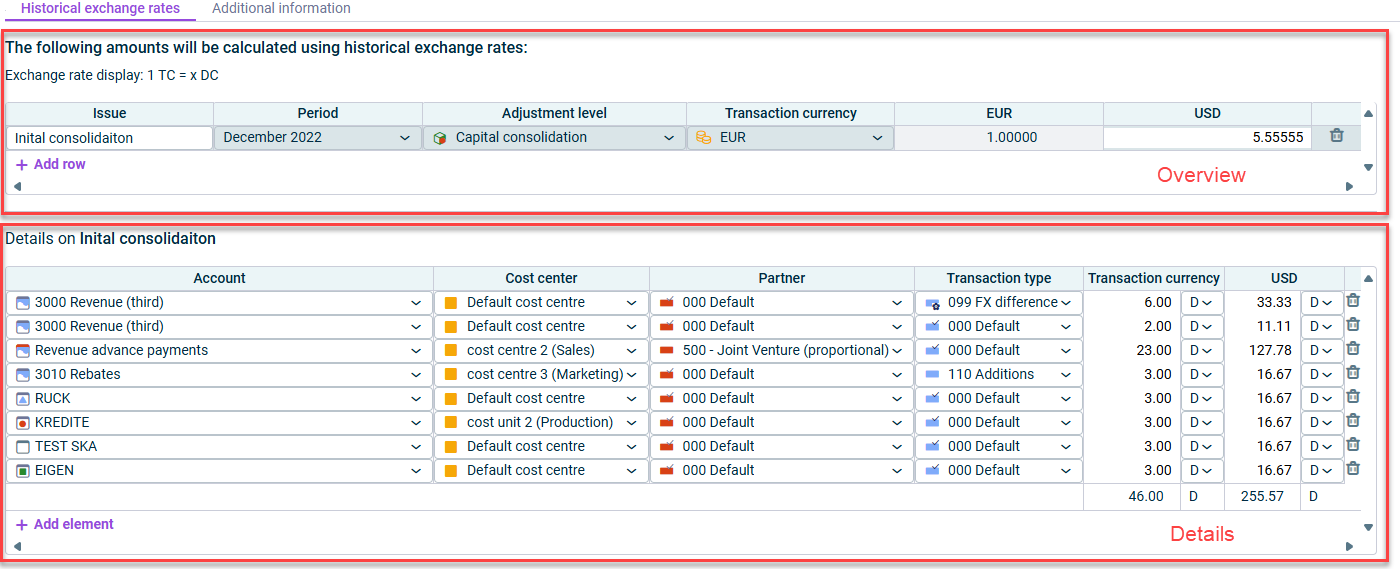
In the Translation with historical exchange rates posting, the translation with historical exchange rates is defined for accounts. If translation with historical exchange rates is defined for an account then the value which has been calculated originally using the current exchange rate is cleared and the value which has been calculated using the historical exchange rate is posted.
The configuration of the automatically created Translation with historical exchange rates postings can be edited in the CFO Solution Platform.
In the Details area, you must specify the accounts to be translated with the historical exchange rate specified in the Overview area. The following options are available:
Option
Description
Account
Account or item for creating the posting
Cost center/ partner/ transaction type
Allows selection of a cost center/partner/transaction type from the respective drop-down lists
Transaction currency
Amount to be translated in the transaction currency
Select C for credit for equity and liability accounts, and D for debit for asset accounts.
Note: When the amount to be translated is entered in the Transaction currency column, the system automatically calculates the value in the currency column using the historical exchange rate saved in the Overview area.
This content was generated using AI and reviewed by Lucanet subject matter experts before publication.