CFP Add-In for Excel 365 can be used to selectively transfer Excel plannings or Excel postings to the Lucanet database. The format and structure of the LUCANET workbook are decisive when transferring Excel data to Lucanet. Data can only be transferred successfully from MS Excel to Lucanet if the workbook has a specific structure and contains keywords.
You can transfer the values from MS Excel to Lucanet via menu command or shortcut.
The Excel workbook must contain the following elements:
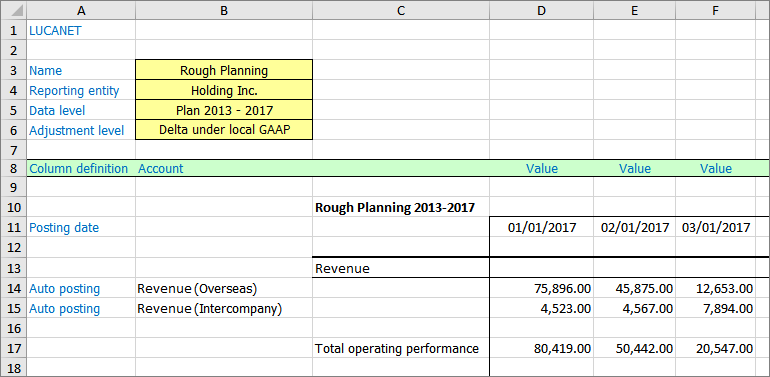
For Lucanet to recognize the workbook for import, cell A1 must contain the word LUCANET.
Keywords that allow Lucanet to identify and import data and information (in the example in blue font).
Parameters that contain information for importing into Lucanet (example with yellow background).
The data to be imported, which contains the corresponding values (with the white background in the example).
Example for transfer of values to Lucanet
Types of formatting, such as the font size, font, frame, and colors of the Excel spreadsheets, have no influence on the import into Lucanet and are freely selectable.
Keywords can be used to define which data needs to be imported from an Excel worksheet. A distinction is made between keywords in column A and the ones in the Column definition row, as well as between required and optional keywords.
If several worksheets of the open workbook come into question for the import (i.e. several worksheets contain the keyword LUCANET in cell A1), you need to specify the worksheets that are to be imported.
To do so, choose the desired worksheet(s) by activating the checkboxes:
This content was generated using AI and reviewed by Lucanet subject matter experts before publication.