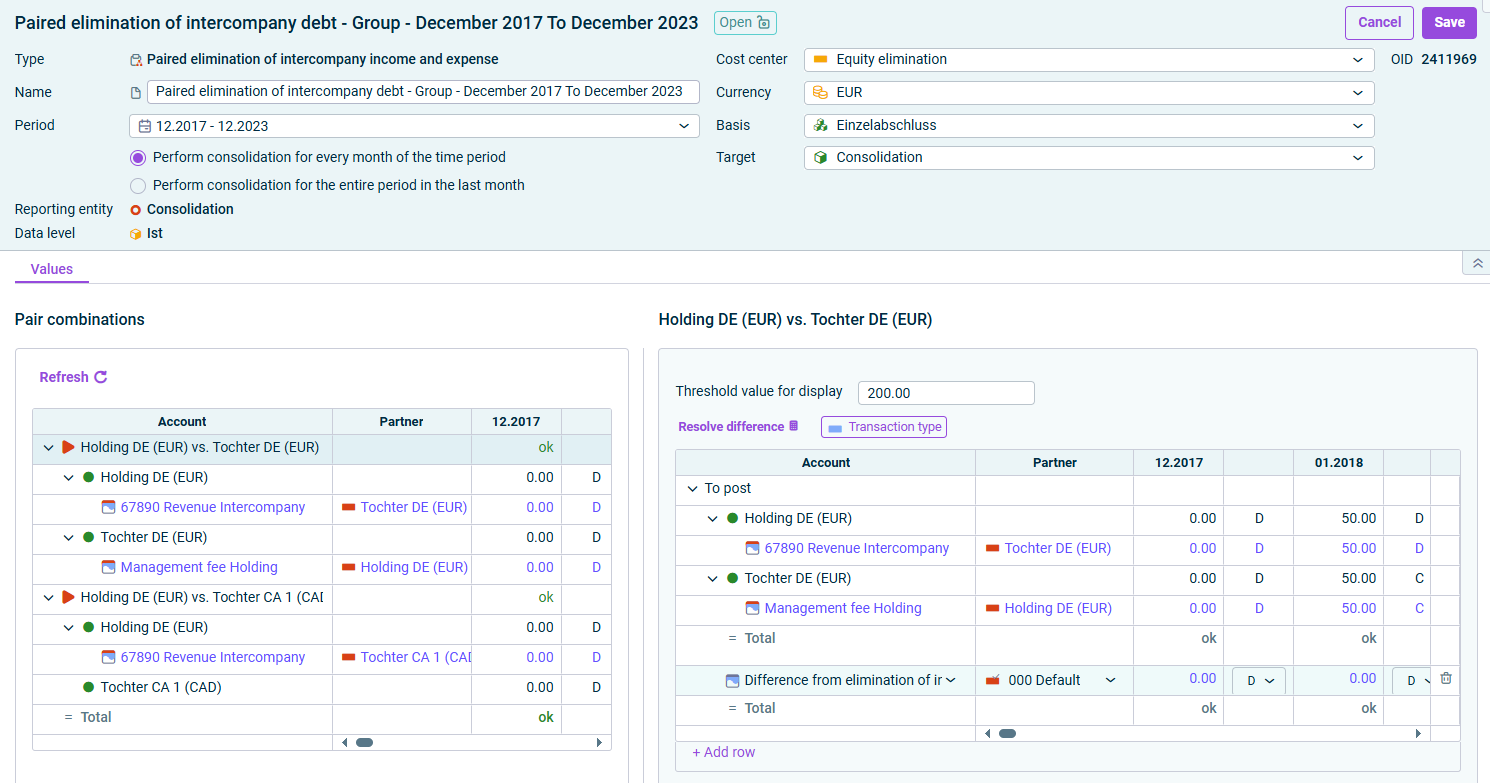
The Paired elimination of intercompany debt wizard enables the wizard-assisted elimination of debts and receivables between affiliated companies. Pair combinations of accounts are formed between reporting entities or cost centers based on settings previously made in the Consolidation areas workspace.

The wizard for paired elimination of intercompany debt is displayed as follows, for example:

Wizard for paired elimination of intercompany debt

The following options must be configured in the Paired elimination of intercompany debt wizard:

Edit the general properties of the wizard for paired elimination of intercompany debt in the top area of the detail view:

OptionDescription
NameName of the wizard.
PeriodTime period for which the elimination is to be performed

Note: After the period has been changed, it is necessary to update the wizard (see section Updating Wizard).
Cost centerCost center for the postings
CurrencyCurrency, in which the consolidation postings are to be made. By default, the transaction currency of the consolidation area is used.
BasisAdjustment level with the data for the generation of the consolidation postings
TargetAdjustment level on which postings are to be made

All pair combinations of reporting entities between which debt relationships exist are listed on the Values tab:

  • If the receivables correspond to the liabilities within the combined pair, the value is displayed in green.
  • If there is a difference, it is displayed in red or green – according to the definition of the threshold value.
  • To obtain detailed information, click the arrow in front of the desired pair combination or item.
Area 'Pair combinations'

The following options are available in the Pair combinations area:

OptionDescription
RefreshRefreshes the values in the wizard.
Resolve differencesAutomatically resolves any differences that may have occurred within a posting. Click on a row that contains differences and then click the Resolve differences command.

Select the pair combination in the table whose details you want to view or edit.

The following options are available in the table on the right:

OptionDescription
Threshold for DisplayDifferences above the entered value are highlighted in red in the Pair combinations area.
Deferred taxesDisplays the percentage for deferred taxes.

Note: You can currently only take deferred taxes into account and enter a tax rate in Lucanet.Financial Client.
Transaction TypesShows or hides the Transaction Types column.

If you change the period in the General area, the message Please update the consolidation wizard is displayed. Proceed as follows in this case:

1

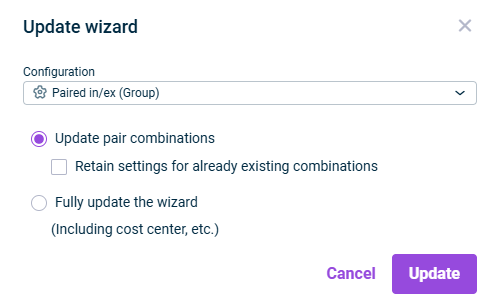
Click Update wizard in the Pair combinations area. The Update wizard dialog is displayed:

'Update wizard' dialog
2

Choose the desired configuration for the paired elimination of intercompany debt.

3

Define which elements should be updated. Do one of the following:

  • Update pair combinations, if only the pair combinations are to be updated.

Note: If the Retain settings for already existing combinations check box is deactivated, any settings already created might be overwritten by the configuration settings of the wizard.

  • Fully update the wizard, to update all settings in the wizard.
4

Click Update.