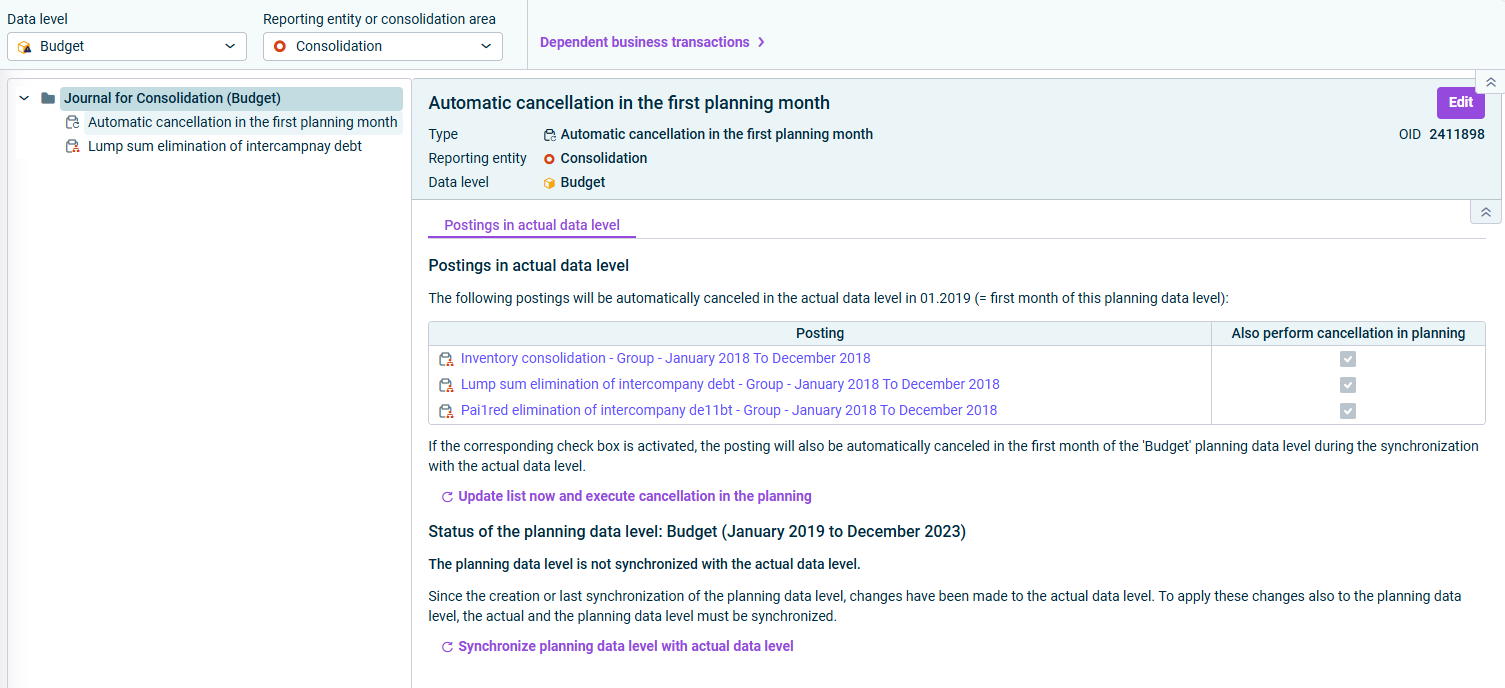
In the Import and Journals workspace, automatic cancellation of postings in the first month of the planning data levels can be configured in the journal of a consolidation reporting entity with a posting of type Automatic cancellation in the first planning month. A cancellation is necessary to prevent already consolidated figures from being consolidated again during consolidation in the planning data level.
The posting Automatic cancellation in the first planning month is created automatically in the journal of a consolidation reporting entity if the actual data level contains elimination of intercompany debt wizards or inventory consolidation wizards that post to the last month before the beginning of the planning data level.
Additionally, one of the following actions must be performed:
Action
Also perform cancellation in planning
Synchronize planning data level with actual data level
For new lines, cancellation is activated automatically in the planning data level.
Creating a planning data level without template
For all lines, cancellation is activated automatically in the planning data level.
Creating a planning data level with template
For lines that already exist in the template, the configuration is copied from the template. For new lines, cancellation remains deactivated in the plan.
The following options are available in a posting of the type Configure automatic cancellation in the first plan month.
Option
Description
Postings in actual data level
Also perform cancellation in planning: Activate the check box for postings to be canceled in the first month of the planning data level.
Update list now and execute cancellation in the planning
Click Update list now and execute cancelation in the planning to execute the cancelation.
Note: The link Update list now and execute cancelation in the planning is only available when the posting is not (or no longer) in editing mode.
Synchronize planning data level with actual data level
If necessary, click Synchronize planning data level with actual data level to synchronize the planning data level with the actual data level (see section Synchronizing Planning Data Levels).
Note: The link Synchronize planning data level with actual data level is only available when the posting is not (or is no longer) in editing mode.
This content was generated using AI and reviewed by Lucanet subject matter experts before publication.