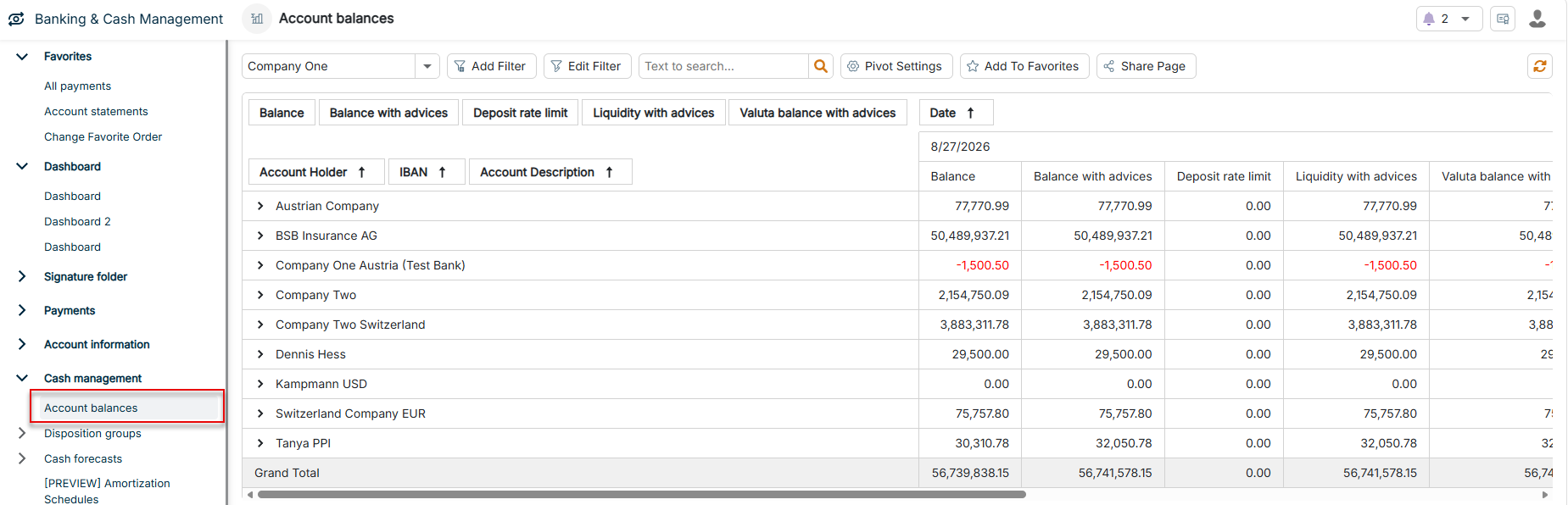
The Account balances workspace provides you with a central pivot view of the posting and valuta balances as well as the credit limits and liquidity of all accounts in Lucanet Banking & Cash Management (BCM). The overview also serves as the data basis for automatic dispositions, cash forecasts, and interest calculations.
The account balances combine imported bank data with forecast data and display both current and future liquidity positions — as the basis for disposition decisions and interest management.
The Account balances workspace can be found under Banking & Cash Management | Cash management | Account balances and is displayed as follows, for example:
In addition to the general functions, the following functions are available in the toolbar of the workspace:
Function
Description
Standard Filter
Filters the account balances by period — 7, 30, 90, 180, or 360 days into the past or into the future. Periods in the future take the forecast data into account.
Pivot Settings
Enables you to adjust the display in the pivot table: - Show amounts in thousands: Displays amounts in units of thousands. - Exclude Saturdays: Hides all data rows whose date falls on a Saturday. - Exclude Sundays: Hides all data rows whose date falls on a Sunday.
The four standard data fields Balance, Balance with advices, Liquidity with advices, and Valuta balance with advices are reported in the Account currency of the respective account. All fields with the suffix (EUR), in contrast, display the value converted into euros. You add the EUR variants via the context menu (see Inserting, Moving, or Hiding Columns).
The pivot table displays the following fields by default:
Field
Description
Balance
Posting balance of the account on the respective date, without advice transactions. The basis is the closing balance of the associated account statement.
Balance with advices
Most recent available balance of the account, calculated as Balance + advice transactions.
Liquidity with advices
Available liquidity, calculated as Balance with advices + credit limit
Note: For accounts that are flagged as not relevant for liquidity in the master data — for example, certain blocked or escrow accounts — the liquidity is always reported as 0.
Valuta balance with advices
Balance based on the valuta date — the value date — instead of the posting date, including the advice transactions. Serves as the basis for interest calculations.
Date
Date for which the account balances are reported in the respective column. The basis is the date of the closing balance from the account statement.
Account Holder
Name of the company or legal entity that holds the account
IBAN
International bank account number for the unique identification of the account
Account Description
Internal name or description of the account for easier identification
Grand Total
The pivot table displays a Grand Total for each of the four standard data fields on the far right of the table. BCM calculates the grand total automatically — there is no separate, configurable field for it.
You can customize the column structure of the pivot table. To do so, right-click a column header, for example Account Holder, IBAN, Account Description, or Date. The following options are available in the context menu:
Option
Description
Title
Displays the name of the field that you right-clicked as the first entry of the context menu.
Move column
Moves the field within its area — row, column, or data area — by one position. The sub-entries are deactivated if no further position is available.
Insert column
Inserts an additional field before the field that you right-clicked. The submenu displays only fields that are not yet contained in the pivot table — see the two tables at the end of this section. If all fields are already displayed, the entry is not displayed. In the data area, only measures are available for selection; in the row and column areas, only text and date fields.
Hide column
Removes the field from the pivot table. The action is deactivated as long as only a single field is present in the respective area.
Reset view settings
Resets the pivot table to the default layout. The Pivot Settings from the toolbar — amounts in thousands, hidden Saturdays and Sundays — are also reset. A confirmation dialog is displayed before resetting.
BCM saves your customizations automatically. The next time you open the Account balances workspace, the pivot table is displayed in exactly the configuration in which you last left the table.
The following fields are available via Insert column:
Row fields
Field
Description
National bank code
National bank code of the account-holding institution
Account
Superordinate company or organizational unit of the account holder
Account type
Type of the account, for example current account, fixed-term deposit account, or loan account
Account category
Name of the assigned account category
Account number
National account number
Account currency
ISO currency code of the account, for example EUR, USD, or CHF
Data fields
Field
Description
Forecast
Forecast balances and liquidity based on forecast transactions, each in account currency and EUR: Forecast balance, Forecast balance with advices, Forecast liquidity, Forecast liquidity with advices, as well as Forecast transactions sum and Forecast transactions accumulated.
Credit limit
Credit limit and Credit limit (EUR) as well as the negative variants Credit limit (negative) and Credit limit (negative, EUR) for charts and debit displays.
Liquidity
Liquidity and Liquidity (EUR) — calculated as balance + credit limit — as well as Liquidity with advices (EUR). The Liquidity with advices variant in account currency is part of the default view.
Balance
Balance (EUR) and Balance with advices (EUR). The variants in account currency are part of the default view.
Valuta liquidity
Liquidity based on the valuta date: Valuta liquidity, Valuta liquidity (EUR), Valuta liquidity with advices, and Valuta liquidity with advices (EUR).
Valuta balance
Valuta balance, Valuta balance (EUR), and Valuta balance with advices (EUR). The Valuta balance with advices variant in account currency is part of the default view.
Deposit rate limit
Deposit rate limit and Negative interest limit (EUR) — threshold above which a custody fee is charged on credit balances. You maintain the threshold with a validity date in the master data of the account on the Deposit rates tab; for each date, the pivot table displays the threshold valid on that day. If no custody fee is stored for the account, the field displays 0.
Advices by
Intraday or not yet posted movements, each as daily sum and accumulated, in account currency and EUR: Advices by transaction date sum, Advices by transaction date accumulated, Advices by valuta date sum, Advices by valuta date accumulated.
This content was generated using AI and reviewed by Lucanet subject matter experts before publication.