This page archives the release notes for older versions of XBRL Tagger.
The versions of all solutions that you are currently using and those of the CFO Solution Platform are displayed when you select About Lucanet from the Help section in the CFO Solution Platform.
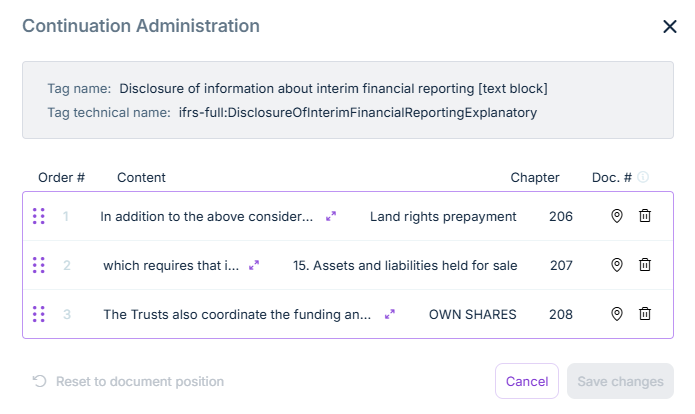
You can now manage continuation chains directly in the XBRL Tagger. When a tagged text block extends across multiple sections of a document, the individual sections are linked into a continuation chain. In the new Continuation Administration dialog, you can view and manage the entire chain in one place.
You can now activate a multi-panel mode in the XBRL Tagger that allows you to open up to three panels side by side. For example, activate the multi-panel mode to open and edit the taxonomy, validation results, and properties in parallel. Use the toggle to switch between single-panel and multi-panel mode.
In the XBRL Tagger, you can now enter and tag values that are not present as visible elements in the source document. This feature is particularly relevant for reports in which certain values must be reported that do not appear explicitly in the document. You can add values and assign these elements to elements from the taxonomy by drag-and-drop.
Hidden elements are part of the document validation and the iXBRL export: they are considered during XBRL validation and included in the iXBRL report package.
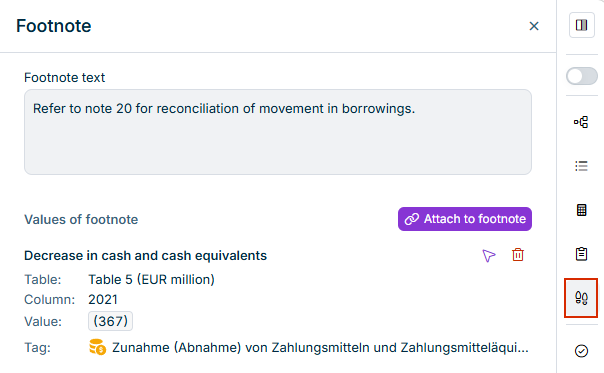
With the new footnote management, footnotes can be created as separate tags and linked to the corresponding table cells or text passages, increasing traceability and machine readability.
The footnote panel in the sidebar shows a list of all footnotes available in the currently open document.
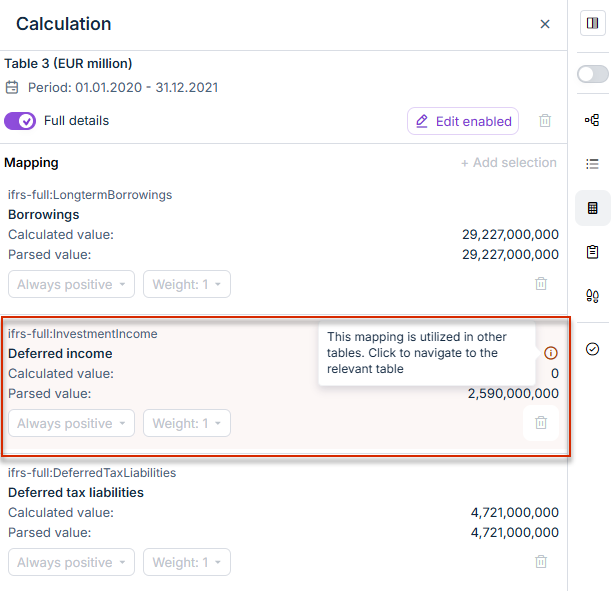
In the Calculation linkbase, the XBRL Tagger now shows which summands are used in other tables of the same report: summands that are used in multiple tables are highlighted with a light red background and a red information icon. Click the information icon to navigate directly to the corresponding table and cell. This way, you can check cross-table tag relationships at a glance and quickly identify tagging inconsistencies.
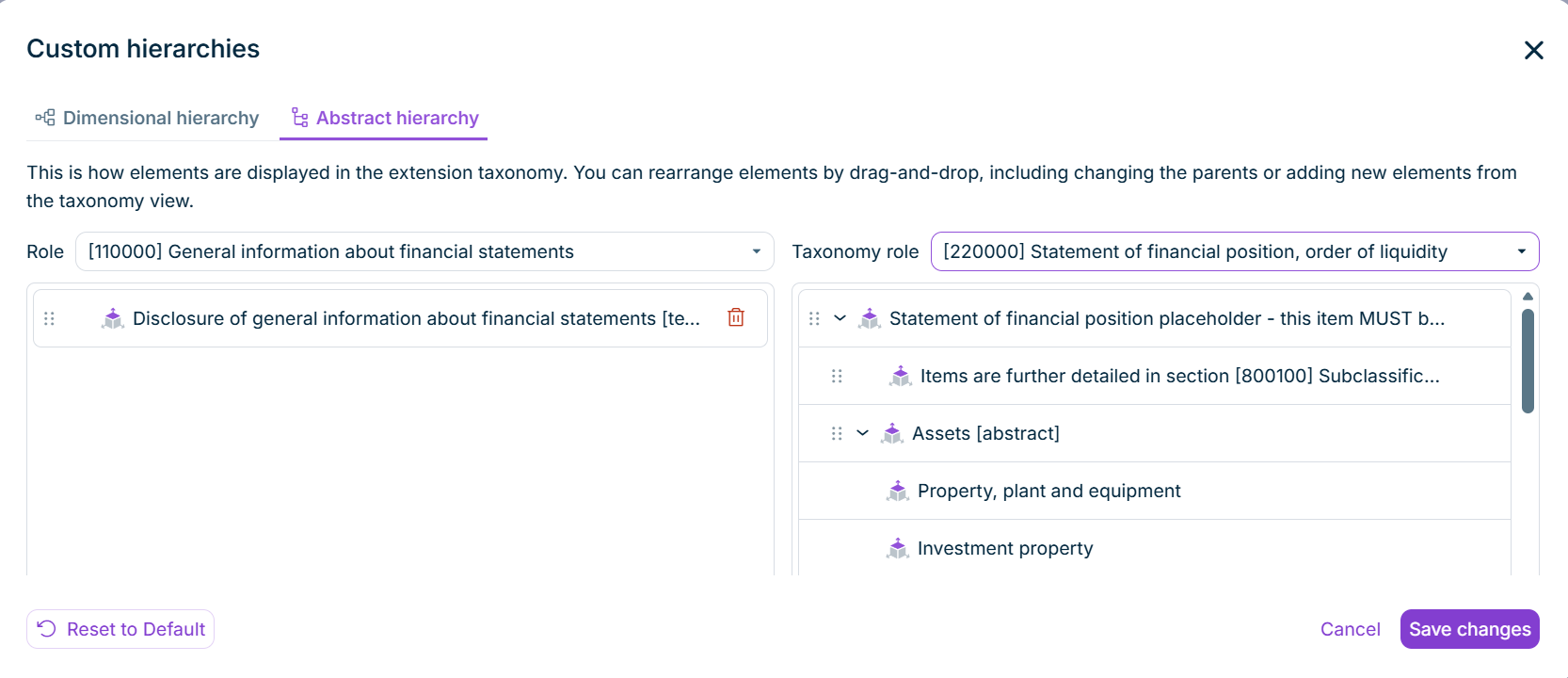
In the XBRL Tagger, you can now adjust the hierarchy of dimension members and abstract elements directly. Use the Custom hierarchies button in the toolbar of the XBRL document to open a dialog with two tabs:
Dimensional hierarchy: On this tab, you can rearrange dimension members and their axes per table.
Abstract hierarchy: On this tab, you can restructure abstract elements of an extension taxonomy per role.
On both tabs, you can move elements by drag-and-drop, change parent-child relationships, or add further elements from the taxonomy view by drag-and-drop. The XBRL Tagger applies the saved hierarchy to the generated extension taxonomy as well as to the final iXBRL report.
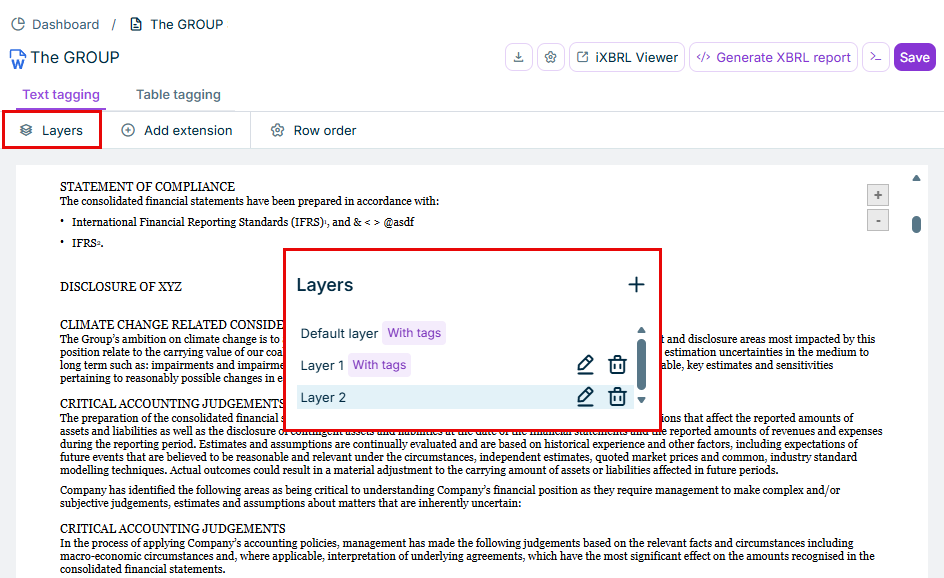
XBRL Tagger now supports layers for tagging. With tagging layers, you can apply different tags to the same text block more than once . Because tags in one layer must not overlap, you can add another layer for overlapping tagging blocks. This is useful when, for example, a paragraph has to be tagged with two different taxonomy elements.
Tagging layers for a document are managed in the layer manager. The default layer is always present and cannot be deleted. Layers that contain tags are labeled in the layer view.
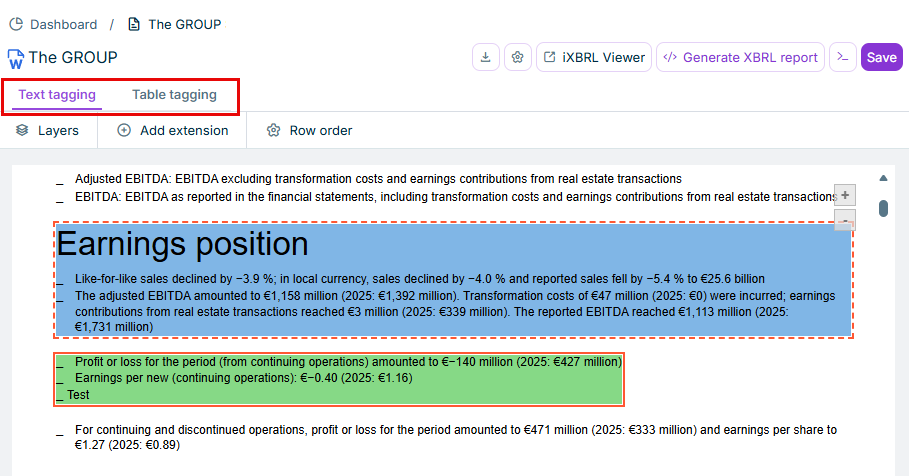
XBRL Tagger now has two separate tabs: Text tagging and Table tagging. Previously, text could only be tagged if a content control had been inserted in the document first. With the split into text tagging and table tagging, this step is no longer required: text blocks can now be selected and tagged directly in the XBRL editor. The separate views also prevent text tags and table tags from obscuring each other.
On the Text tagging tab, you can select text blocks in Word documents directly in the editor and apply an XBRL tag to them. Select the text by clicking and dragging. Handles at the start and end of the selection allow you to adjust the selected range afterwards.
On the Table tagging tab, table cells can be individually selected and tagged.
‘Text tagging’ and 'Table tagging' tabs in XBRL Tagger
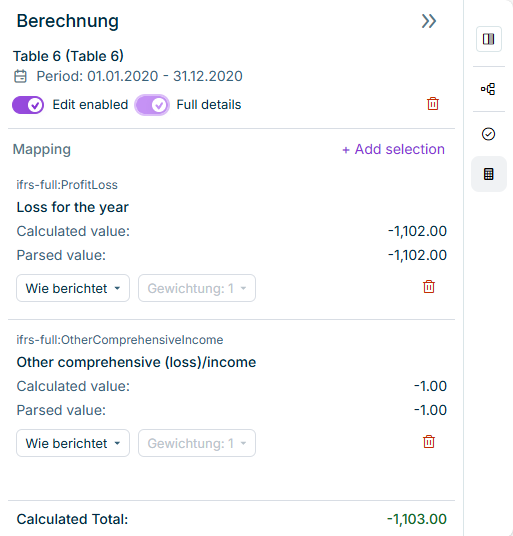
Calculations are a regulatory requirement: XBRL reports must document mathematical relationships between financial figures in so-called calculation linkbases. This records which elements make up a total—for example, Total Assets = Current Assets + Non-Current Assets. Auditors and regulators expect this information as part of a valid XBRL report. XBRL Tagger now provides the calculation view for this purpose. When you click a cell in a document that contains a calculation, the related details are displayed. Color coding indicates whether the calculated total matches the reported value: green means a match, red means a deviation. If there is a deviation, the delta (absolute difference) is also displayed.
The calculation view makes the mathematical structure of the XBRL report transparent and helps you spot deviations early, before the report is submitted. That reduces the risk of validation errors at regulatory filing.
Displaying Full Details
The calculation view also offers the Full details option. When this option is activated, additional technical information is displayed for each summand:
Parsed value: The numeric value that XBRL Tagger read directly from the source document, before sign or weight is applied. This allows you to check whether the tagger interpreted the number correctly.
Technical name: The identifier of the assigned taxonomy element. This is especially useful when several elements in a taxonomy share the same display label—for example in German ESEF translations where different elements use the same German term.
The detail view shows this information only for the summands, not for the total. The colour coding (green/red) for validation is also kept in the detail view. The detail view is aimed in particular at XBRL specialists and internal auditors. It supports full traceability of the calculation logic and makes audit documentation easier. Deviations can be traced to incorrect value reading or sign logic.
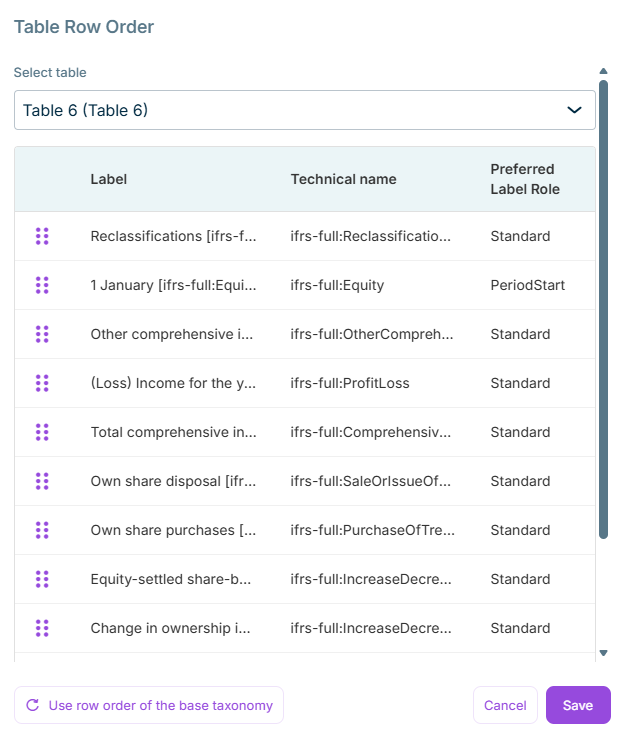
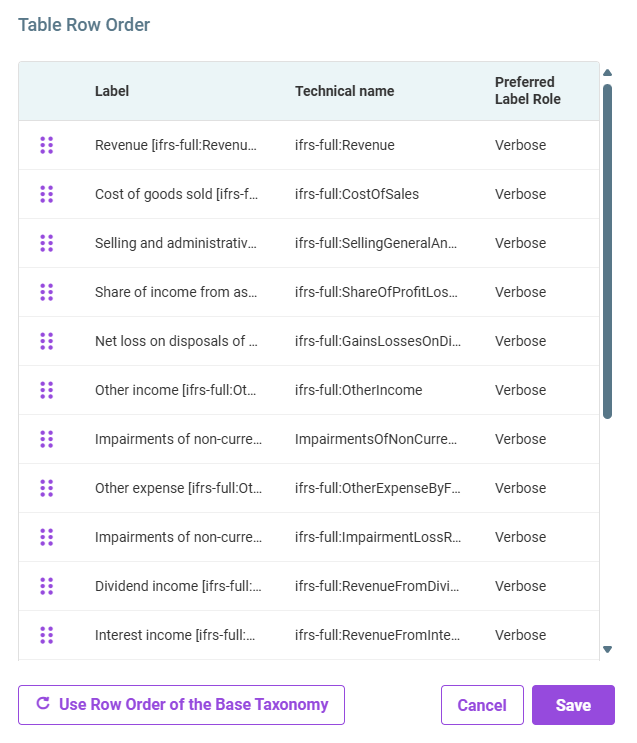
When tagging tables, you can use the Row Order function to adjust the order of the table rows. This function has now been optimized as follows: In the Table Row Order dialog, you can easily switch between the tables in your document using a drop-down list. As soon as you select a table from the drop-down list, the corresponding rows for the selected table are automatically displayed:
Dialog 'Table Row Order'
This improvement optimizes your workflow by allowing you to manage row order across multiple tables without having to return to the document. Lucanet XBRL Tagger also protects your work by warning you of unsaved changes when switching between tables, ensuring that no changes are lost.
When uploading a document that already has tagging, a matching taxonomy is now suggested automatically and displayed in the Add New Document dialog. You can change the suggested taxonomy manually if necessary.
When adding a reporting requirement, you can now select GAAP reporting requirements for Italy, Singapore, and Malaysia. The system automatically configures these reporting requirements with Classic XBRL format settings and ensures immediate compliance with local regulatory mandates. This enhancement allows you to generate compliant XBRL reports in these jurisdictions that fulfill their specific local GAAP requirements without additional configuration.
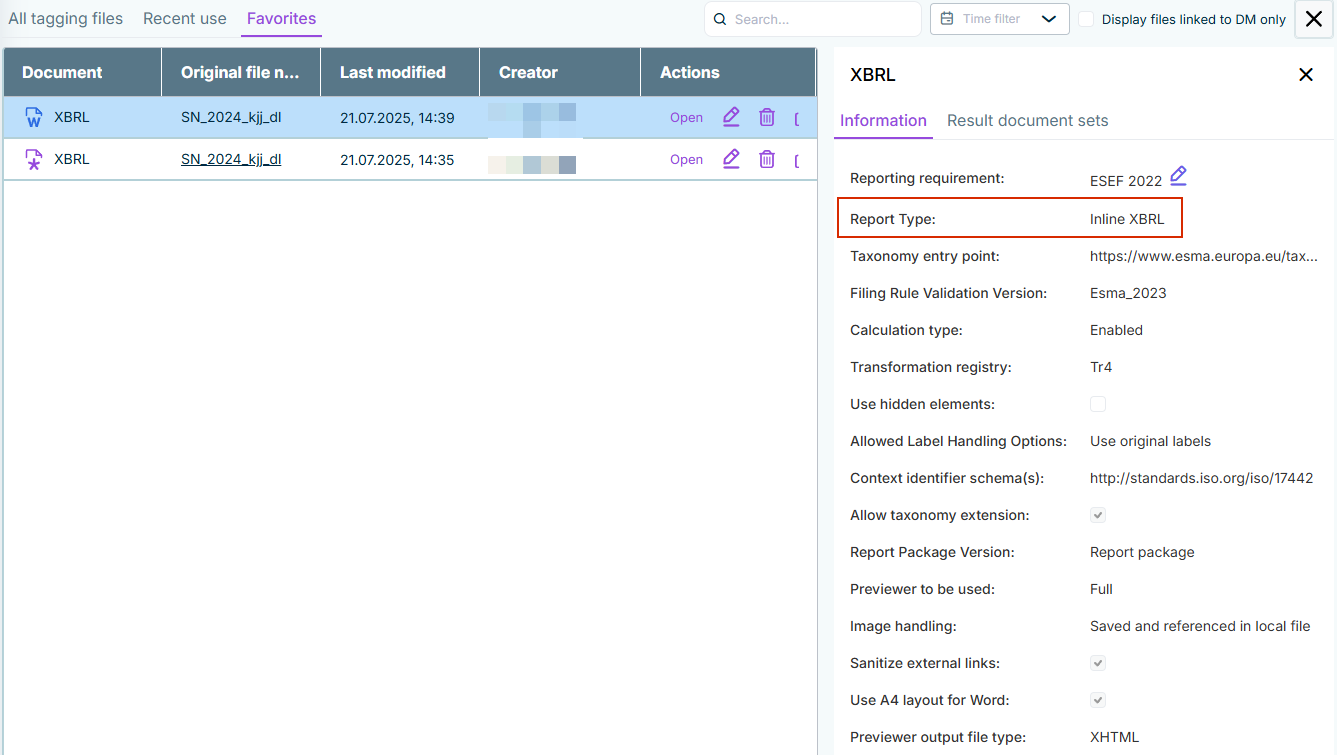
When selecting reporting requirements, the report type will now be displayed, i.e., whether a reporting requirement generates an Inline XBRL Package (iXBRL) or a Classic XBRL Package. This read-only information is displayed for each document on the Information tab:
In addition to bug fixes and stability and performance improvements, the new release contains the following enhancements:
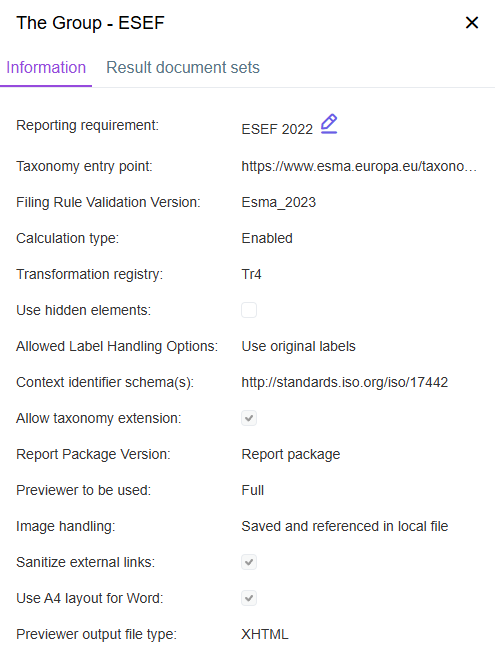
Redesign of the information window: The new layout replaces the previous one with an optimized user interface, so no scrolling or manual saving is required anymore.
Displaying information for a document
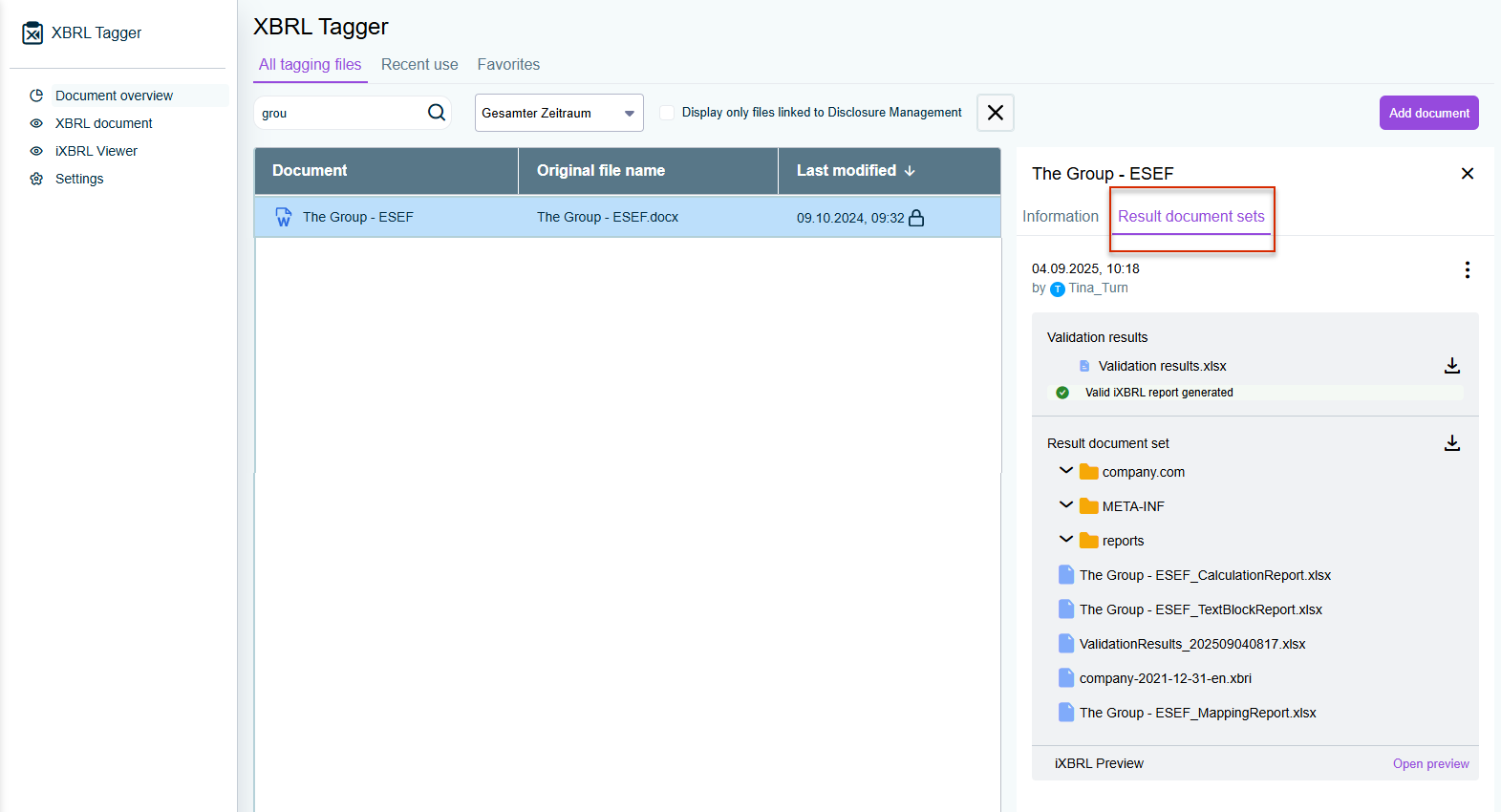
Display of result documents: The result documents for a file are now displayed in the document overview in the right-hand panel on the Result document sets tab. With the redesign, you can easily expand, collapse, and download result documents, which simplifies finding and managing files generated from a document.
Displaying result documents in the document overview
Favorites and recently used files: Among additional features, you can now mark files as favorites and view recently opened documents sorted by date (newest first) for faster access to frequently used files.
New icons: In XBRL Tagger, each document format is now clearly marked with its own distinct icon. For example, Word and Disclosure Management documents each have a unique and easy-to-recognize icon. The icon is displayed next to the document in the document overview as well as in the tagging view.
Setting primary taxonomy: The primary taxonomy in the settings is now set automatically according to the selected reporting requirement. For both Disclosure Management and non–Disclosure Management files, the automatically selected primary taxonomy cannot be changed and is displayed in gray.
Automatic assignment of reporting requirements: When you transfer a document from Disclosure Management into XBRL Tagger, you no longer need to assign the reporting requirement manually. XBRL Tagger now assigns the corresponding reporting requirement automatically.
You can see the reporting requirement assigned to a document in the document overview on the Information tab as soon as you select a document in the overview.
You can now adjust the row order of entries in extension taxonomies when tagging tables in a designated dialog. Simply click the Row order button in the ribbon menu, and adjust the order using drag-and-drop. You can also reset the row order to the base taxonomy by clicking the button Use Row Order of the Base Taxonomy. This option lets you revert the row order of entries to match the original order from the base taxonomy, making it easier to align your data structure whenever needed.
If the row order in your extension taxonomy already matches the base taxonomy, the button Use Row Order of the Base Taxonomy is automatically deactivated.
If a document from Disclosure Management has been imported into the XBRL Tagger, the linked document can be opened directly from the Document overview of the XBRL Tagger in the Cockpit of Disclosure Management.
In addition, the document overview can be filtered to display only those documents linked to Disclosure Management.