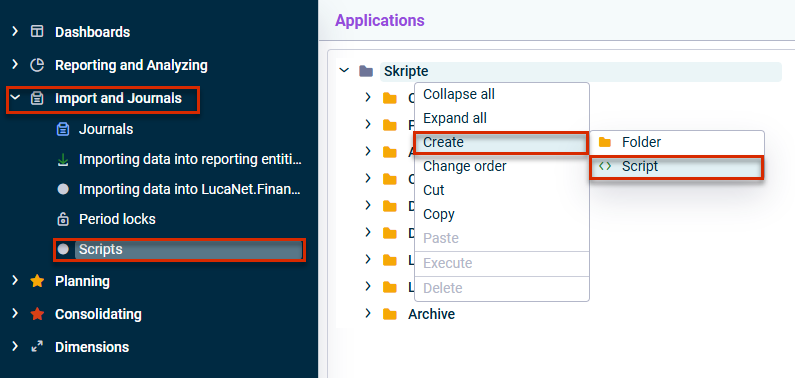
In order to import an xP&A data export into CFP, you must first create and configure the data transfer script Lucanet xP&A #3700-xP&A.SQL.FOS.
Note for customers who still use Lucanet.Financial Client
You can either perform this step in the Lucanet CFO Solution Platform or in Lucanet.Financial Client. The script will be visible and editable in both systems, no matter where you created it.
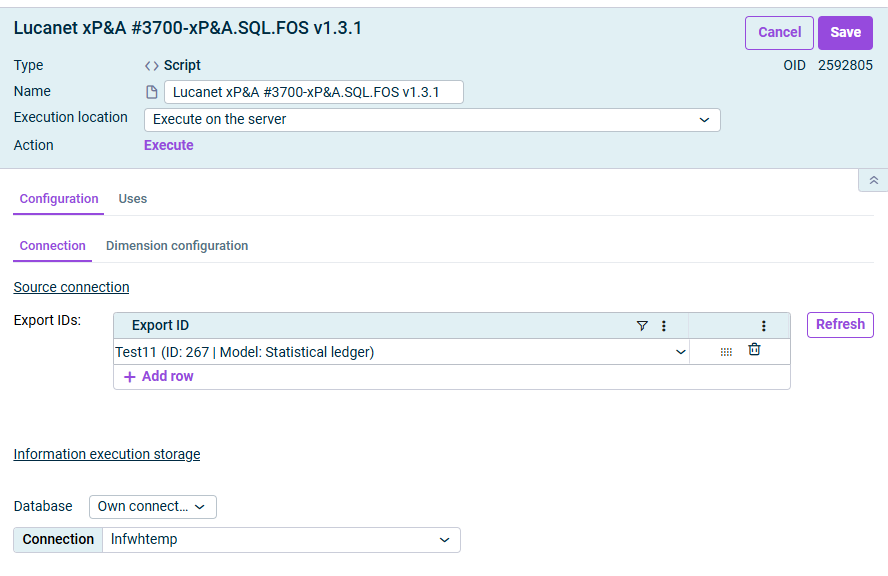
The Connection tab is displayed as follows, for example:
'Connection' tab
Configure the following options on the Connection tab:
Parameter
Description
Export IDs
Select all xP&A exports, i.e. the models that should be imported. All exports are available which have been created in xP&A and for whose model you have access permissions. You can click Refresh to update the selection of available exports.
Database
Optional: Connection to an SQL database Serves as a temporary storage location for reimporting exports already performed from xP&A and for drill-down without restarting the export from xP&A. Connection information for Lucanet.Financial Warehouse can be used here.
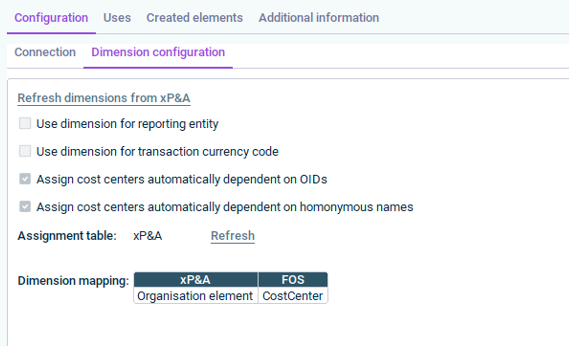
The Dimension configuration tab is displayed as follows, for example:
'Dimension configuration' tab
On the Dimension configuration tab, you map xP&A dimensions to CFP dimensions.
The key mapping dimension is entity (i.e. how does the entity dimension in your xP&A model translate to cost centers in CFP).
The following options are available on the Dimension configuration tab:
Option
When to use
Refresh dimensions from xP&A
Click Refresh dimensions from xP&A to update the available dimensions from the specified xP&A export(s).
Use dimension for reporting entity
Activate if you use a custom dimension in xP&A (not integrated from CFP) and want to map it to reporting entities manually.
Use dimension for transaction currency code
This is a legacy option and not needed in the current xP&A setups.
Assign cost centers automatically dependent on OIDs
Activate when you use the organization element structure from CFP in xP&A. The OID (unique identifier per cost center) enables automatic matching.
Assign cost centers automatically dependent on OIDs
This is a fallback option — where matches are based on name. Requires a dedicated assignment table.
Dimension mapping
Assign xP&A dimensions to Lucanet.Financial OLAP Server (FOS) dimensions. For user-defined dimensions, you can use the target dimensions UserdefinedDimension1 to UserdefinedDimension9; when configuring the data source, use the corresponding DimensionsCode as needed.
Best practice: Always create a separate assignment table for xP&A imports to avoid conflicts with other import processes.