An assignment table is used to save all elements imported from xP&A into Consolidation & Financial Planning (CFP) (e.g. accounts, reporting entities/cost centers, transaction currency, etc.) and their assignment to elements in CFP.

Assignments are defined during the data import and can then be changed or deleted at any time.

Note for customers who still use Lucanet.Financial Client

You can either perform this step in the Lucanet CFO Solution Platform or in Lucanet.Financial Client. The data source will be visible and editable in both systems, no matter where you created it.
To create an assignment table for the xP&A import into CFP, proceed as follows:

1

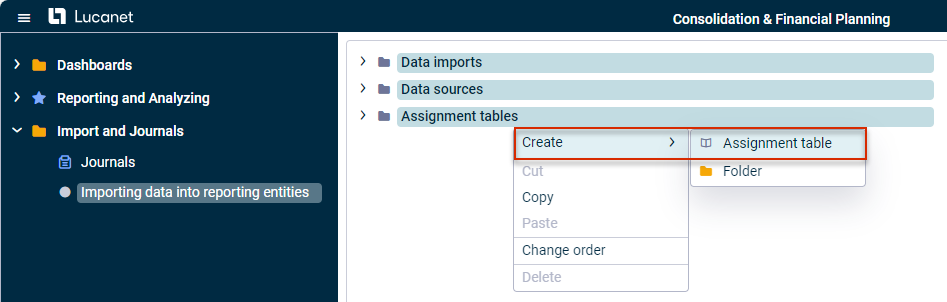
In the tree view, right-click the Assignment tables folder and choose Create | Assignment table from the context menu.

Shows the tree view of the 'Importing data into reporting entities' workspace with the 'Assignment tables' folder's right-click context menu open. Highlighted in red is the 'Assignment table' option under 'Create'.
Creating an assignment table
2

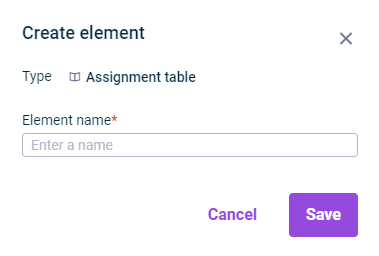
The Create element dialog is displayed:

Shows the 'Create element' dialog for a new 'Assignment table', with a required 'Element name' field.
Dialog 'Create element'
3

Specify the name of the assignment table in the Name field.

4

Click Save or press Enter.

5

The assignment table is displayed in the tree view and can be selected when creating the data import (see Creating and Executing the Data Import ).

This content was generated using AI and reviewed by Lucanet subject matter experts before publication.