You can connect to a Lucanet CFP Data Source to pull in data from Lucanet Consolidation & Financial Planning into xP&A.

  • A user can only integrate data from CFP if they have a license for Consolidation & Financial Planning, and only for the data they have access to in CFP.
  • Access permissions for Consolidation & Financial Planning are configured in the platform administration under user management. To access CFP data, an xP&A user must be assigned the data model role Editor or Observer. In addition, at least read permissions must be granted for the CFP workspaces and data levels they should have access to. For more information, see Creating and Editing Users for the Lucanet CFO Solution Platform and Defining User Permissions for Data Model Roles.

To connect to a CFP data source:

1

Open the Data workspace.

2

Choose one of the following options:

  • Open the Data workspace from the overview on the home page and click + New.
  • Open the model you want to integrate data into. In the overview, click the + icon next to Data and select New data source.
3

In the Data sources dialog, open the Accounting tab and select Consolidation & Financial Planning.

The CFP data source is only available to users who have a license for both xP&A and Consolidation & Financial Planning in the CFO Solution Platform.

4

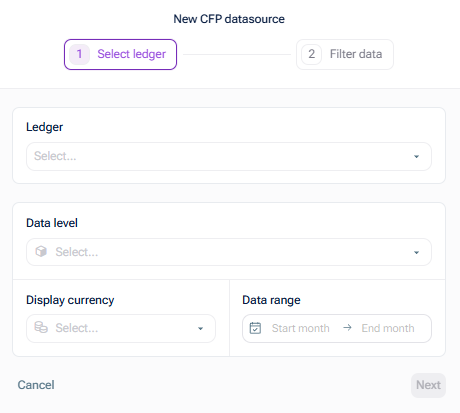
In the New Lucanet CFP Data Source dialog, select the ledger and the data level from Lucanet Consolidation & Financial Planning from which you would like to transfer data, and specify the display currency and the date range for the data source:

Select ledger
5

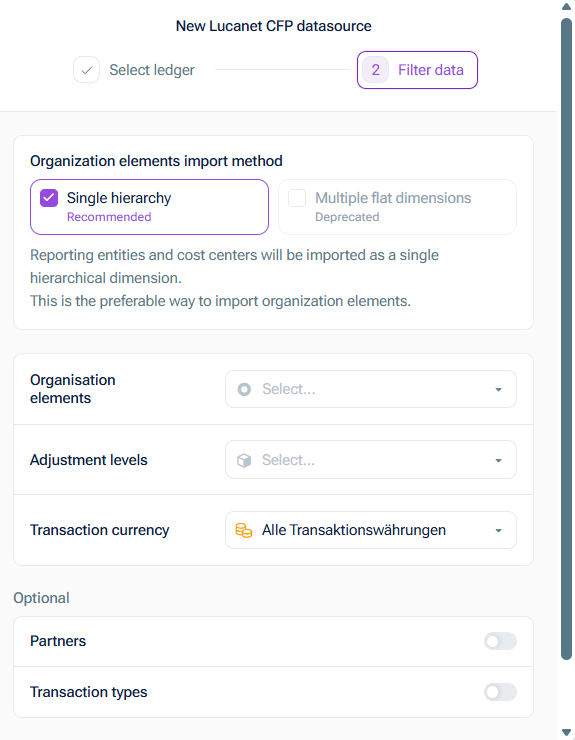
Click Next. The Filter data step is displayed as follows:

Filter data
6

Choose the method for importing organization elements. The following options are available:

  • Single hierarchies, to import reporting entities and cost centers as a single hierarchical dimension.

    This is the recommended option to import organization elements.

  • Multiple flat dimensions, to import reporting entities and cost centers as 2 independent flat dimensions.

    This is the deprecated option to import organization elements. It still works but won't get any improvements in the future. We strongly recommend the Single hierarchies method.

7

Choose the organization element and the adjustment level, and optionally the partner(s) and transaction type(s), which you would like to transfer with this data source from Lucanet Consolidation & Financial Planning.

8

Click Create data source.