Database queries are used to define which data is pulled in from your BI/Database system into Lucanet xP&A (Extended Planning & Analysis). They are entered during the set-up process of the integration (see individual set-up instructions for each system) and need to be structured in a certain way.
In this chapter we explain how a database query is defined and what needs to be considered in regards to linked dimensions that are queried.
A query must return at least one value column for the variables (which can be numbers or dates).
A query can return optional columns for dimensions, dimension mappings, or cohorts.
Linked dimensions must be included in the following form `from dimension > to dimension` (using backticks)
For more details on linked dimensions, see Linking dimensions and the following chapter Limitations and Workarounds for Querying Linked Dimensions.
A query must contain from followed by the name of the table the data is to be extracted from.
Example query:
selectdate, users, country, region as "country > region"fromusers_table
Explanation:
The data is queried from the users_table.
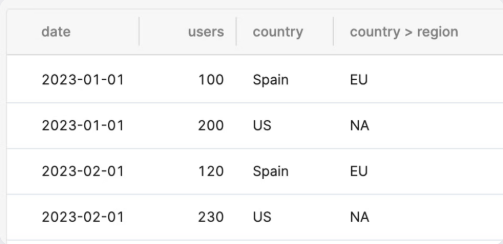
The first column (date) has the dates of the transactions (timestamp or date type).
The second column (users) contains the values of the "users" variable (number type).
The third column (country) is a dimension column, the users are broken down by country (string).
The fourth column ( region as "country > region") is a dimension mapping. The region is not an independent dimension, but the countries are assigned to regions.
Example query result:
Example query result
Querying Constant Values
If you only want to import constant values (no time series), the date column can be null. For example:
selectnull as date, price, plan_namefromprice_table
When working with queries, you can only create one level of linked dimensions (mappings) per query. This means you can establish multiple direct relationships from a single source dimension, but you cannot create chained relationships within the same query.
Allowed in one query:
A → B
A → C
A → D
Not allowed in one query:
A → B and B → C simultaneously
Workaround Solution
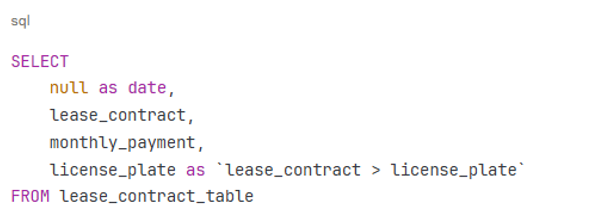
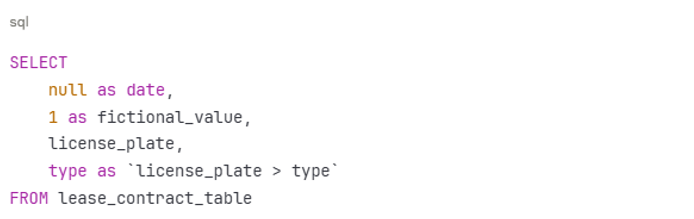
To handle multi-level relationships, you need to create two separate queries:
Query 1: Define the initial mapping relationship
Query 2: Define the secondary mapping relationship using a fictional value