In the Reverse postings workspace of Lucanet Lease Accounting, you can reverse saved or exported postings for one or several components of a contract. You can assign one reversal posting date or reverse each posting in its original posting period.

Reversing postings in Lucanet Lease Accounting has the following consequences:

  • Lucanet Lease Accounting removes the affected postings that have not yet been exported from the database.
  • For every affected exported posting, Lucanet Lease Accounting creates a corresponding contra entry. The contra entry uses either the selected reversal posting date or the original posting period, depending on the reversal mode. Transfer the contra entries to the same application to which you transferred the original postings.
  • The measurements, modifications and/or reassessments of a contract component are not reset.
  • After the posting has been reversed, contract components can be modified and reassessed and added with an effective date within the reversed periods.
  • The status of the affected periods is set to not posted. These periods can be posted again after the posting has been reversed.
  • Existing reversal postings and reversed postings remain unaffected.
  • The reversal of a posting cannot be undone.

To reverse postings for one or several components in Lucanet Lease Accounting:

1

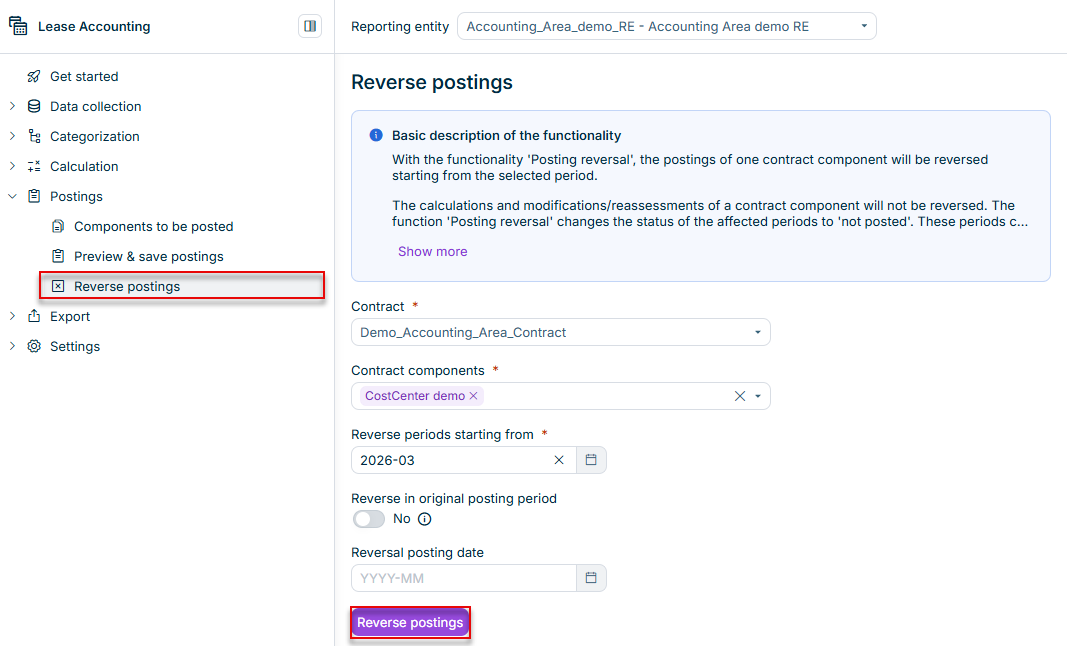
Navigate to Postings | Reverse postings:

Shows the 'Reverse postings' workspace in Lucanet Lease Accounting with the 'Basic description of the functionality' info box, the 'Contract' drop-down list with 'Demo_Accounting_Area_Contract', the 'Contract components' drop-down list with 'CostCenter demo' selected, the 'Reverse periods starting from' field set to '2026-03', the 'Reverse in original posting period' toggle set to 'No', the 'Reversal posting date' field with the placeholder 'YYYY-MM', and the 'Reverse postings' button. Highlighted in red are the 'Reverse postings' item in the 'Postings' navigation and the 'Reverse postings' button.
The 'Reverse postings' workspace
2

In the Contract drop-down list, select the contract for which you want to reverse postings.

3

In Contract components, select one or several components, or select All to include all listed components of the contract.

If you change the contract, the component selection is cleared. Select the components of the new contract before continuing.

4

Under Reverse periods starting from, select the first period whose postings you want to reverse. The reversal includes that period and all later posted periods of the selected components.

5

Choose how Lucanet Lease Accounting dates the contra entries:

  • To use the original posting periods: Activate the Reverse in original posting period option. The Reversal posting date field is hidden, and each contra entry uses the posting period of its original posting.
  • To use one specified period: Leave the Reverse in original posting period option deactivated and select the Reversal posting date for the contra entries. If none of the affected postings has been exported, you can leave the date empty because Lucanet Lease Accounting removes the postings without creating contra entries.
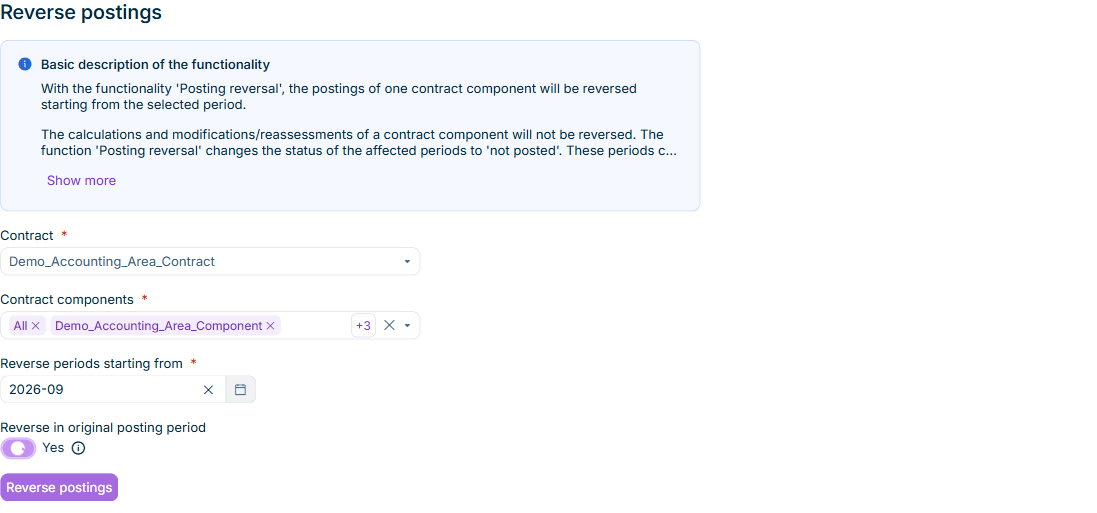
Displays the 'Reverse postings' workspace in Lucanet Lease Accounting with all components of one contract selected and 'Reverse in original posting period' activated. The 'Reversal posting date' field is hidden.
Reversing postings in their original posting periods
6

Click Reverse postings, review the contract and selected components in the confirmation dialog, and confirm the reversal.

Lucanet Lease Accounting processes a multi-component reversal as one background task. If a component cannot be reversed, Lucanet Lease Accounting continues with the remaining components and records the failed component and the reason in the task log. Check the result under Active tasks in the function bar. A task with both successful and failed components has a warning status.

Note on configuration

The following restrictions apply when you configure a posting reversal in Lease Accounting:

  • It is only possible to select contracts and contract components that have been created for the selected reporting entity.
  • The period under Reverse periods starting from must be within the accounting term of each component. Each component must have active postings in that period or a later period.
  • If you specify a Reversal posting date, the period must not precede the latest posting period of the exported postings that you want to reverse. You cannot select a future month for the reversal posting date.
  • If you activate Reverse in original posting period, you do not enter a common reversal posting date. Each contra entry uses its own original posting period.
  • If the contract component is posted again, the new posting date for the reversed periods must be greater than or equal to the last active posting stamp for the relevant contract component.

The following example illustrates which accounting periods Lucanet Lease Accounting reverses:

Saved postings

In the example, the following postings have been saved:

  • Accounting period January 2024 | Posting stamp: March 2024
  • Accounting period February 2024 | Posting stamp: March 2024
  • Accounting period March 2024 | Posting stamp: March 2024

Input for posting reversal

Reverse periods starting from: February 2024

Periods that will be reversed

February 2024 and March 2024

In Lucanet Lease Accounting, the Reverse periods starting from field determines which accounting periods to reverse. The Reverse in original posting period option determines the posting dates of the contra entries for exported postings.

For example, an exported January posting has a posting date in March, and an exported February posting has a posting date in April. If you reverse both accounting periods with Reverse in original posting period activated, Lucanet Lease Accounting dates the January contra entry in March and the February contra entry in April. If you deactivate the option and select May as the Reversal posting date, both contra entries use May.

This content was generated using AI and reviewed by Lucanet subject matter experts before publication.