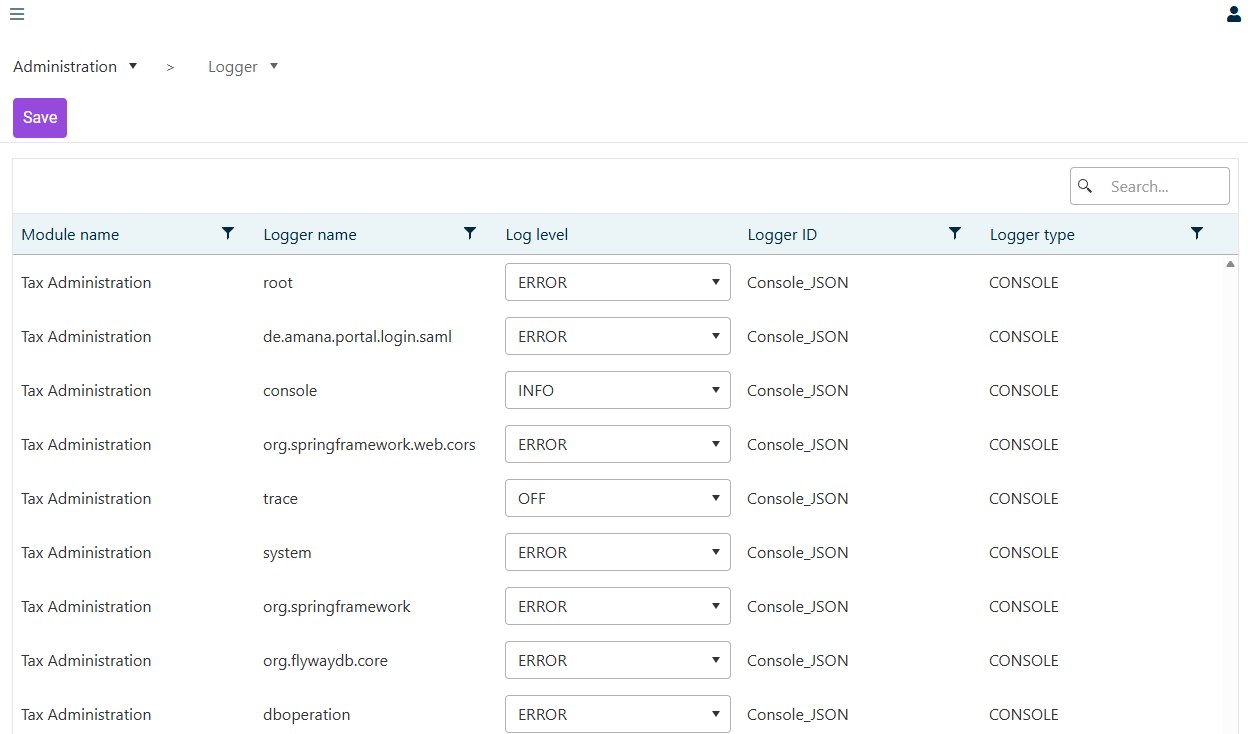
The Logger workspace lets administrators configure the log levels of the Tax Administration module. Adjusting log levels here is the recommended way to capture additional diagnostic information when investigating an issue, without restarting the software.

The Logger workspace can be found in the Administration folder of the Tax Administration module.

Logger workspace listing each logger by Module name, Logger name, Log level (editable drop-down list), Logger ID and Logger type
'Logger' workspace

The table lists every configured logger. The columns contain the following information:

ColumnDescription
Module nameThe module the logger belongs to (for example Tax Administration).
Logger nameThe technical name of the logger (for example root, console, org.springframework).
Log levelEditable drop-down list with the current log level (see the table below).
Logger IDThe technical identifier of the logger configuration (for example Console_JSON).
Logger typeThe output type of the logger (for example CONSOLE).

To change a log level, proceed as follows:

1

Locate the logger you want to change. You can use the search field or the column filters above the table.

2

Open the Log level drop-down list in the row of the required logger and select the desired level.

3

Click Save to apply the change.

The following log levels are commonly available in the drop-down list. Levels are hierarchical — selecting a level includes all more severe levels as well.

LevelDescription
OFFDisable the logger entirely.
ERRORDefault for production loggers — only errors are recorded.
WARNIn addition to errors, log warnings about unusual but recoverable situations.
INFOStandard operational events (start-up, configuration loaded).
DEBUGDetailed diagnostic information; useful when reproducing a specific issue.
TRACEVery fine-grained, high-volume tracing; use only short-term during investigation.

DEBUG and TRACE levels can produce a large volume of log data and may impact performance. Use them temporarily to investigate a specific problem and adjust the level afterwards.

The root logger acts as the fallback for every logger that does not have its own configuration. Changing the root level therefore changes the verbosity of the whole application.

Last updated on Sep 1, 2026