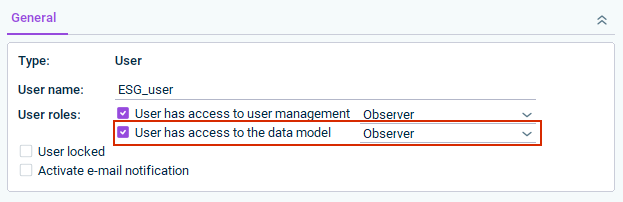
This guide explains how to configure the rights of an ESG user with the Administrator user role who also needs access to data in the Consolidation & Financial Planning (CFP) solution. ESG Administrators need read permissions on CFP master data so that the organization elements defined in CFP are visible in the ESG master data.
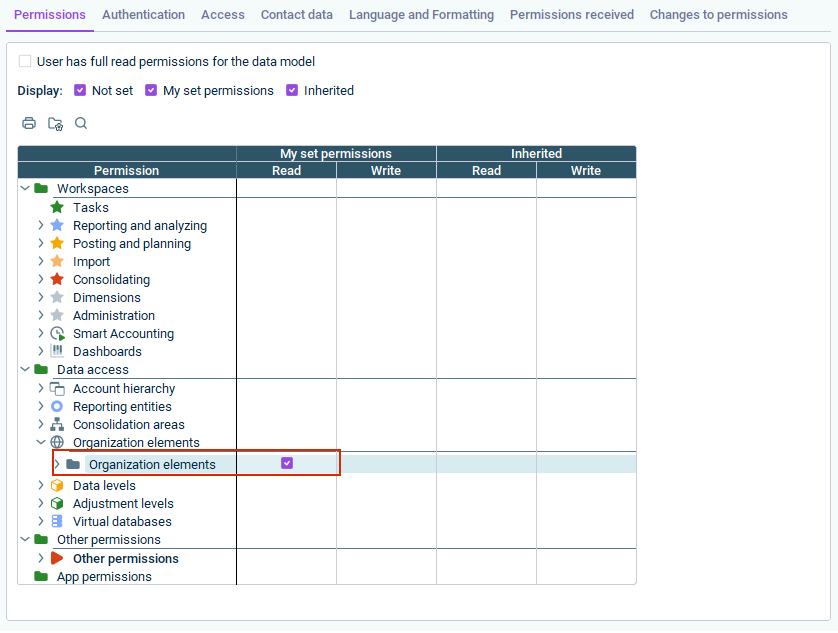
In the Permissions tab, navigate to the Data access folder and open the Organization elements subfolder.
2
Enable the Read permission for Organization elements. The enabled permission is displayed as follows:
Enabling the 'Read' permission for organization elements in the 'Data access' folder
3
Switch to the Access tab and activate the Lucanet.Financial Client and Lucanet.Excel Add-In check box. The activated access rights are displayed as follows:
Enabling access via Lucanet.Financial Client and Lucanet.Excel Add-In
After the setup, CFP appears as an enabled solution in the main menu. The ESG Administrator sees only the relevant master data; financial figures are not visible.
This content was generated using AI and reviewed by Lucanet subject matter experts before publication.