The ESRS, ESRS 2.0, or VSME questionnaire in Lucanet ESG Reporting consists of several elements that are displayed in a tree structure and offers you various functionalities. Before starting to configure your questionnaire, familiarize yourself with the setup and general functions and, in case of working with an ESRS questionnaire, with the possible impact of mapping the results of a double materiality assessment (DMA) on the ESRS questionnaire structure.

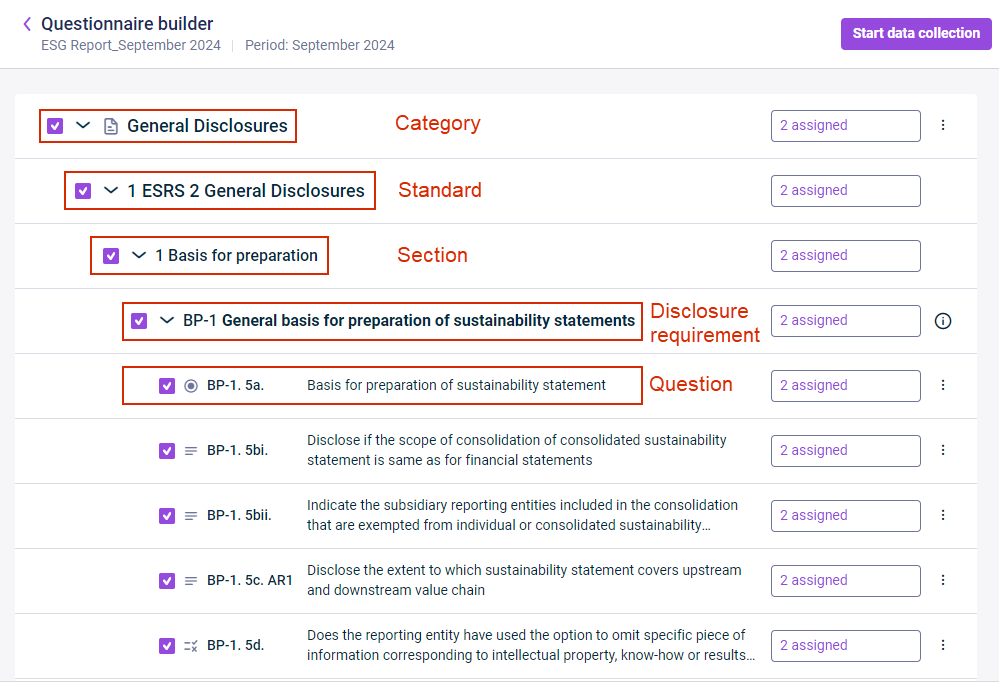
The ESRS, ESRS 2.0, or VSME questionnaire in Lucanet ESG Reporting is displayed in a tree structure to make it easier to recognize which elements belong to which superordinate element and the current position of the user in the hierarchy. The questionnaire consists of the following hierarchy elements: categories, standards, sections, disclosure requirements, and questions:

Shows the questionnaire hierarchy in Lucanet ESG Reporting. Highlighted in red are the levels 'Category', 'Standard', 'Section', 'Disclosure requirement', and 'Question', with examples from 'General Disclosures'.
Hierarchy of the ESRS questionnaire

The questionnaires in Lucanet ESG Reporting include the following:

  • The ESRS questionnaire includes the categories General Disclosures, Environmental, Social, and Governance and can be displayed in English, German, French, or Italian.
  • The ESRS 2.0 questionnaire provides the same questionnaire structure as the standard ESRS hierarchy, i.e., General Disclosures, Environmental, Social, and Governance. However, compared to ESRS, the ESRS 2.0 structure is shorter and less complex.
  • The VSME questionnaire includes the categories General Information, Environmental Metrics, Social Metrics, and Governance Metrics and can be displayed in English, German, French, Italian, Spanish, Polish, or Dutch.

Each category provides access to the corresponding ESRS or VSME standards and the sections, disclosure requirements, and questions the standard contains.

Using the context menu or information icons on the right-hand side in Lucanet ESG Reporting, you can do the following:

  • For categories: Click the three-dot icon Three-dot menu icon to show or hide all subordinate elements.
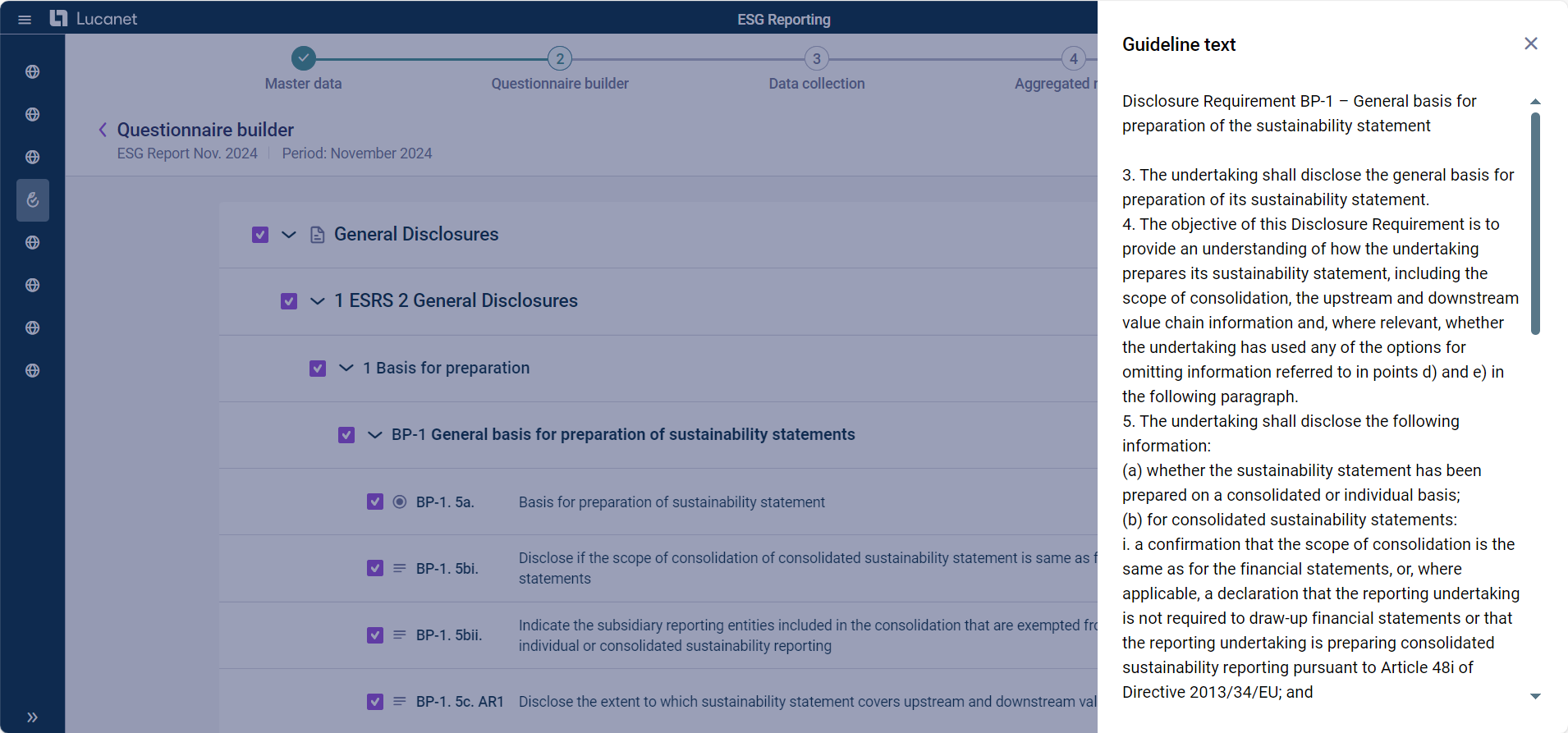
  • For disclosure requirements: Click the information icon Information icon to view the original text of the guideline the disclosure requirement is based on.
  • For questions: Click the three-dot icon Three-dot menu icon to display a preview of how the question will be displayed to the ESG Data Collector(s) or to view the original text of the guideline the question is based on.
Shows the 'Guideline text' panel in Lucanet ESG Reporting with the original guideline text for disclosure requirement BP-1 next to the questionnaire builder.
Guideline text for a question from the ESRS questionnaire

If you, as an ESG Administrator in Lucanet ESG Reporting, have chosen ESRS as report guideline and activated the option Double materiality assessment when creating the ESG report, you will automatically have access to a pre-configured ESRS questionnaire, i.e. as soon as all reporting entities assigned to the ESG report have submitted their DMA reports, the ESG solution will automatically apply this information to the relevant parts of the ESRS questionnaire. The following applies:

  • If a reporting entity marked a topic, sub-topic, or sub-sub-topic as having either financial or impact materiality, this reporting entity is assigned to the respective element in the ESRS questionnaire.
  • If a reporting entity did not mark a topic, sub-topic, or sub-sub-topic as having either financial or impact materiality, this reporting entity is not assigned to the respective element in the ESRS questionnaire.
  • If none of the reporting entities marked a topic, sub-topic, or sub-sub-topic as having either financial or impact materiality, then the respective element is automatically excluded from the ESRS questionnaire.
  • All other parts of the ESRS questionnaire that are not mapped in the DMA report are included in the ESRS questionnaire and assigned to all reporting entities.

Keep in mind: You can change this presetting by configuring the ESRS questionnaire according to your needs (see Configuring the Report Questionnaire).

This content was generated using AI and reviewed by Lucanet subject matter experts before publication.