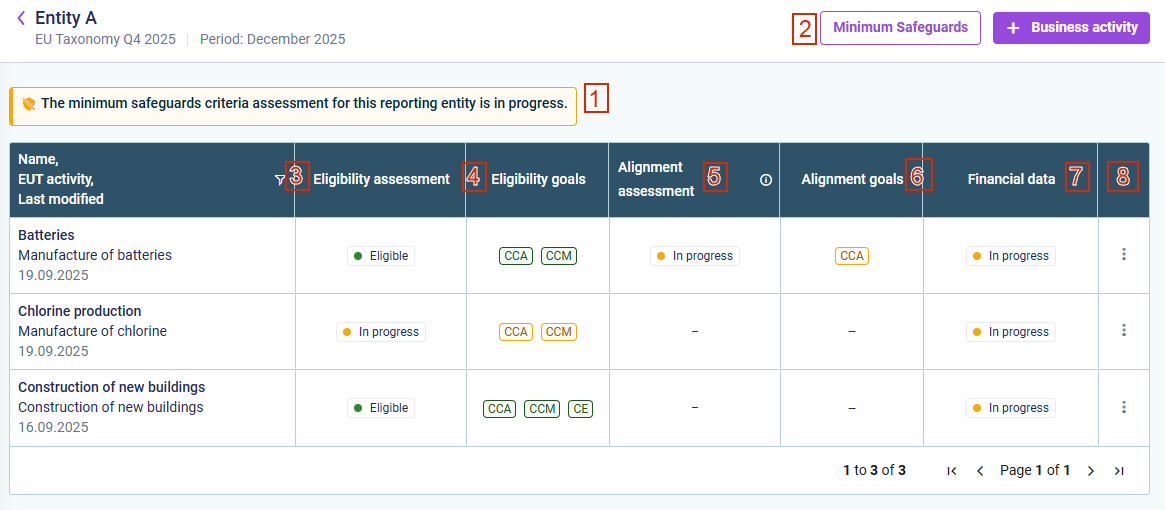
After clicking the desired reporting entity in the Reports and Activities workspace, the status overview is displayed as follows, for example:
Status information on reporting entity
No.
Description
1
Assessment of minimum safeguards
2
Option to display the minimum safeguards questionnaire for this reporting entity
3
Status of assessment for taxonomy eligibility
4
Applicable environmental goals for taxonomy eligibility. Their color indicates the status: Green: The business activity is eligible for this environmental goal. Gray: The business activity is not eligible for this environmental goal. Yellow: The assessment is still in progress. Hover over an abbreviation to see the full name of the environmental goal.
5
Status of assessment for taxonomy alignment: Aligned: Minimum safeguards have been met, and the activated goals in the SCC and DNSH questionnaire all have the status Compliant or Not applicable. Not aligned: Minimum safeguards have not been met, or at least one of the activated goals in the SCC and DNSH questionnaires have the status Not compliant. In progress: Assessment of the minimum safeguards criteria has not yet begun or is still in progress, or at least one of the activated goals in the SCC and DNSH questionnaires has the status In progress.
6
Applicable environmental goals for taxonomy alignment. Their color indicates the status: Green: The business activity is aligned for this environmental goal. Gray: The business activity is not aligned for this environmental goal. Yellow: The assessment is still in progress. Hover over an abbreviation to see the full name of the environmental goal.
7
Status of collection of financial data: In progress: the collection of financial data is ongoing. Completed: the baseline values for the reporting entity and the financial data for the business activity have been collected. -: there is no financial data, e.g. because the business activity is not eligible for the EU Taxonomy.
8
Three-dot menu with options to Delete the business activity or use Go to financial data to directly navigate to the detailed financial data page of the corresponding reporting entity.
This content was generated using AI and reviewed by Lucanet subject matter experts before publication.