If your business activity is eligible for the EU Taxonomy in Lucanet ESG Reporting, you can proceed to the Alignment assessment page. In this page, you specify for each of the environmental goals associated with your business activity whether your business activity is compliant with the following criteria:

  • Substantial Contribution Criteria (SCC)
  • Do No Significant Harm (DNSH)

In Lucanet ESG Reporting, your business activity is considered as aligned with the EU Taxonomy if:

  • The compliance with the SCC and DNSH criteria is achieved and
  • Your reporting entity fulfils the minimum safeguard criteria.
To assess if your business activity is aligned with the EU Taxonomy in Lucanet ESG Reporting:

1

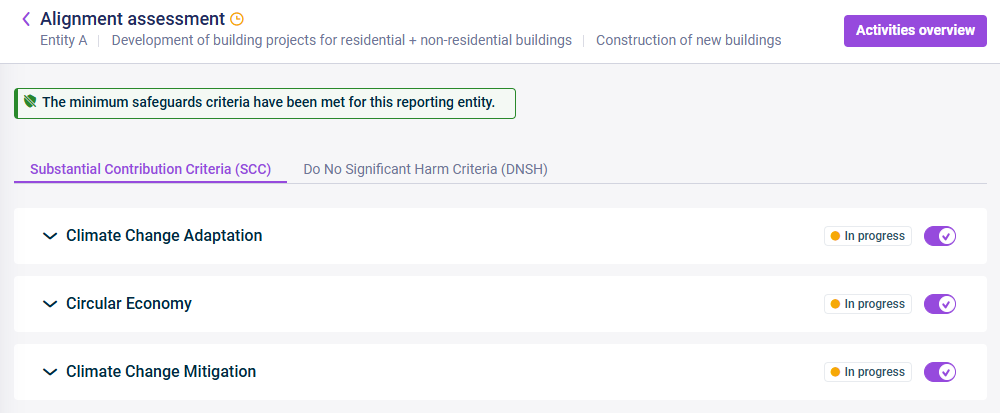
On the Eligibility assessment page, click Alignment assessment. The Alignment assessment page is displayed as follows:

Shows the 'Alignment assessment' page in Lucanet ESG Reporting with the 'Substantial Contribution Criteria (SCC)' and 'Do No Significant Harm Criteria (DNSH)' tabs, environmental goals, and their 'In progress' statuses.
Example for 'Alignment assessment' page
2

If necessary, deactivate the toggle buttons for the environmental goals that are not applicable on the Substantial Contribution Criteria (SCC) tab. The criteria on the Do No Significant Harm Criteria (DNSH) tab will be adjusted accordingly (see Environmental Goal Dependencies).

3

For each question of the displayed environmental goals on the SCC and DNSH tabs, indicate whether your business is compliant or not compliant, or choose Not applicable if the question does not apply to your business activity.

4

If necessary, enter a comment.

The following dependencies apply to environmental goals in the SCC and DNSH questionnaires in Lucanet ESG Reporting:

Notes:

  • If you activate more than one environmental goal on the SCC tab, all six criteria on the DNSH tab will be activated.
  • If you activate only one environmental goal on the SCC tab:
    • The other five criteria on the DNSH tab for the other environmental goals are activated.
    • The environmental goal activated on the SCC tab will be deactivated on the DNSH tab.
  • In case you change responses for the environment goals on the Eligibility Assessment page after starting the alignment assessment, resulting in qualifying or disqualifying environmental goals, the display of qualified environmental goals on the Alignment assessment page will change accordingly.
  • To navigate to the overview of the business activities of your reporting entity and their statuses, click Activities overview on the top right of the page.

This content was generated using AI and reviewed by Lucanet subject matter experts before publication.