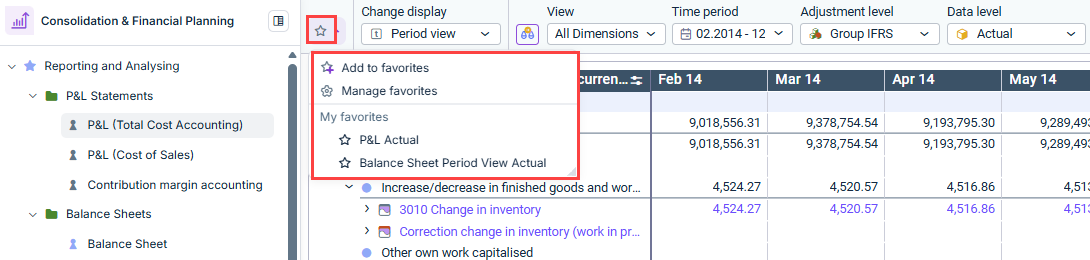
In the dimension bar of Consolidation & Financial Planning, you can save custom views of a ledger or schedules as favorites. This allows you to quickly access frequently used views without having to reconfigure the dimension bar.
You can also share your favorite views with other users.
Select the Add to favorites option to save the currently open view of the ledger or schedule as a favorite under a custom name. The favorite will then appear under My favorites in the Favorites menu.
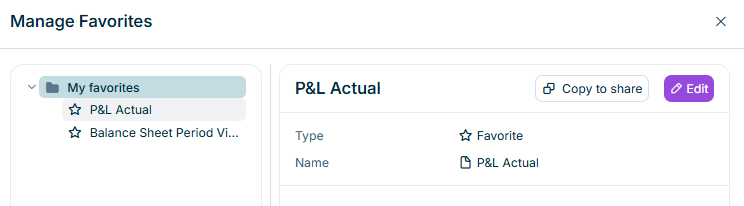
Using the Manage favorites option, you can rename, reorder, and copy existing favorites to share them with other users. The Manage favorites dialog appears as follows, for example:
'Manage Favorites' dialog
The following options are available for managing favorites:
Option
Description
Rename a favorite
Select a favorite and click Edit to change the name.
Copy a favorite to share
Select a favorite and click Copy to share to copy the favorite to the clipboard and send it to another user. Note: In order for other users to open the view shared via the favorite, they must have the appropriate access permissions for the ledger or schedule in question.
Create a new favorite folder
Select the My favorites root folder and choose **Create
Move a favorite
Select a favorite and choose Cut from the context menu. Then paste the favorite into the desired location in the Favorites menu.
Change the order of favorites
Select the My Favorites root folder and choose Change order from the context menu. In the Change order dialog, you can then sort the favorites alphabetically or drag them manually to the desired position.
Delete a favorite
Select a favorite and choose Delete from the context menu to delete it.
This content was generated using AI and reviewed by Lucanet subject matter experts before publication.