Total lines are items whose values are based on the total of all items of the same level above the totals item.
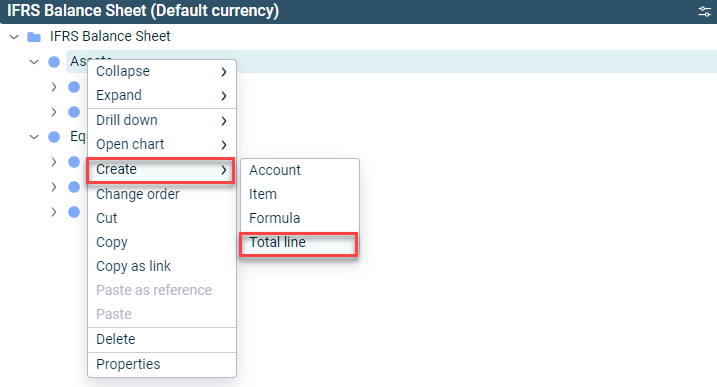
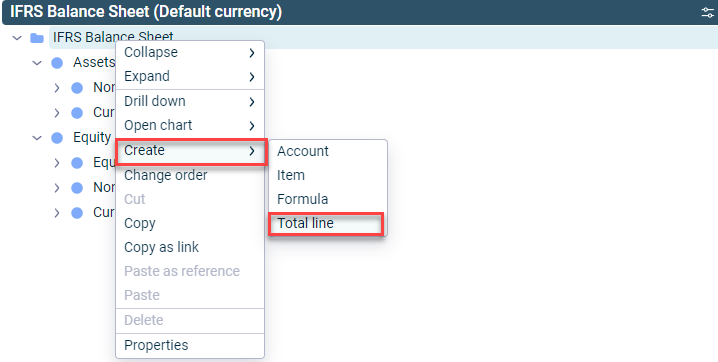
Total lines can be created in ledgers and schedules from the context menu of items and the context menu of the root folder:
To create a total line:
Open the ledger (general ledger, subledger, or statistical ledger) and navigate to the item or root folder under which you want to create the total line.
Right-click the item or root folder and choose Create | Total line from the context menu.
Creating a total line at an item
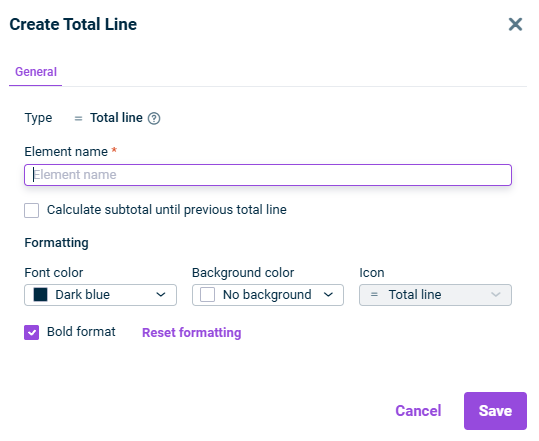
The following options are available in the Create Total Line dialog:
Type
Element type
Name
Name of the total line
Calculate subtotal until previous total line
Calculates only the total up to the previous total line
Formatting
Formatting options for display:
Font color, background color, and if the element is to be formatted bold.
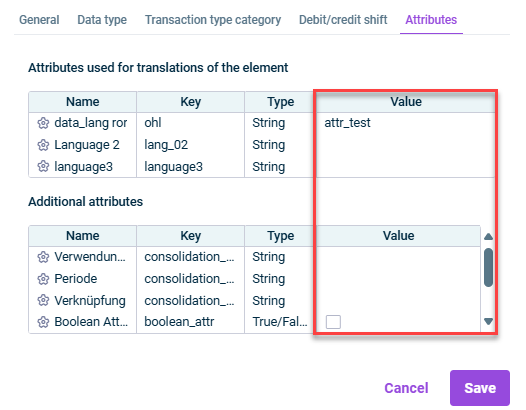
Attributes are used to define multilingual or customer-specific names for Lucanet elements.
The Attributes tab displays all attributes that have been defined in the Attributes workspace and are enabled for this dimension.
You can edit the value of an attribute by opening the element's edit mode and clicking on the corresponding row in the Value column.
Last updated on Aug 16, 2023